Media Management
English
8
Chapter
69
Note:
Copy-protected songs, such as
PianoSoft songs, cannot be copied to
a removable medium.
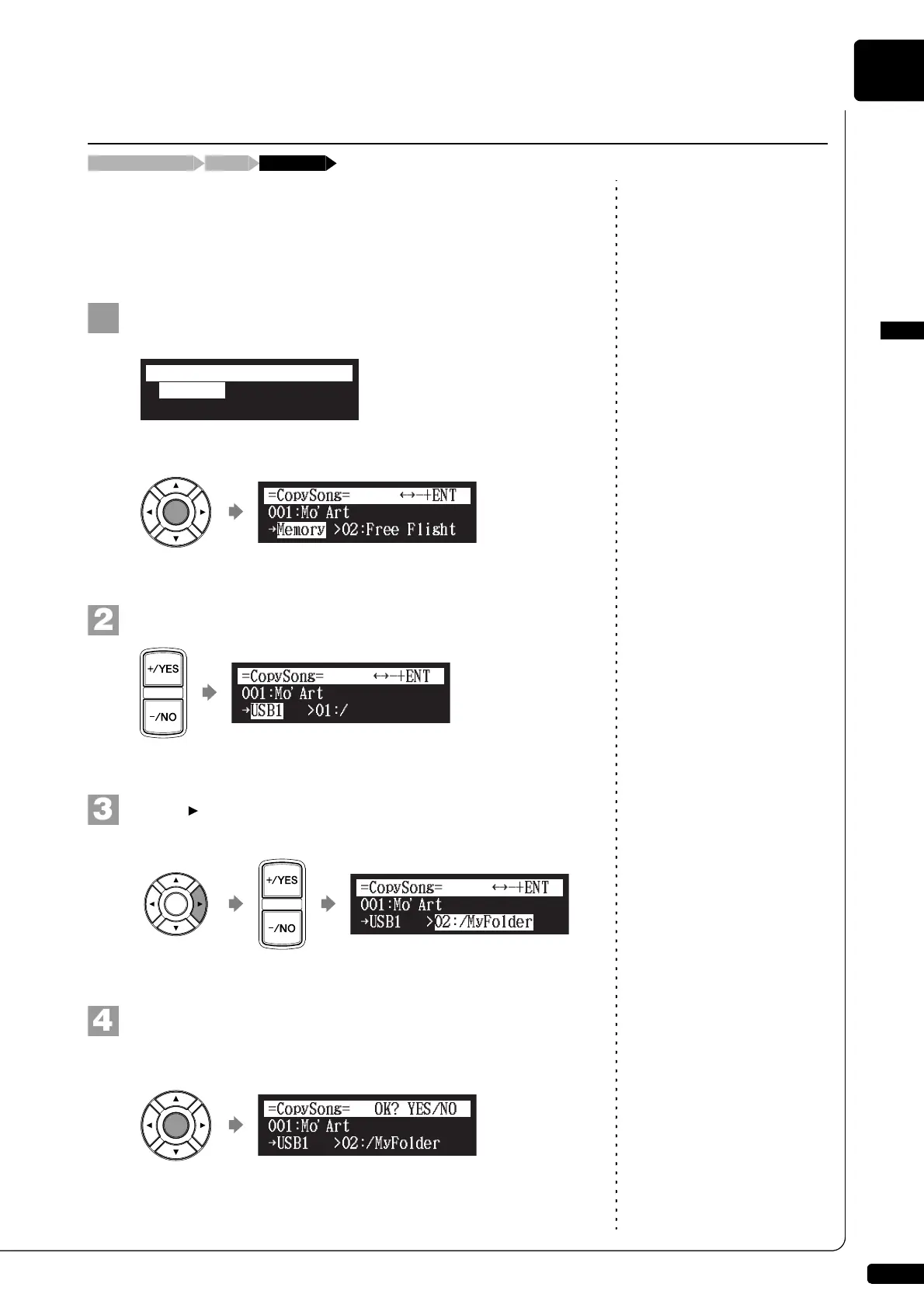
You can copy songs stored on an album to another.
This function is available for song in the album on [Memory], [CD](CD-
ROM), [USB1], [USB2] and [FromToPC].
Note:
Up to 999 songs can be saved in an
album.
Select “CopySong” in the song function menu, then press
[ENTER].
The CopySong screen appears.
Select a destination medium with [+/YES] and [–/NO].
Press [ ] to move the cursor to the album, and press
[+/YES] and [–/NO] to select a destination album.
Press [ENTER].
“OK?” flashes in the first line of the screen.
Making Copies of Songs
[FUNC.]Song selection screen “CopySong”
*CopySong
*RenameSong
*DeleteSong
=SONG MENU=
(1/2)
*SortSong
a
{
}{
001:Mo
a
Art
USB1
{
>01:/
=CopySong=
-+ENT
}{
001:Mo
a
Art
USB1
{
>02:/MyFolder
=CopySong=
-+ENT
}{
a
{







 To Next Page