Media Management
English
8
Chapter
77
Note:
Up to 999 songs can be added to a
playlist.
This function is available only for songs/albums on [Memory].
Note:
You cannot add songs on media
other than [Memory] directly to the
playlist. First copy songs to the
internal flash memory.
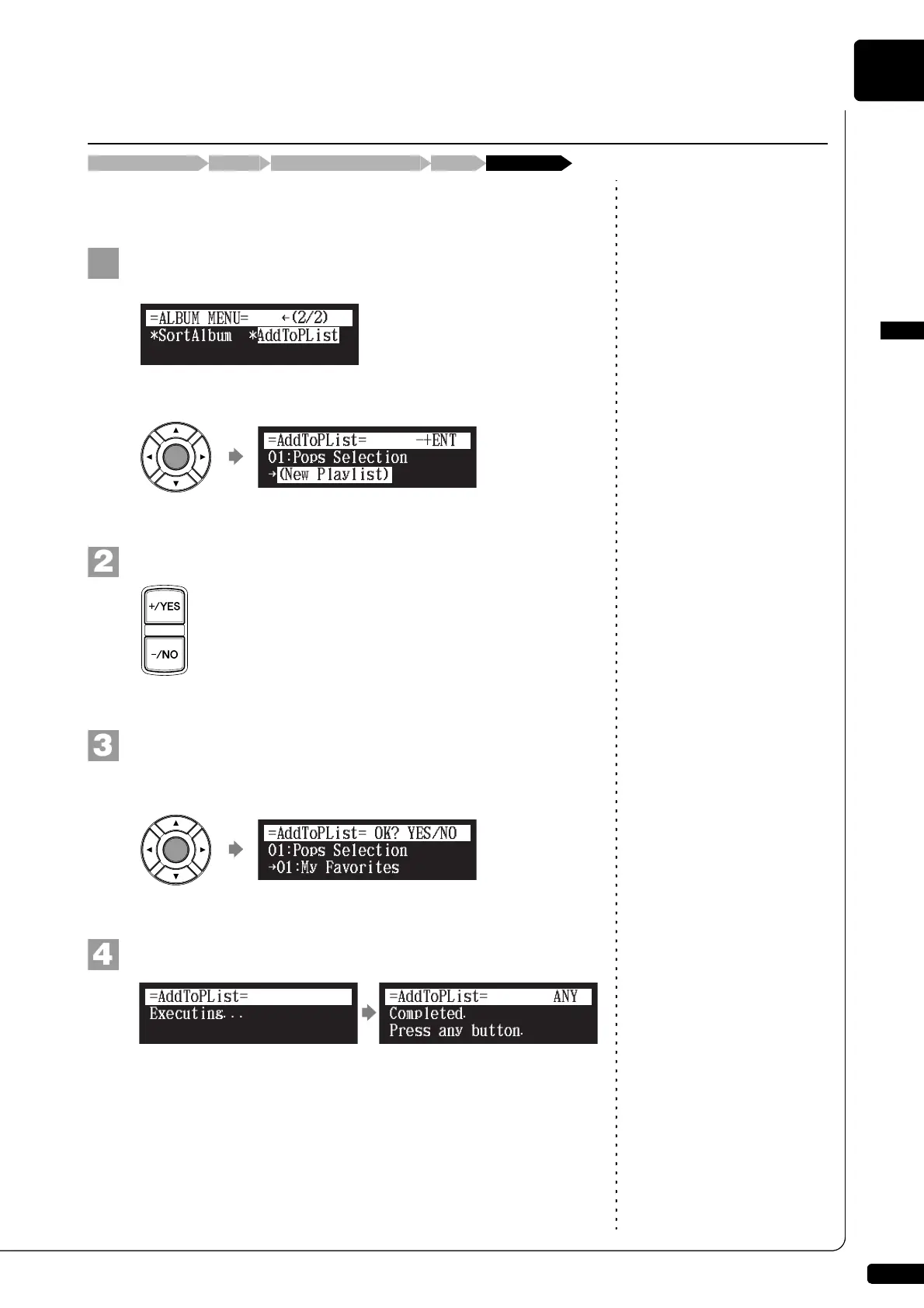
Select “AddToPList” in the album or song function menu,
then press [ENTER].
The AddToPList screen appears.
Note:
If “New Playlist” is selected in step
2, the title of added album is copied
to that playlist.
Select a destination playlist with [+/YES] and [–/NO].
Note:
If you select “New Playlist” and add
songs to it, the playlist is titled as
“My Playlist.”
Note:
The new playlist created in this
procedure can be selected from
“Playlist” in the media selection
screen.
Press [ENTER].
“OK?” flashes in the first line of the screen.
Press [+/YES] to add, [–/NO] to cancel.
After a while, the completion message appears.
Press any button to return to the album or song selection screen.
Adding Songs/Albums to the Playlist
[FUNC.]Media selection screen “AddToPList”Album or song selection screen“Memory”
}
{
{
!
Completed.
Press any button.
=AddToPList=
ANY







 To Next Page