Other Settings
11
Chapter
114
■ Using the Shortcut
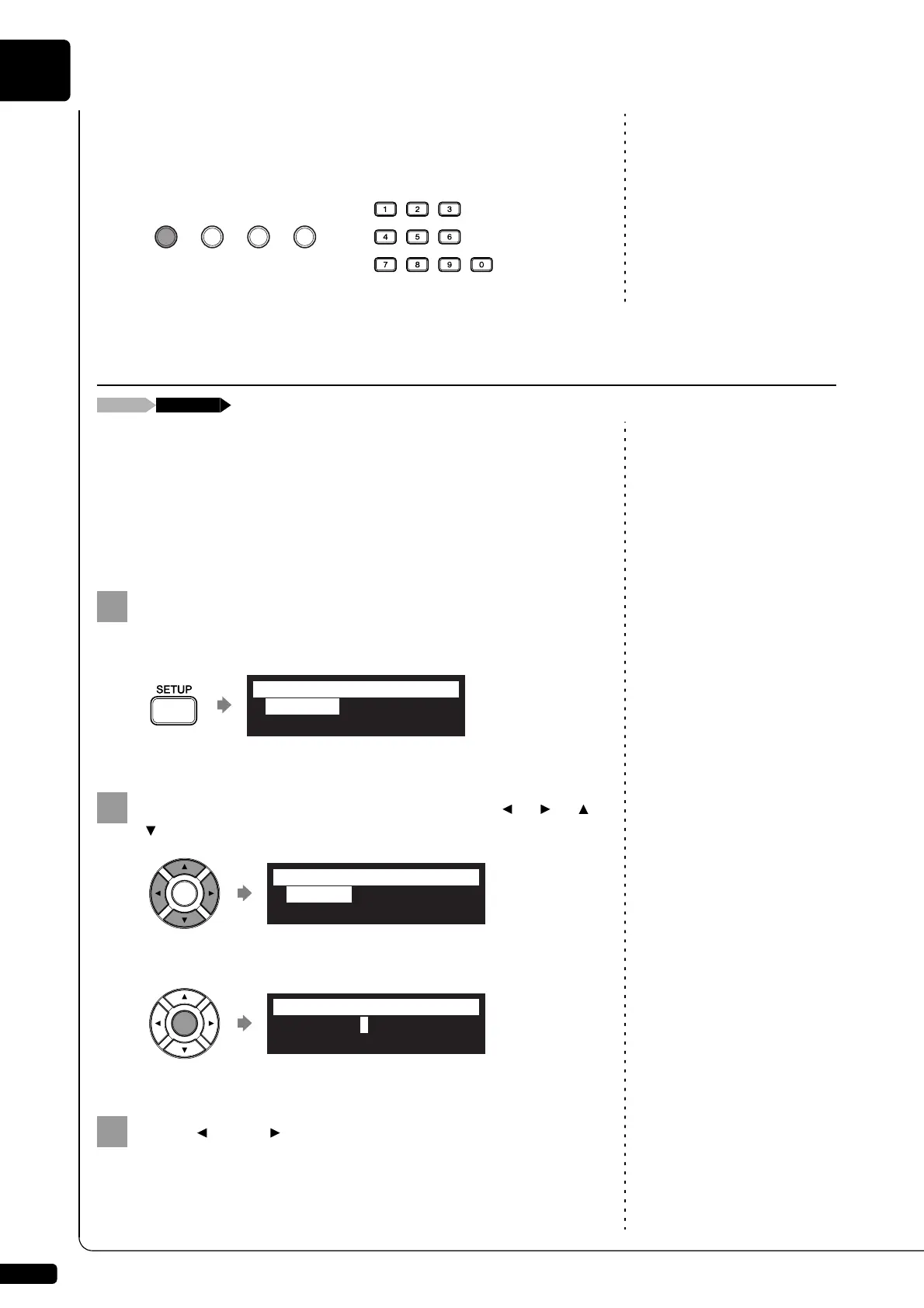
Holding the green button on the remote control, press the corresponding
number button on the number keypad to execute the assigned function.
Note:
These settings are not required for
the use of the remote control of this
unit. In case of using an external
remote controller, refer to the user’s
guide for that remote controller.
You can enter the 4-digit passcode to prevent unauthorized access from
the commercially available external remote controller, or you can also set
the MAC address of the external remote controller to allow it to access
your Disklavier without entering the passcode.
Note:
If changes are inappropriately made
for these settings, the external
remote controller may not function
properly. In such cases, enter
“####” to reset the passcode setting.
■ Setting the Passcode
Press [SETUP] on the remote control.
The setup menu screen appears.
Select “Passcode” with the cursor buttons ([ ] [ ] [ ]
[ ]), then press [ENTER].
The passcode setting screen appears.
Press [ ] and [ ] to move the cursor left and right.
Setting the Passcode to Prevent Unauthorized Access
*TimerPlay *AudioI/O
*M-Tune*MIDI
=SETUP MENU= (1/3)]
*Passcode *Reset
=SETUP MENU= _(3/3)
>Passcode=####
=Passcode= ]-+







 To Next Page