Basic Song Playback
English
3
Chapter
25
To enjoy the DisklavierRadio, first
you need to connect to the Internet.
See Chapter 9 “Internet Direct
Connection (IDC) – Connecting the
Disklavier to the Internet” on
page 93.
You can listen to streaming broadcasts of music, with many channels of
music contents.
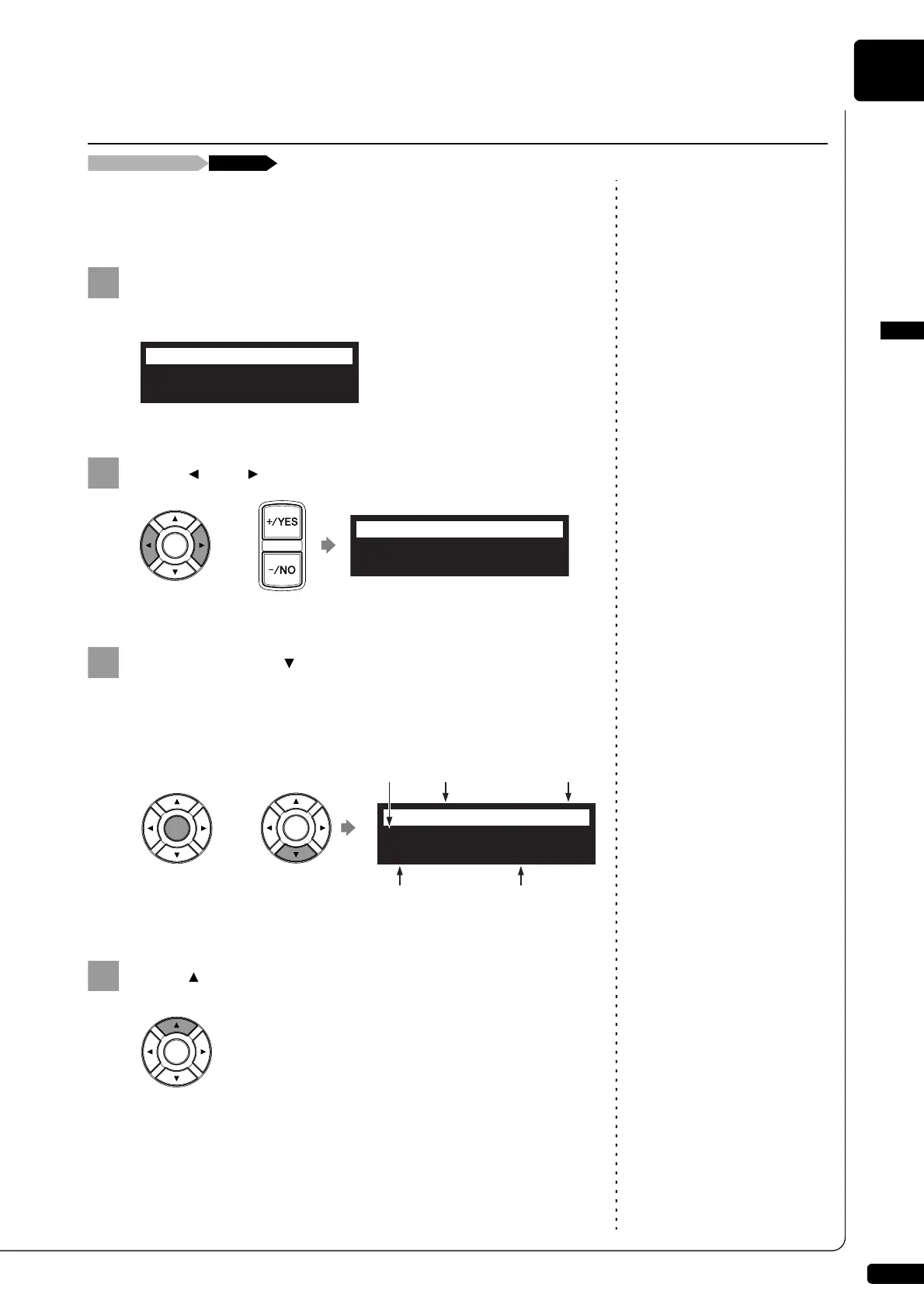
Select “D-Radio” in the media selection screen.
To select a medium, see Chapter 3
“Basic Song Playback – Selecting
Medium and Their Contents” on
page 17.
The channel selection screen appears.
Press [ ] or [ ] or [+/YES] or [–/NO] to select a channel.
Press [ENTER] or [ ] to begin the broadcast of the
selected channel.
The DisklavierRadio screen appears.
Press [ ] twice to stop the broadcast and return to the
media selection screen.
Listening to the DisklavierRadio™
Media selection screen “D-Radio”
01:Complimentary C
=RADIO SELECT=
02:Classical and S
=RADIO SELECT=
My Funny Val
=D-Radio=
Jazz
V+00
CH-08:
Channel Title
Volume
Medium
Channel
Number
Song Title







 To Next Page