Media Management
English
8
Chapter
79
Note:
Up to 99 playlists can be created.
You can create a new playlist for playing back your favorite songs in your
selected order.
Note:
If you enter the same title as the
playlist already exists, the new
playlist is titled in the form of
“playlist title [xx]” (“xx” indicates
the number).
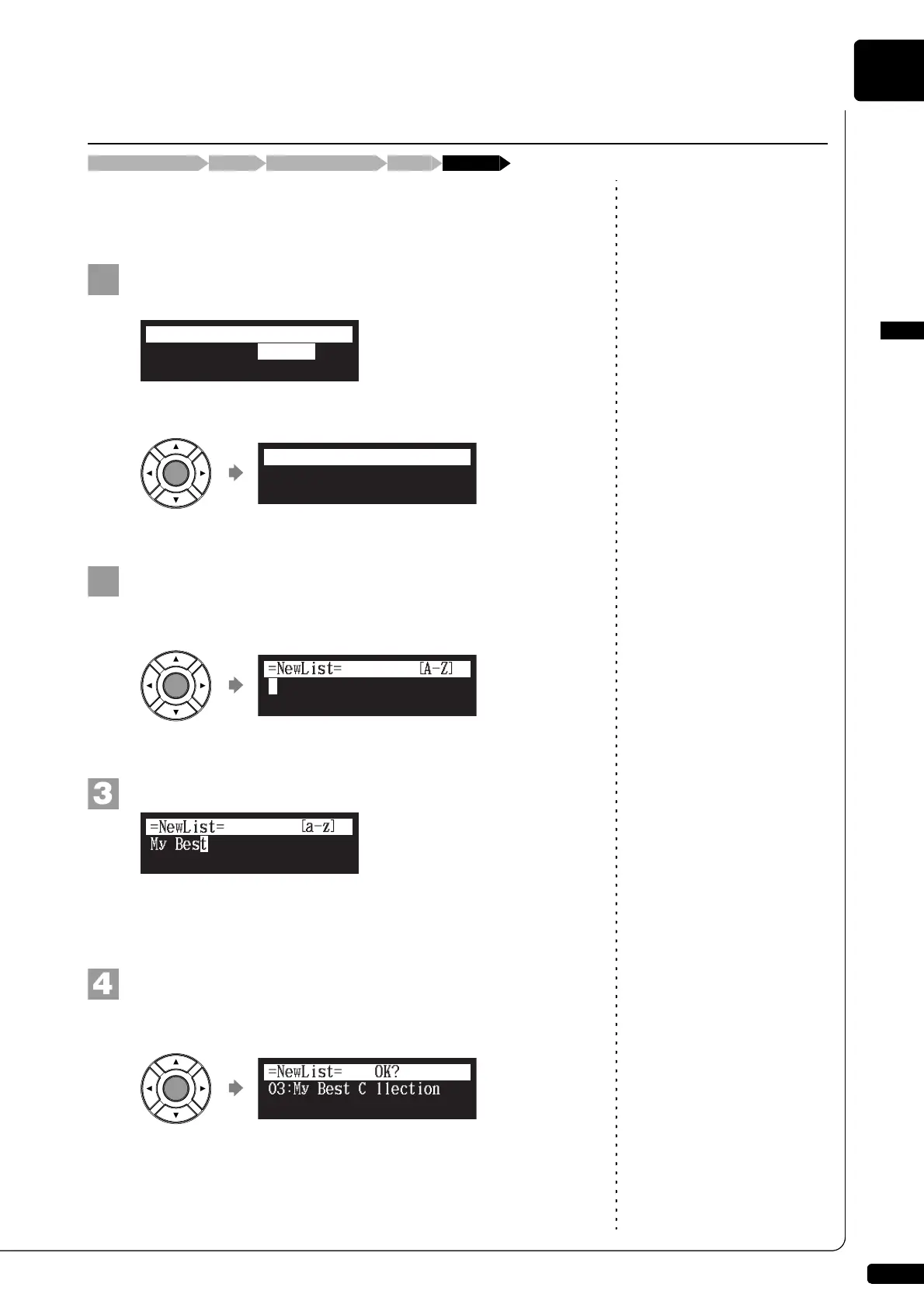
Select “NewList” in the album function menu for the
playlist, then press [ENTER].
The NewList screen appears.
Press [ENTER].
The playlist title editing screen appears.
Enter a title to a new playlist.
You can enter up to 64 characters.
Follow the instructions in “Entering Characters” on page 47.
Press [ENTER].
“OK?” flashes in the first line of the screen.
Creating a New Playlist
[FUNC.]Album selection screen “NewList”Media selection screen “Playlist”
*DeleteList
*RenameList
*NewList
=ALBUM MENU=
(1/1)
03:(no title)
=NewList=
ENT
03:My Best Collection
=NewList= OK? YES/NO







 To Next Page