Advanced Song Playback
English
4
Chapter
31
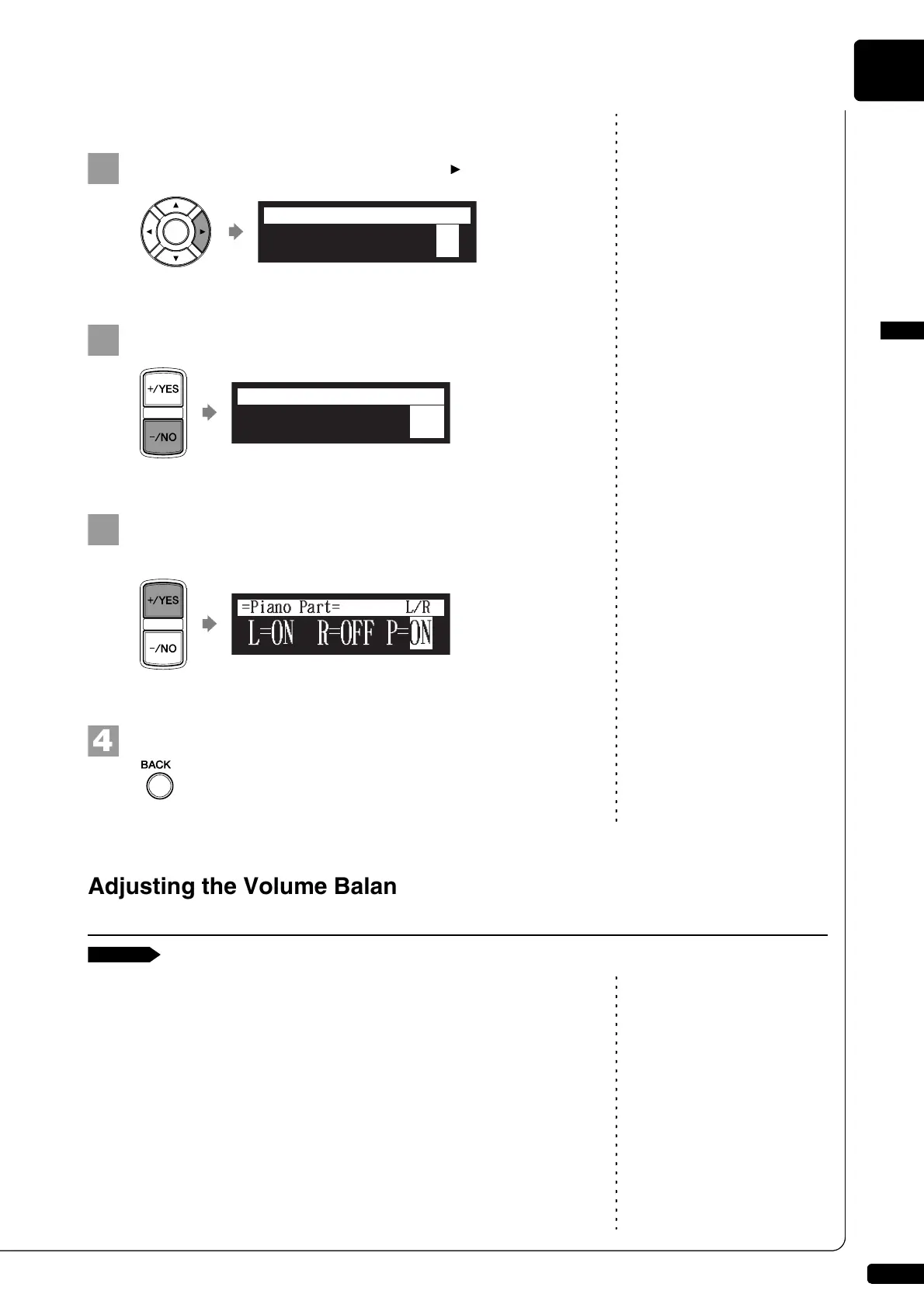
■ Cancelling the Pedal Part
On the part cancellation screen, press [ ] to select “P=.”
Press [–/NO] to cancel a pedal part.
To replay the pedal part, press [+/YES] with the cursor is
on “P=.”
Press [BACK] to return to the song playback screen.
Note:
You cannot adjust the volume
balance during the DisklavierRadio
playback.
Besides adjusting the overall volume, the volume balance among the
different sound sources as described below can be adjustable.
TG: Adjusts the volume of the ensemble sound reproduced by the
tone generator (TG) of the Disklavier.
Audio: Adjusts the volume of the accompaniment or standard audio
sound pre-recorded in the software (CDs).
See Chapter 5 “Advanced Piano
Playing – Playing the Disklavier
with an Ensemble Voice” on
page 43.
Voice: Adjusts the volume of the ensemble voice when you play using
the voice function.
L=ON R=OFF P=ON
=Piano Part=
L/R
L=ON R=OFF P=OFF
=Piano Part=
L/R
Adjusting the Volume Balance among the Keyboard Playing,
Ensemble Sound, and Software Playback







 To Next Page