OPERATION
Carl Zeiss Operating the motorized microscope via the touchscreen of the TFT display Axio Imager
100 430000-7344-001 M70-2-0020 e 06/2009
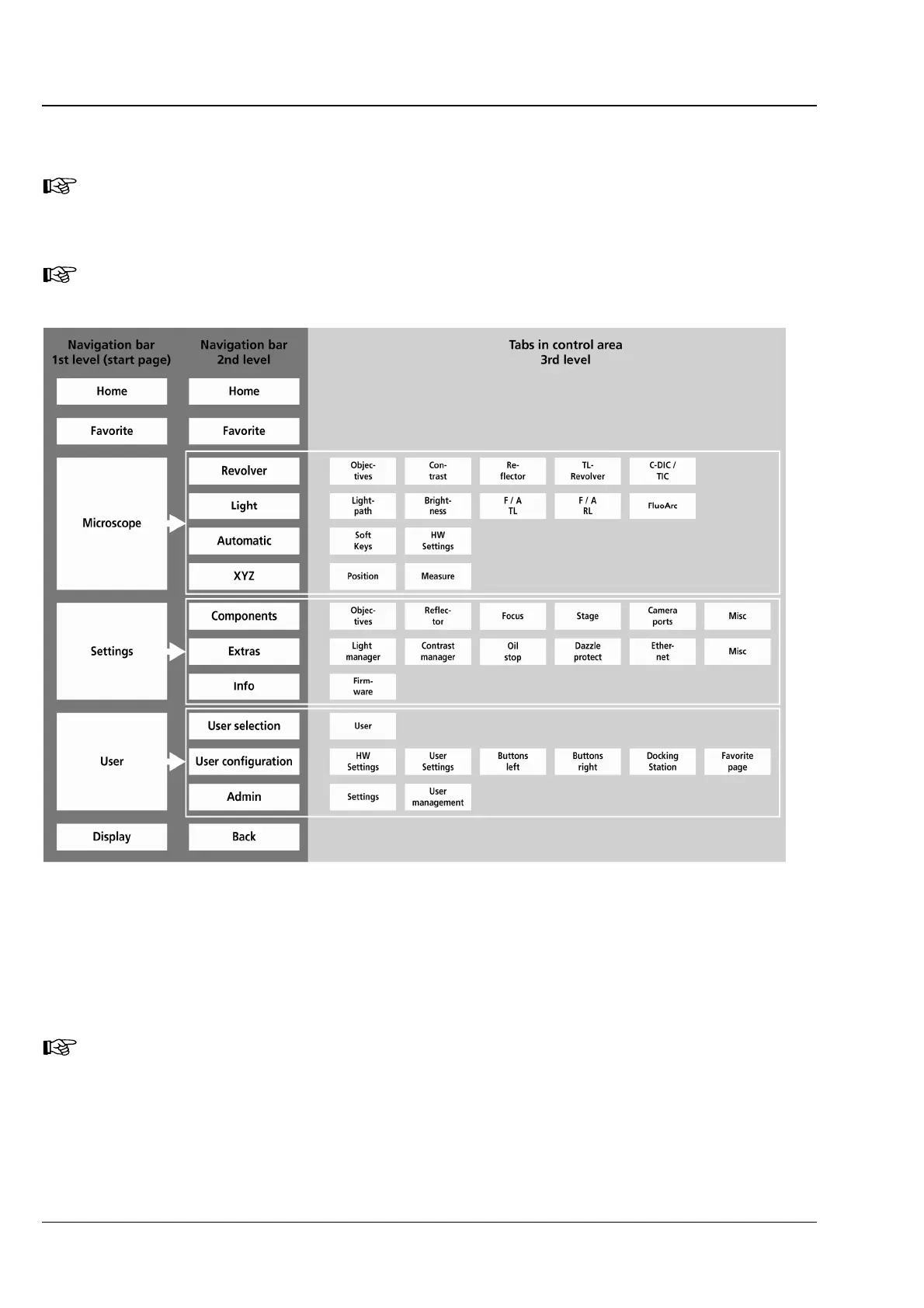
4.8.2 Menu structure
Depending on the microscope configuration, the actual menu structure may deviate from the
structure shown below. It shows the total scope inclusive of optional components and menu
items that are accessible only if the user has administrator privileges (without administrator
login, the user has reading privileges only).
In the second Axio Imager product generation, the stand type (BioMed or Material) does no
longer have to be preselected in the user interface!
Fig. 4-22 Menu structure
On the navigation button bar, the buttons of the first level appear on the very left (
Fig. 4-22). By pressing
the Microscope, Settings, User and Display buttons, the button assignment on the navigation button
bar is changing.
The buttons in the second level of the navigation button bar activate the correspondingly allocated tabs.
By pressing the tabs, further buttons appear in the control area of the screen.
All the operating functions are exclusively displayed in the control area (
4-23/2) or in a pop-up
window. The instrument status existing at any given time may be conveniently gathered from
the navigation bar or the Home page.








 To Next Page