START-UP
Axio Imager Changing the mechanical stage Carl Zeiss
M70-2-0020 e 06/2009 430000-7344-001 67
3.33 Changing the mechanical stage
Mechanical stages can be bolted on or turned and
centered depending on their type. The range of
stage travel is 75 mm in the x direction and 50 mm
in the y direction. Fixed stages with drive to right
or left are available. The drive is to the right on the
rotary mechanical stage.
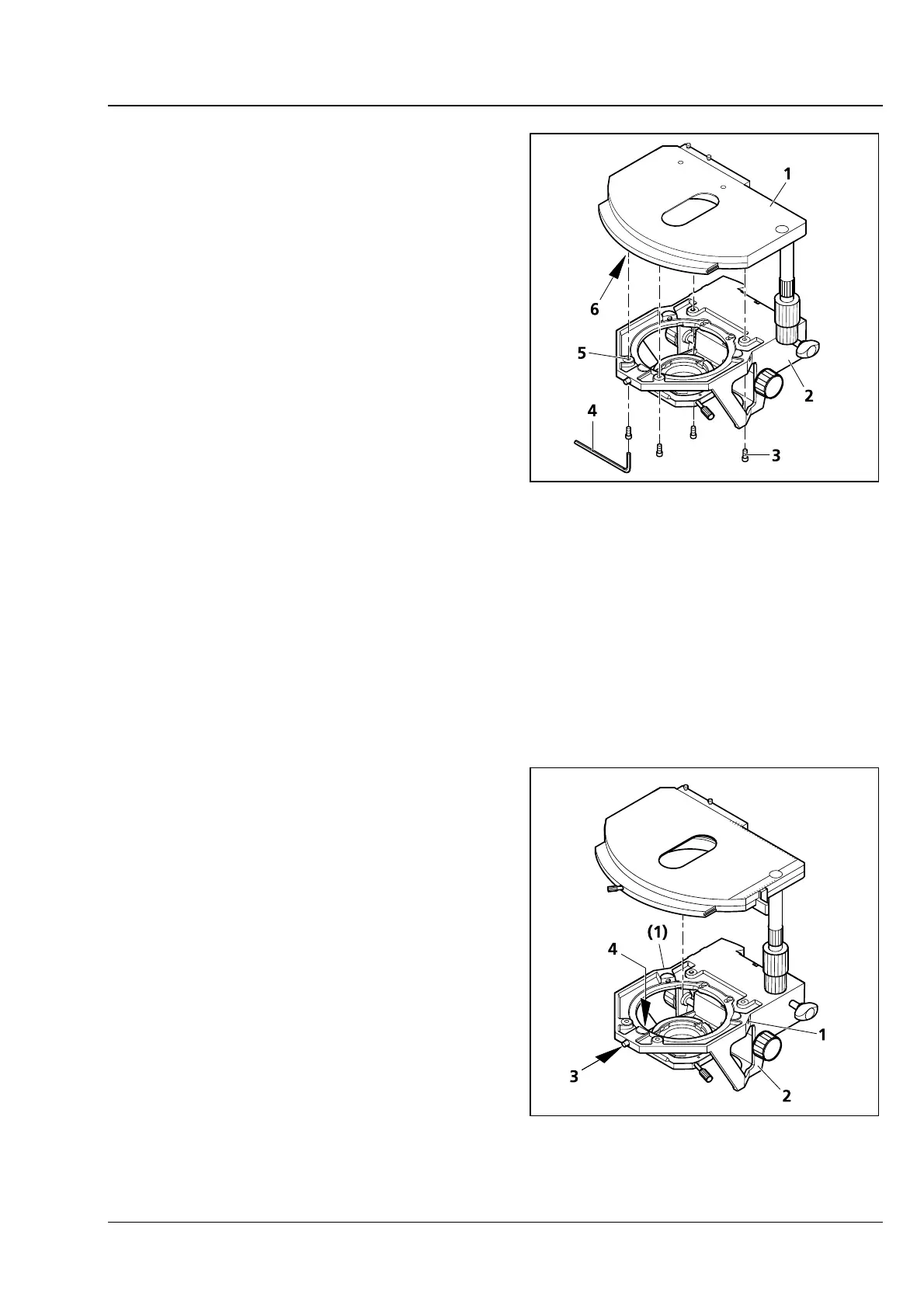
3.33.1 Fixed mechanical stage 75x50 R
(1) Removing the stage
• Unscrew four fastening screws (3-51/3) on
stage carrier (
3-51/2) using the offset SW 3
Allen key (
3-51/4).
• Remove stage (3-51/1) upwards from the stage
carrier.
(2) Attaching the stage
• Place stage (3-51/1) onto stage carrier (3-51/2) in such a manner that the threaded holes on the
bottom of the stage (
3-51/6) are positioned above the stage carrier openings (3-51/5).
• Insert four fastening screws (3-51/3) through the stage carrier from below and screw them into the
bottom of the stage; use the shorter screws for the front.
• Orient stage in the x-y direction and tighten the fastening screws.
3.33.2 Rotary mechanical stage
75x50/240° R
(1) Removing the stage
• Loosen screw cap (3-52/3) from the spring
housing (about three rotations).
• Turn back centering screws (3-52/1), if
necessary.
• Press the stage to the front against spring pin
(
3-52/4), lift it off the stage carrier (3-52/2) from
the back and remove it upwards.
• Retighten screw cap (3-52/3).
(2) Attaching the stage
• Loosen screw cap (3-52/3) from the spring
housing (about three rotations).
• Place the stage with the dovetail groove on the
spring pin (
3-52/4).
Fig. 3-51 Changing the fixed mechanical
stage
Fig. 3-52 Changing the rotary mechanical
stage








 To Next Page