START-UP
Axio Imager Installing Polarizer D, fixed Carl Zeiss
M70-2-0020 e 06/2009 430000-7344-001 73
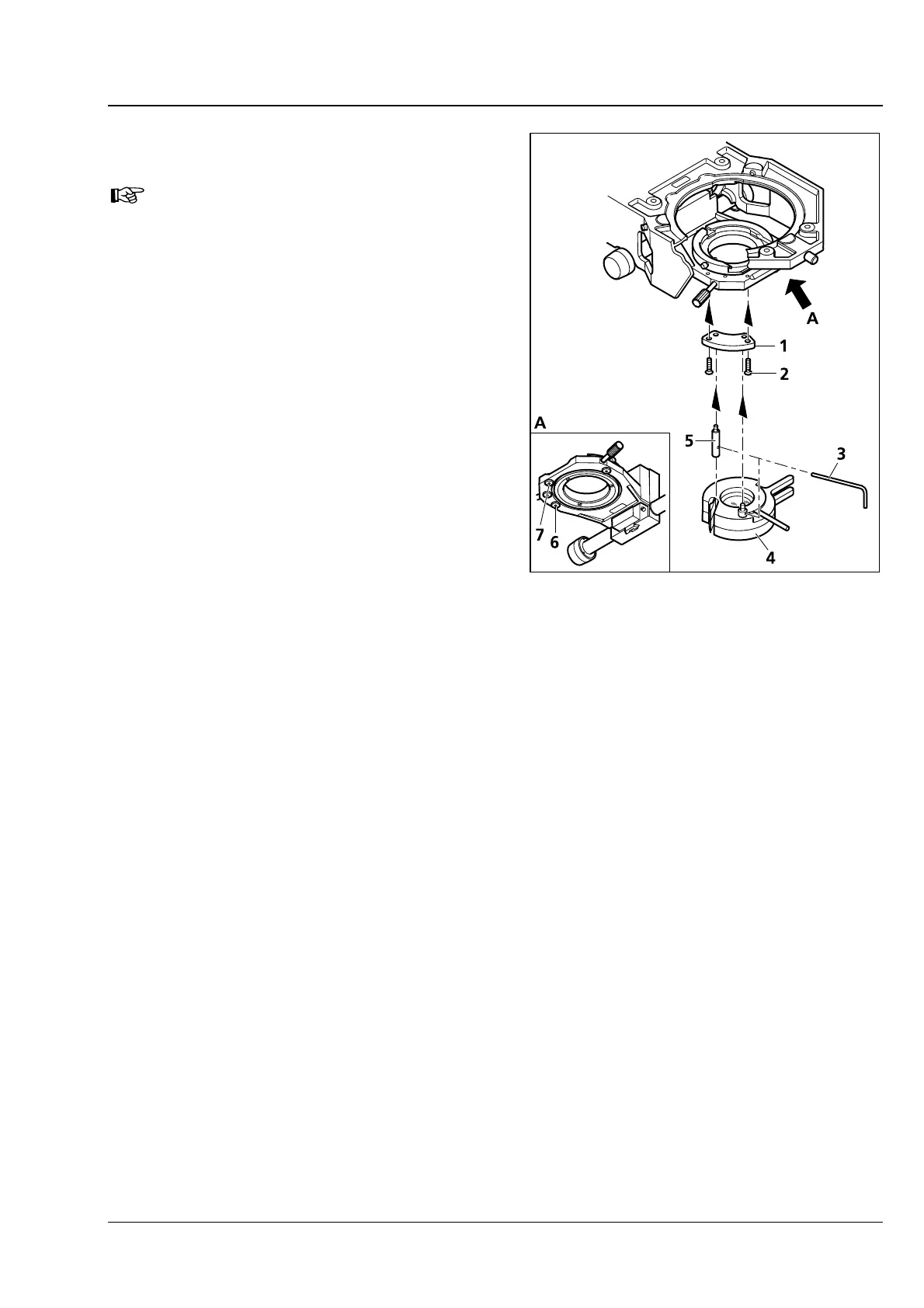
3.35 Installing Polarizer D, fixed
If the stand is provided with a
detachable stage carrier, remove it (see
Section
3.13), put it aside upside down
and install the polarizer from top.
• Remove any installed polarizer or color filter
carrier from the condenser carrier.
• Fasten adapter plate (3-59/1) with screws
(
3-59/2) to the condenser carrier making use of
the provided holes (
3-59/6 and 7).
• Hold the polarizer (3-59/4) parallel to the
bottom side of the condenser carrier. Using the
offset adjusting lever (
3-59/3), screw the
retaining bolt of the polarizer (
3-59/4) into the
rear tapped hole of the adapter plate as far as it
will go.
• Using the adjusting lever (3-59/3), screw the
detent bolt (
3-59/5) into the front tapped hole
of the adapter plate as far as it will go.
For the installation of other polarizers or of the
color glass holder, proceed analogously.
Fig. 3-59 Installing Polarizer D, fixed








 To Next Page