START-UP
Carl Zeiss Installing and removing P&C reflector modules Axio Imager
46 430000-7344-001 M70-2-0020 e 06/2009
3.19 Installing and removing P&C reflector modules
Normally, the reflector turret is factory-equipped with P&C (Push&Click) reflector modules on customer's
request. However, the user can also change the equipment of these turrets.
The reflector turret is designed to hold maximally six or ten reflector modules dependent on the model.
3.19.1 Installing a module
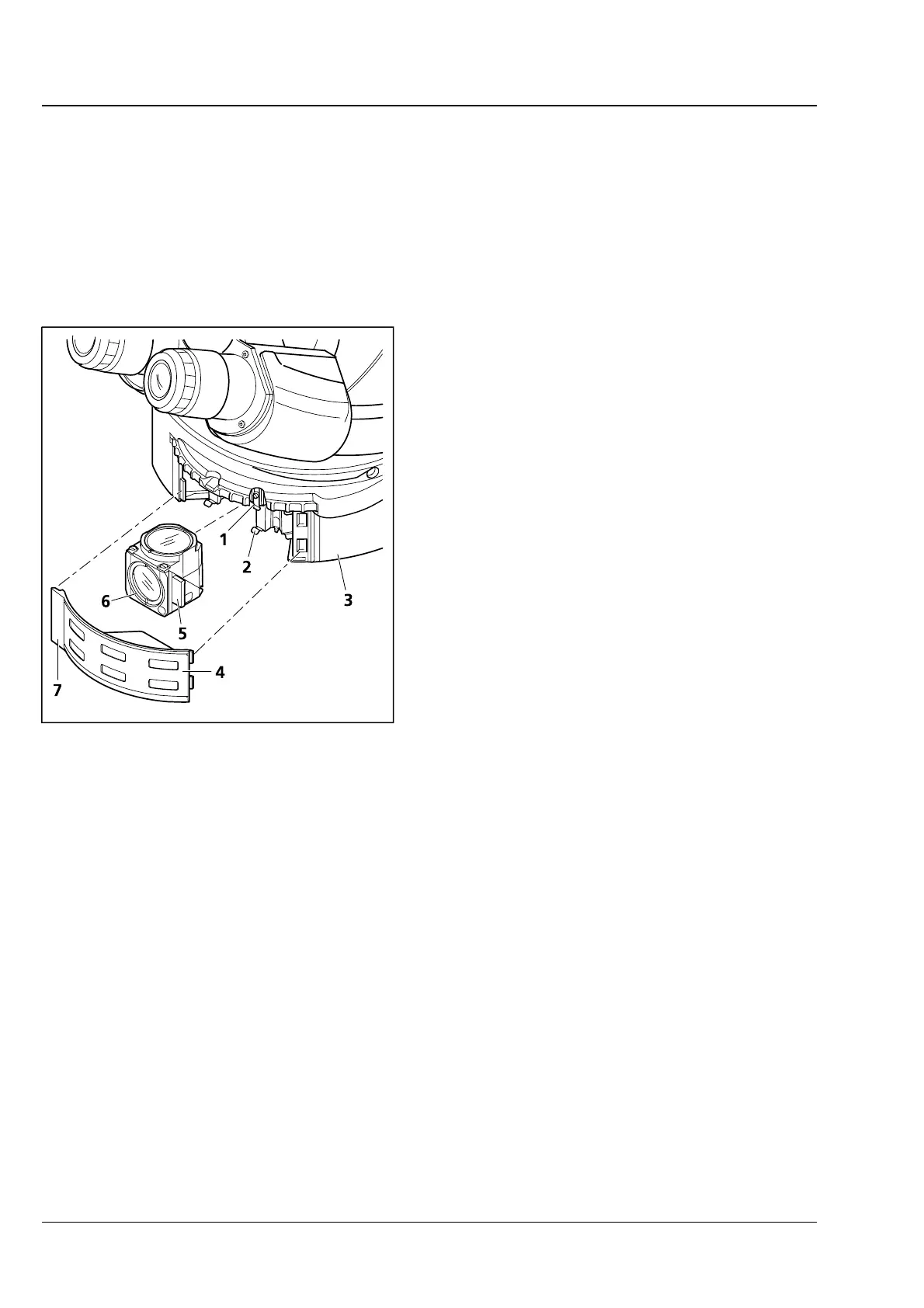
• Fold up cover flap (3-22/4) on reflector turret
(
3-22/3) to the right and unhinge it using the
handle (
3-22/7) arranged at the left.
• Turn reflector turret until the desired position
(position ID labeled on reflector turret) becomes
accessible in the mounting hole.
• Holding it by the handles (3-22/5) arranged right
and left on the module, insert the module
(
3-22/6) obliquely from the bottom into the
upper spring clips (
3-22/1) on the reflector
turret.
• Then press the module at the bottom until it
snaps securely into the bottom spring clips
(
3-22/2) of the reflector turret as well.
3.19.2 Removing a module
• Slightly tilting the module, pull it out first from
the bottom spring clips and then from the top
spring clips. Remove it completely.
• After having removed and installed the reflector modules, hang in the cover flap and let it snap in.
• Turn on the reflector turret by three (6-position reflector turret) or five positions (10-position reflector
turret) to swing the just installed module into the optical path.
• After you equipped the turret as desired, label the adhesive labels with the new filter combination and
affix them to the corresponding fields on the cover flap.
3.20 Changing the filter set in the reflector module FL P&C
The filter sets for the FL P&C reflector module can be combined and assembled individually by the
customer.
Insert only fluorescence filters having a free aperture of ≥ 22 mm, as otherwise the image may be
masked. Make sure this requirement is met, when using filters from other manufacturers.
Filter sets or fully assembled FL P&C reflector modules can be ordered from Carl Zeiss.
Fig. 3-22 Changing P&C reflector modules








 To Next Page