33 Rev.B
SMARTLINK DIRECT CONTROL INTERFACE
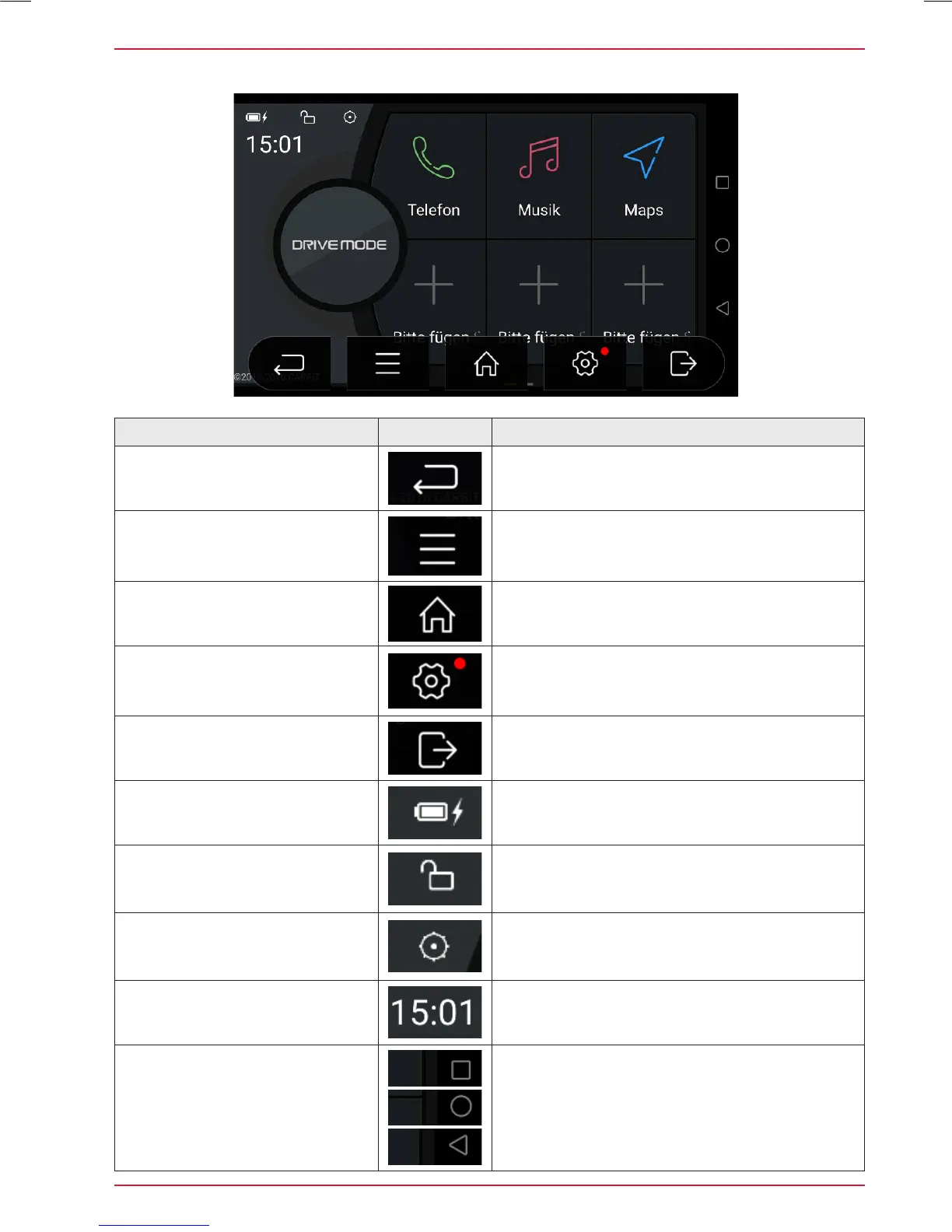
Function Icon Operation
Drive Mode Panel Back Icon
Tap to exit Drive Mode panel
Smartlink Control Bar Icon for
menu control bar (to access
Version info and display setup)
Tap to display infos and open display setup.
See page 34.
Drive Mode Home Icon
Tap to jump back to main menu
Smartlink Setup Icon
Tap to open the Smartlink Direct setup page
Smartphone disconnect Icon
Tap to disconnect the smartphone and to jump
back to smartphone select page
Battery Level and Charge Status
icon
Shows battery level and charge status
Drive Mode Icon to activate or
lock screen rotation
Tap to activate screen (auto) rotation, or lock of
screen rotation in dependency to smartphone
Smartlink Icon for menu bar
Tap to open menu bar
Display of Time
Display of Time (no operating function)
Smartphone Control Bar Icons
to operate the connected smart-
phone (Icons and control logic
may vary in accordance with
connected smartphone model)
Tap to access/ open further functions of the
connected smartphone



 To Next Page