7 Rev.B
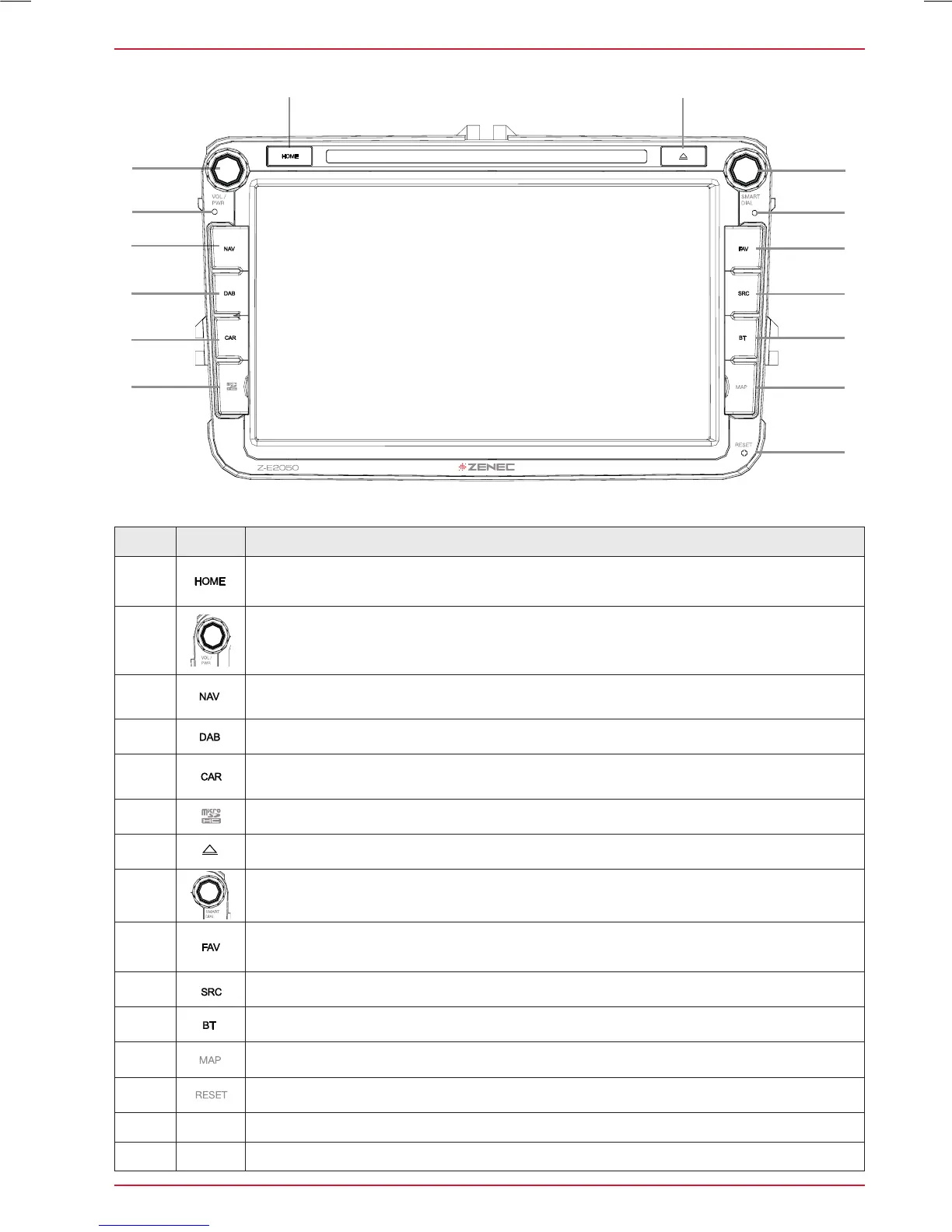
Z-E2050 (FRONT PANEL)
Item Icon Function
1
Tap to jump back to main menu
Press and hold jump to audio settings
2
Turn to increase or decrease playback volume
Press and hold to turn device ON or OFF
Tap to mute/- unmute device
3
Tap to jump to navigation
Press and hold to open Quick Control Bar inside navigation source
4
Tap to open DAB+ radio source
5
Tap to jump to CAR
Press and hold jump to special CAR Menu
6
Slot for the microSD with Media Files (Audio & Video)
7
Tap, to eject the DVD
8
Turn for list scrolling
9
Tap to select preferred content or execute a function
Press and hold to jump to audio settings
10
Tap to change the source
11
Tap to open the Bluetooth hands-free page
12
microSD card slot for GPS navigation software behind „MAP“ cover
13
Hole in the panel for the reset pin
14 ○
Internal microphone
15 ○
IR receiver for remote control
Device Front Panel Control Options



 To Next Page