51 Rev.B
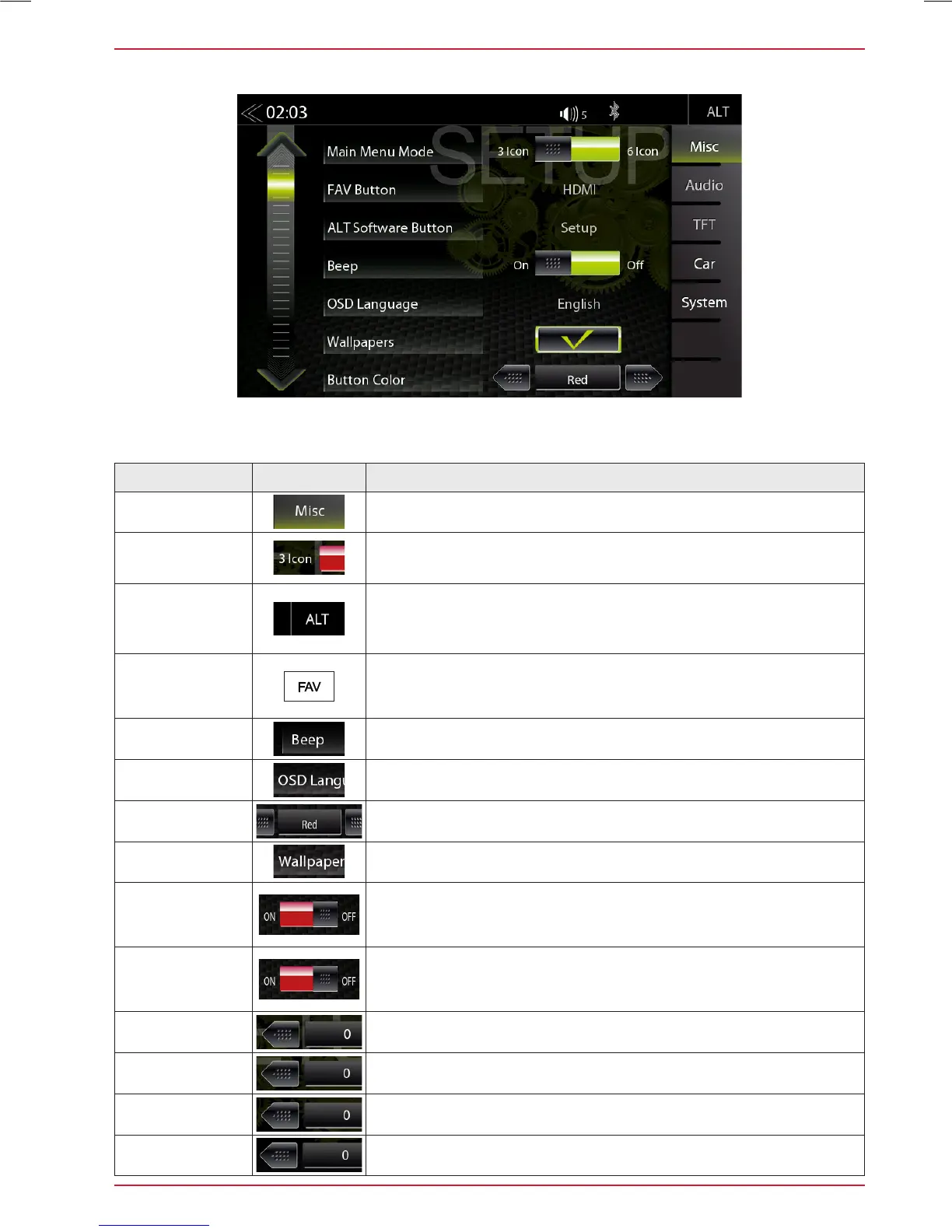
MISC SETUP
Function Icon Operation
Misc
Tap to access basic settings view
Main Menu
Mode
Tap to switch to 3 Icon or 6 Icon main page display layout
ALT Software
Button
Tap to select source function for ALT button
(CAM/Mute/NAVI/Tuner/EQ/Setup/BT-Music/BT/DISP/iPod/SD/
USB/HDMI/Smartlink/DVD)
FAV Button
Tap to select source function for FAV button
(CAM/Mute/NAVI/Tuner/EQ/Setup/BT-Music/BT/DISP/iPod/SD/
USB/HDMI/Smartlink/DVD)
Button sounds
ON / OFF
OSD Language
Tap to change the menu language
Button Color
WHITE / RED Tap to change the color
Wallpapers
Tap to change the background image
Volume
Pop-Up
ON / OFF
Off = visual volume pop-up disabled
On = visual volume pop-up enabled
Nav Media
Control Bar
ON / OFF
Off = Nav Media Control Bar disabled for navigation
On = Nav Media Control Bar enabled for navigation
Rev. CAM IN
Brightness
-4 ~ 4
Rev. CAM IN
Contrast
-10 ~ 10
Rev. CAM IN
Saturation
-5 ~ 5
Rev. CAM IN
Hue
-5 ~ 5
In the Misc menu page, you can configure settings for the display mode with 3 or 6 icons, ON/OFF of
the beep sound, as well as the LED color of the lighting of the buttons on the device front.



 To Next Page