63 Rev.B
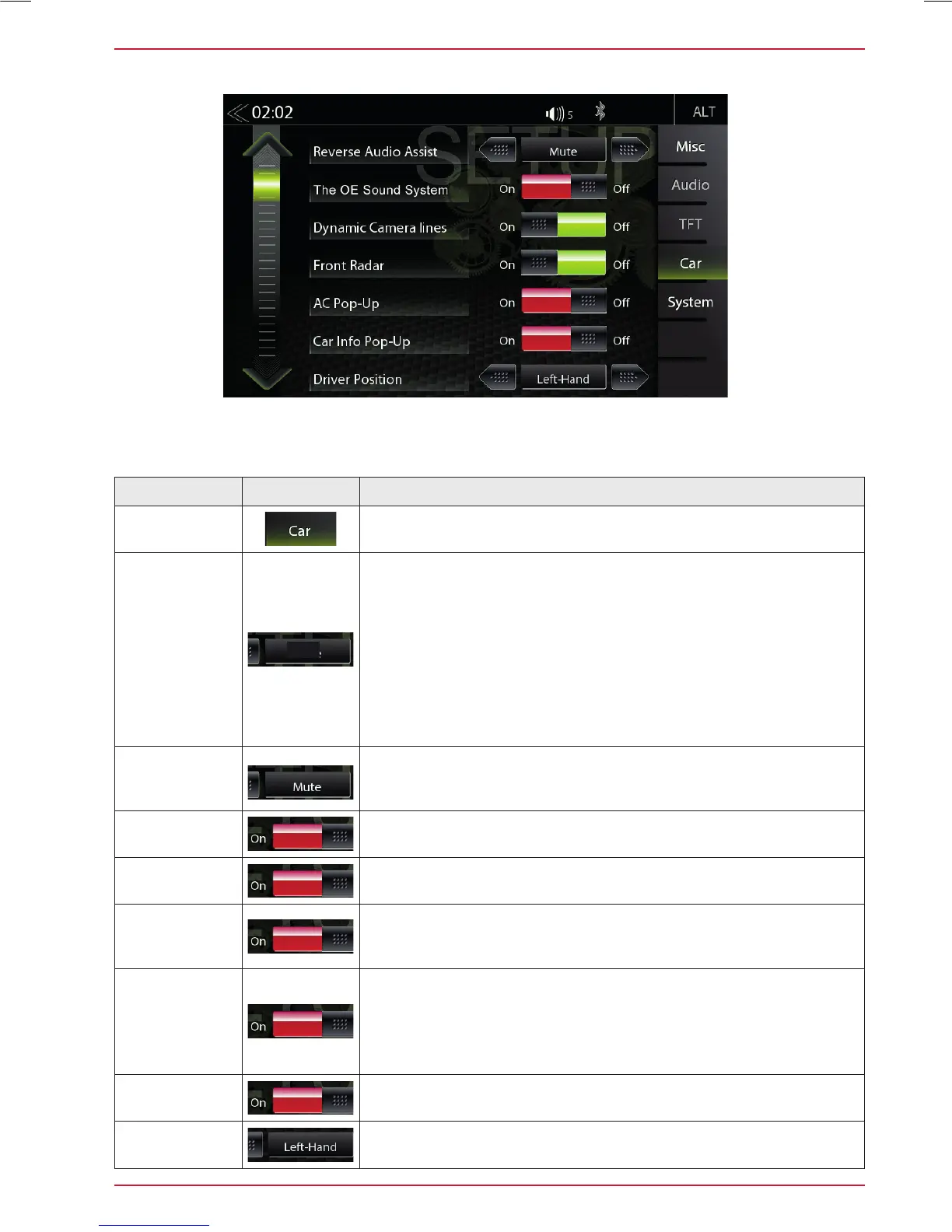
CAR (VEHICLE) SETUP
In the Car Setup menu, you can set how the ZENEC device interacts with optional components such
as cameras and parking assist of the vehicle.
Function Icon Operation
Car (vehicle)
Tap to access vehicle configurations
Park Assist
Touch to set the parking aid display source.
OFF / CAM / OPS / OPS & CAM:
• OFF = The function is turned off permanently.
• CAM = If a rear view camera is connected, the camera picture
will be displayed automatically.
• OPS = Indicates the optical parking system depending on the
vehicle configuration.
• OPS & CAM = Indicates a combined picture of the rear view
camera and the optical parking system.
Reverse
Audio Assist
OFF / MUTE / Reduced
OE Sound
System
ON / OFF
Dynamic
Camera lines
ON / OFF
Front radar
ON / OFF
Indicates the optical front parking system depending on the
vehicle configuration.
AC Info
(Pop-up)
ON / OFF
Off = Air conditioning pop-up window does not appear during
adjusting
On = Air conditioning pop-up window does appear during
adjusting
Car Info
(Pop-up)
ON / OFF (Fig. S/68)
Driver
position
Left-hand, Right-hand
CAM



 To Next Page