Preparations
Setting the power supply used (Power Source)
20
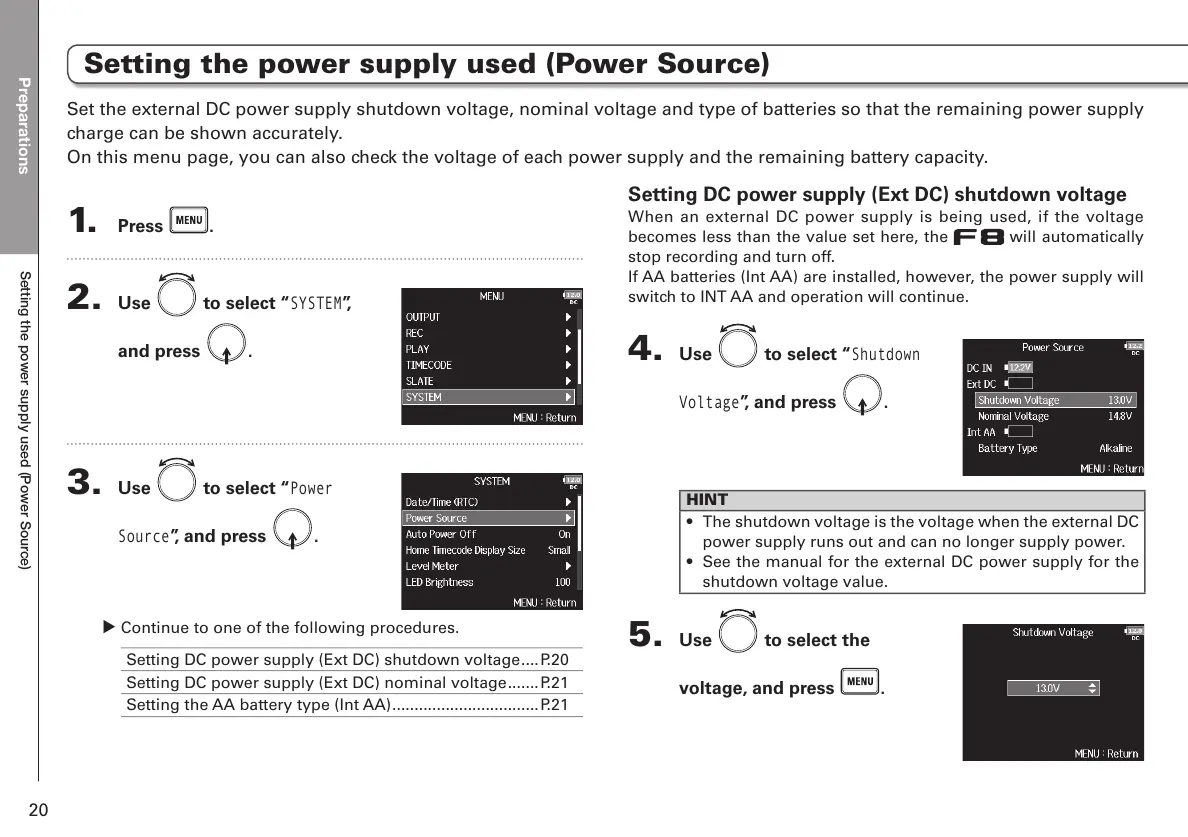
Setting DC power supply (Ext DC) shutdown voltage
When an external DC power supply is being used, if the voltage
becomes less than the value set here, the will automatically
stop recording and turn off.
If AA batteries (Int AA) are installed, however, the power supply will
switch to INT AA and operation will continue.
4. Use to select “
Shutdown
Voltage
”, and press .
HINT
• The shutdown voltage is the voltage when the external DC
power supply runs out and can no longer supply power.
• See the manual for the external DC power supply for the
shutdown voltage value.
5. Use to select the
voltage, and press
.
1. Press .
2. Use to select “
SYSTEM
”,
and press
.
3. Use to select “
Power
Source
”, and press .
υ Continue to one of the following procedures.
Setting DC power supply (Ext DC) shutdown voltage ....P.20
Setting DC power supply (Ext DC) nominal voltage .......P.21
Setting the AA battery type (Int AA) .................................P.21
Set the external DC power supply shutdown voltage, nominal voltage and type of batteries so that the remaining power supply
charge can be shown accurately.
On this menu page, you can also check the voltage of each power supply and the remaining battery capacity.
Setting the power supply used (Power Source)



 To Next Page