•
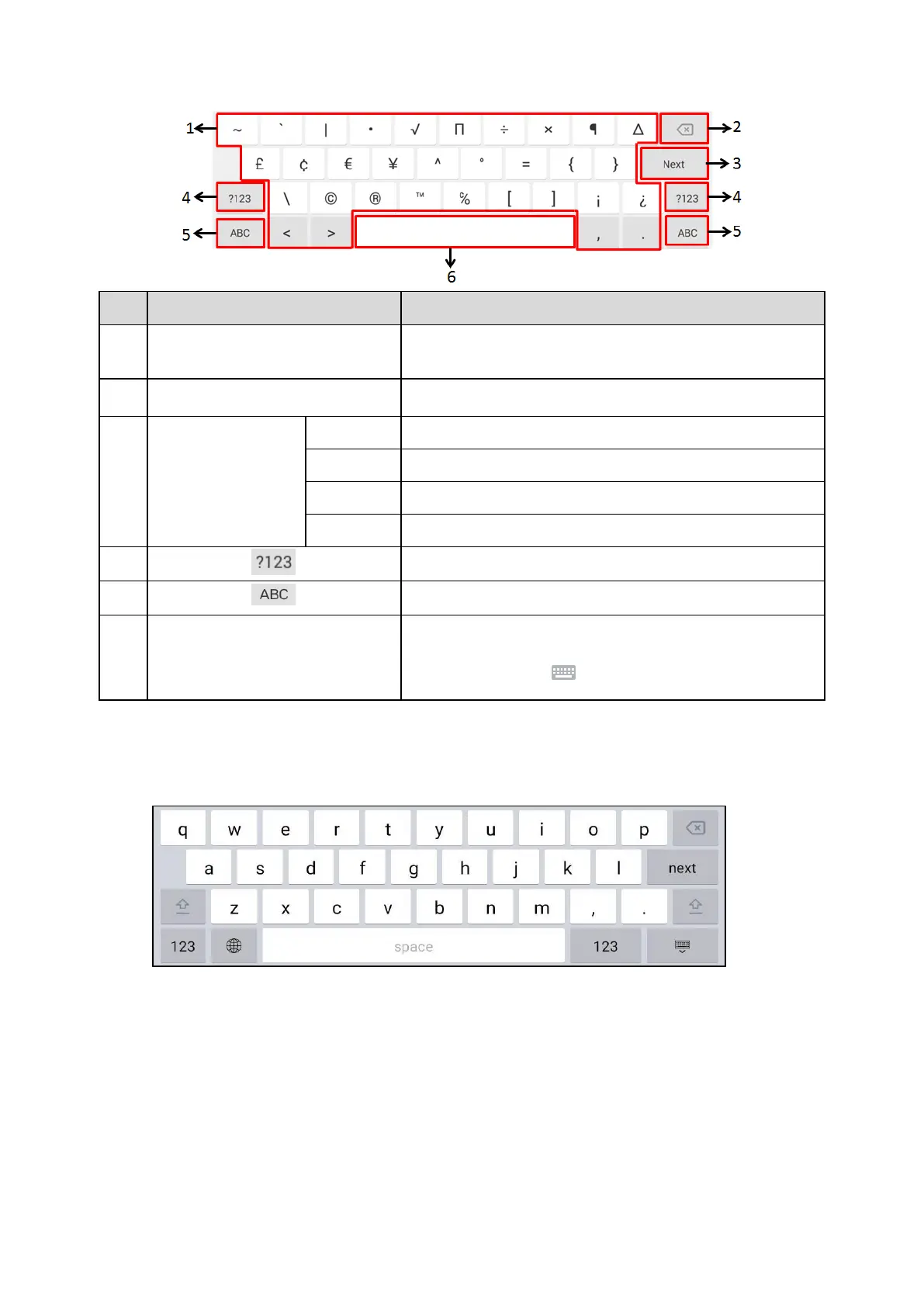
Tap to enter special characters.
•
Long tap a key then slide to choose one of the options to enter
an
alternate character.
•
Tap to delete the entered characters one by one.
•
Long tap to delete two or more characters.
Label automatically to
identify the context-sens-
itive features.
Tap to go to the next field.
Tap to confirm the settings.
Tap to dial out the number.
Tap to browse the web page.
Tap to switch to the numeric&symbolic input mode.
Tap to switch to the lowercase input mode.
•
Tap to enter spaces.
•
Long tap to change the input method.
Tip: You can also tap
at the bottom right corner of the
phone
screen to change the input method.
Google Pinyin Input Method
You can use Google Pinyin input method (谷歌拼音
输
入法) to enter Chinese characters.
When you change the input method to Google Pinyin, the onscreen keyboard displays the English input
mode as
shown below by default:



 To Next Page