Program features 45
Two external control locations, EXT1 and EXT2, are available. You can select the
sources of the start and stop commands separately for each location by setting
parameters 20.01...20.10. The operating mode can be selected separately for each
location, which enables quick switching between different operating modes, for
example speed and torque control. Selection between EXT1 and EXT2 is done via
any binary source such as a digital input or fieldbus control word by a parameter
19.11. You can also select the source of reference for each operating mode
separately.
Events: -
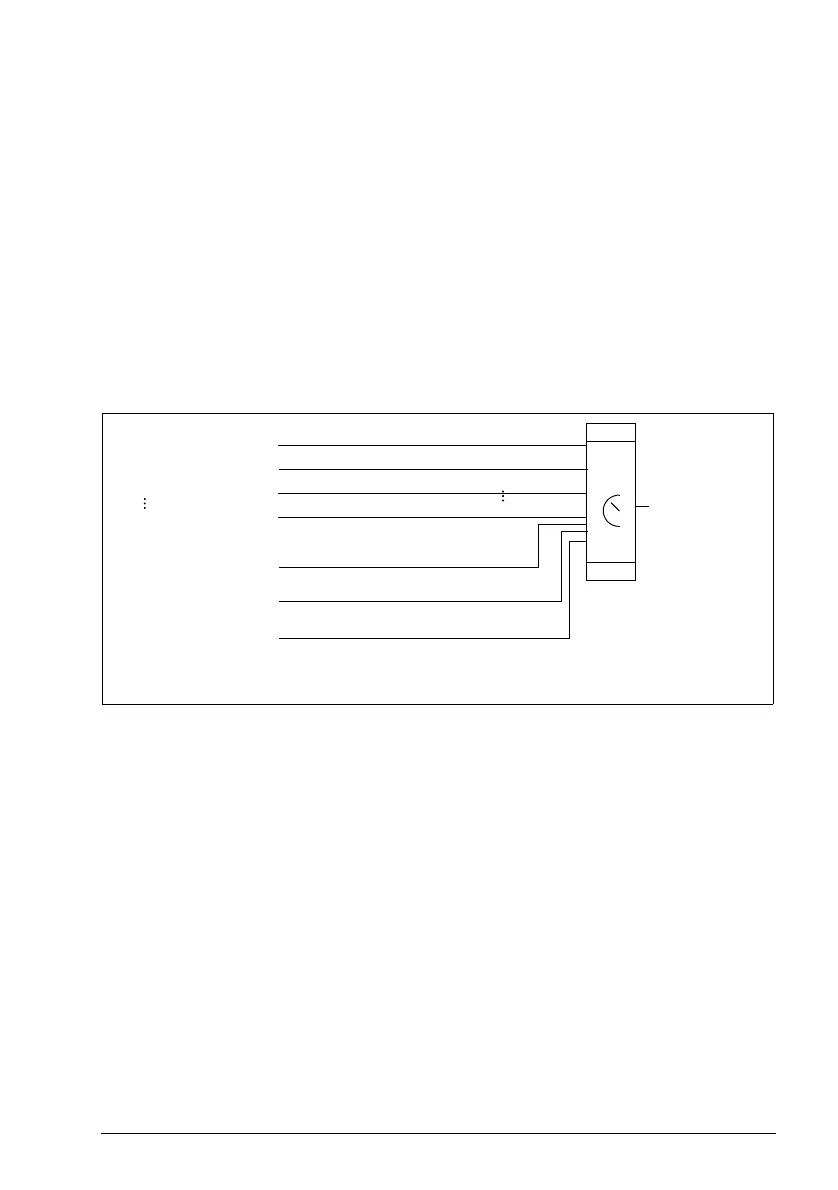
Block diagram: Run enable source for EXT1
The figure below shows the parameters that select the interface for run enable for
external control location EXT1.
Settings and diagnostics
Parameters 19.11 Ext1/Ext2 selection and 20.01…20.10.
Events: -
Supervision 1…6
Other [bit]
DI1
DI5
EXT1
Run enable
EFB MCW bit 3
Select
20.12
DI1
DI5
0
1
Off
Selected
Embedded fieldbus
A bit in a parameter
Supervision
ACS180 FW.book Page 45 Tuesday, March 9, 2021 2:25 PM



 To Next Page