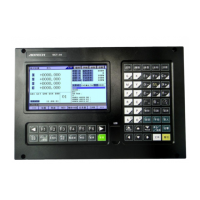
BZ001M056A ADT‐DK300A/400A Engraving Machine
9
Key Figure Purpose
[启动/START]
Startautomaticrunning
3. Manualoperation
3.1 Returningtoreferencepointmanually
Theengravingmachinetoolhasspecificmechanicalposition,whichiscalledasreferencepointandfor
tool exchange and coordinates setting. Generally, when the powersupply is connected, the tool should be
moved to the reference point. This operation is also called as home operation, which will make the CNC
system
confirmtheoriginofmachinetool.
Thehomeoperationincludesprogramandmechanicalmode:
Forprogramhome,theactioncompleteswhenthecoordinatesofmachinetoolare0,andwon’tcheck
whetheroriginswitchisinposition;
Formechanicalhome,theexternalhomesensorswitchisusedtolocatethe
originofthemachinetool;
twocheckingmodesareavailable:
With the external sensor switch, the home operation completes when the sensing is successfully
repeatedly.
Theexternalsensorswitchisusedasdecelerationswitch,andtheservohomeisenabledashomesignal
aftersensingandthenthesensingstops.
You
cansetthe“Homemode”in[Parameter][Generalparameter],andmoveto comprehensivehome
mode (36# parameter) EOB to select. You can also press [SBK] key in home mode to switch among
“Mechanical–Program–Mechanical…”quickly.Thismethoddoesn’tconflictwithparameterset ting.Youcan
selectaccordingly.To
useservohomeasthehomesignal,youneedtoset“AxisphaseZhomeenable”to“1”
in[Parameter][AxisConfiguration]inmechanicalhomemode,andthesettingwilltakeeffectinnexthome
checking.
Severalmethodsareavailablefortoolreturningtoreferencepointandthestepsfollow:
(1)
Eachaxisreturnstoreferencepointseparately


 To Next Page