LOCAL OPERATION MODULATION: FM
ANALOG
MOD
B5225
SIG
GEN
B5243
...
B5279
3-96
FM1 set-up
Use this menu to apply frequency modulation (on path 1) to the internal source, or to configure the
input of the external source.
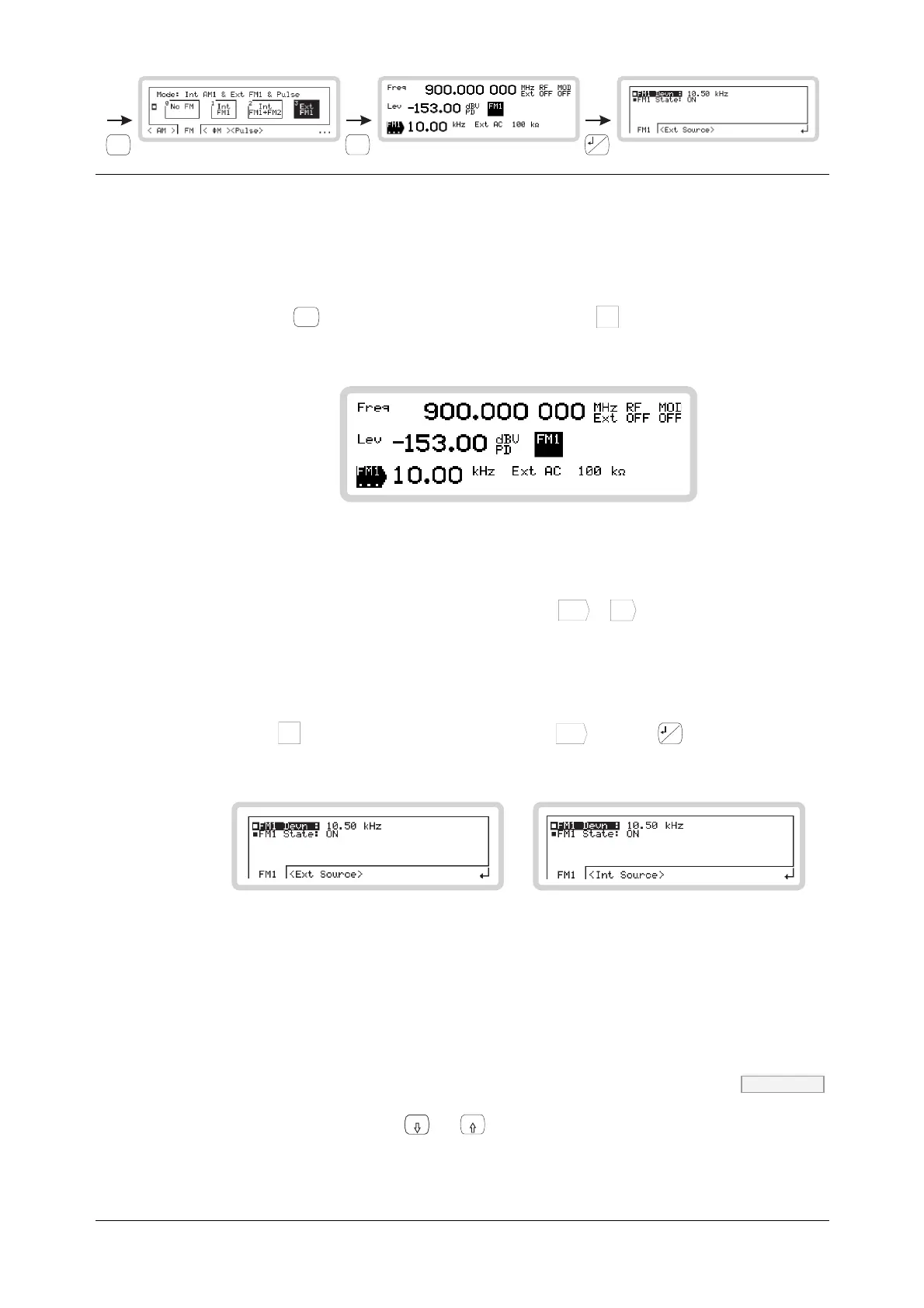
1 Configure the modulation mode for internal or external modulation (page 3-91).
2 Press
SIG
GEN
to show the main screen, and touch the
FM1
soft box to select the function
(Fig. 3-71).
B5243
Fig. 3-71 FM1 main screen
Set FM deviation or internal modulation frequency directly:
1 Touch the relevant function label on the screen (
FM1
...
or
Int
...
).
2 Enter the value using the numeric keypad. Terminate using the appropriate units key.
FM1 sub-menu — <FM1>
Touch the
FM1
soft box to select the function. Touch
FM1
...
and press
...
to view the FM1 sub-
menu (Fig. 3-72).
B5279
or
B5233
Fig. 3-72 FM1sub-menu
From this menu you can:
• Specify the deviation of the modulating frequency
• Turn FM1 modulation source on and off.
FM1 Devn FM page 4-83
Use the numeric keypad or the
x10
and
10
keys to specify the FM1 deviation.



 To Next Page