PAE System Control
Existing 802.1x port settings are displayed and can be configured using the windows below.
Port Capability Settings
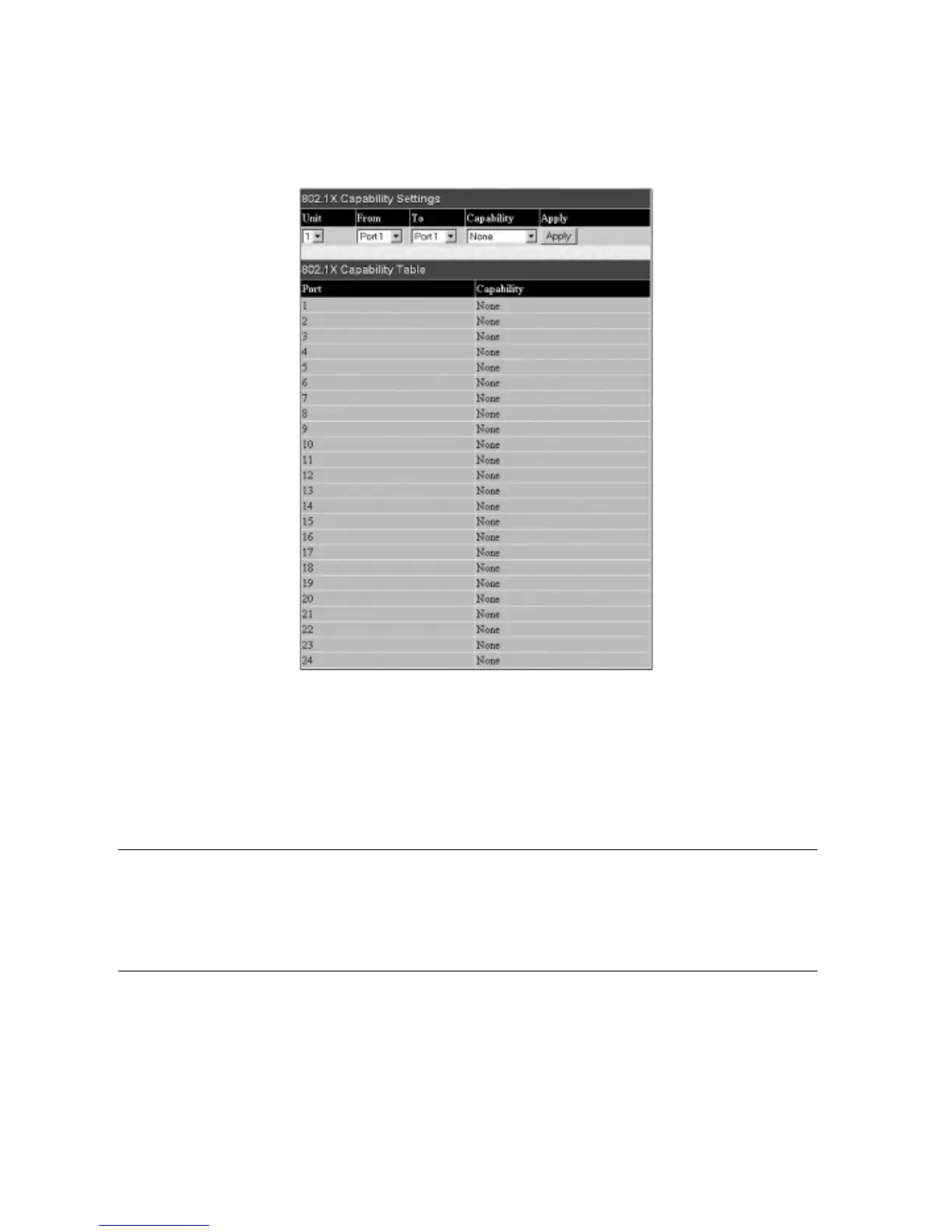
Click Port Access Entity > PAE System Control > 802.1X Capability Settings to view the following window:
Figure 6- 78. 802.1x Capability Settings and Table window
To set up the Switch's 802.1x port-based authentication, select the switch in the switch stack by using the
Unit pull-down menu and then select which ports are
to be configured in the
From and To fields. Next, enable the ports by selecting Authenticator from the drop-down menu under Capability. Click Apply to let
your change take effect.
Configure the following 802.1x capability settings:
Parameter Description
Unit
Choose the Switch ID number of the Switch in the switch stack to be modified.
From and To Ports being configured for 802.1x settings.
Ca
pa
bility
T
w
o r
ole choices can be selected:
Authenticator –
A user must pass the authentication process to gain access to the network.
None –
The por
t is not contr
olled b
y the 802.1x functions.
88
Allied Telesyn AT-9724TS High-Density Layer 3 Stackable Gigabit Ethernet Switch



 To Next Page
 Loading...









