EasyManua.ls Logo

Amada HFA-400 - Page 125

Default Icon
174 pages
Print Icon
To Next Page IconTo Next Page
To Previous Page IconTo Previous Page
Loading...
IV-47
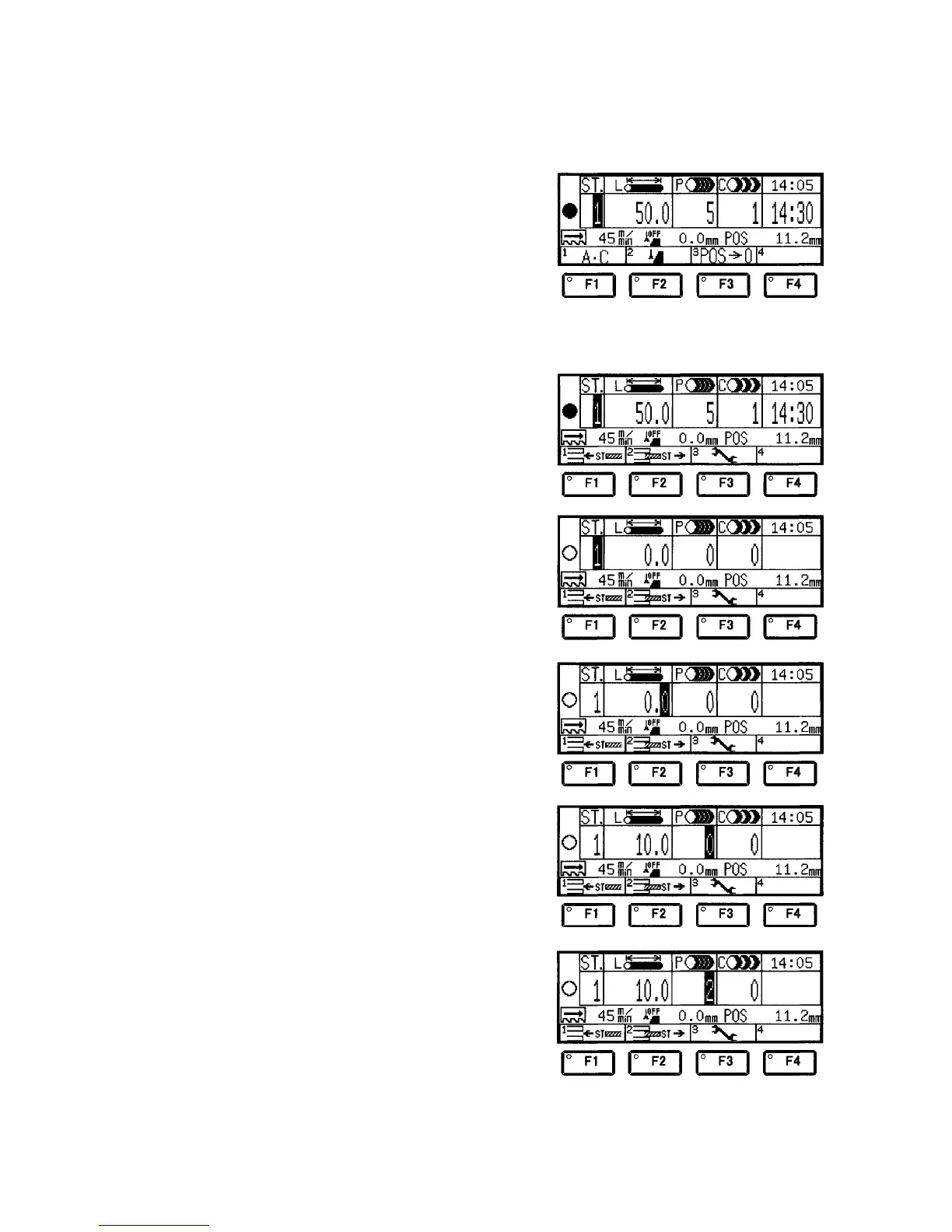
Entry procedure
(Inserting interrupt station (10 mm × 2 pieces) in station 1
currently being executed)
1 Enter the number for
the currently running
station in the ST. field
with the numeric keys.
(In this example, enter
“1”, and press the
ENT key.)
The Current station light illuminates, and the cutting data of the
station 1 are displayed.
2 Press the MENU key
several times to
display the F1 (ST
interrupt) key.
3 Press the F1 (ST
interrupt) key.
The L, P, and C fields
are all reset to “0”,
and the Current
station light
extinguishes.
4 Press the ENT key to
move the cursor to the
L field.
5 Enter the cutoff length
with the numeric keys.
(In this example, enter
“1” and “0”, and press
the ENT key.)
The cursor moves to
the P field.
6 Enter the quantity of
pieces to be cut with
the numeric keys.
(In this example, enter
“2”, and press the
ENT key.)
This completes the
setting of the interrupt
station.

Table of Contents