II-12
Checking electrical connections
Once the electrical connections are completed, check them to see that
they are correctly made as described below.
1 Turn on the shop
circuit breaker switch.
2 Turn the machine
circuit breaker switch
to ON.
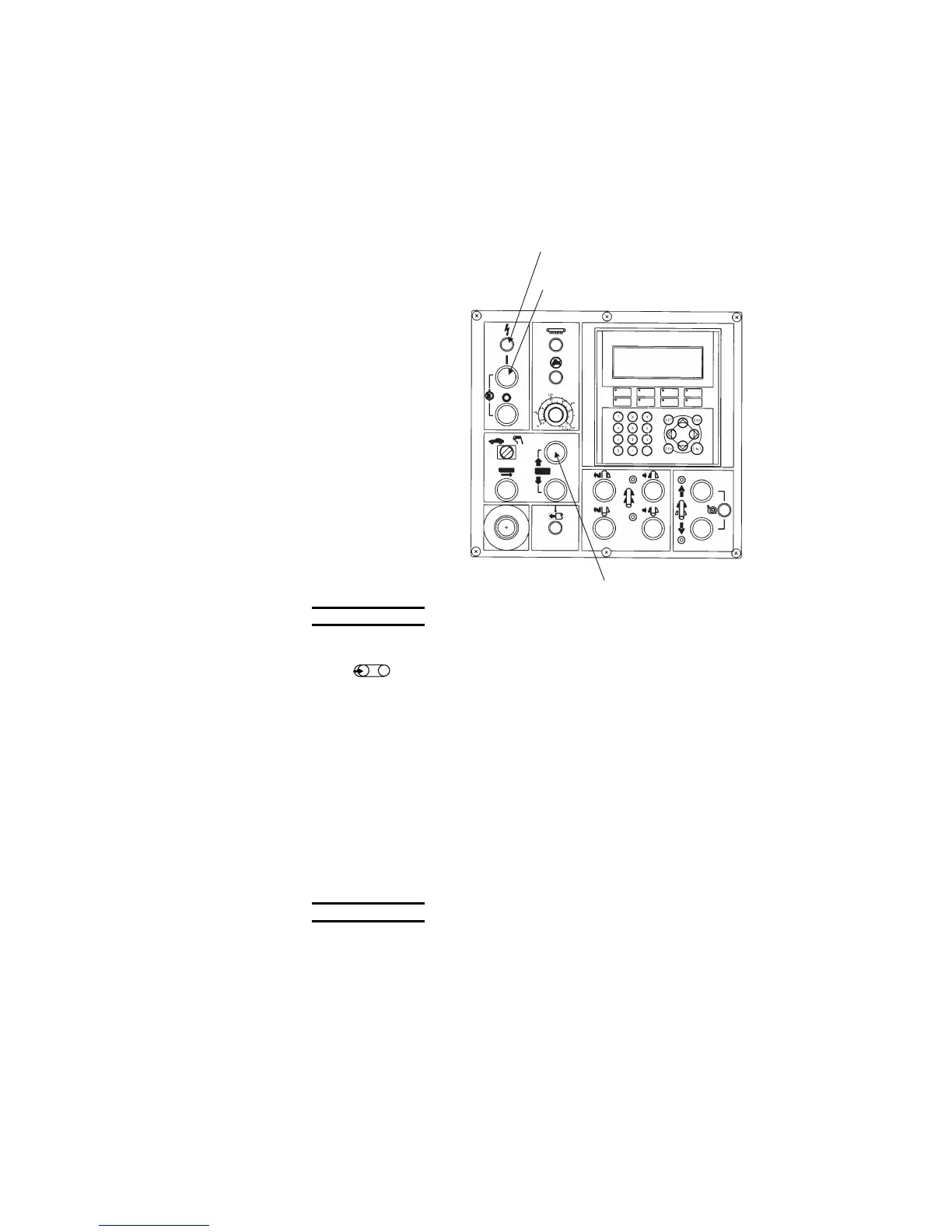
The POWER light on
the control panel
comes on.
3 Press the
HYDRAULIC ON
button on the control
panel.
The light of the button
comes on, and the
hydraulic pump motor
starts.
POWER LIGHT
HYDRAULIC ON BUTTON
BLADE UP BUTTON
NOTE
O When pressing the HYDRAULIC ON button with the saw blade not
installed, turn the saw blade tension lever at the rear of the driven wheel
to “
” beforehand to disable the saw blade breakage detection
limit switch.
4 Press and hold the BLADE UP button on the control panel.
If the electrical connections are correctly made, the sawhead starts
rising 1 to 2 seconds later and continues to rise as long as the
button is pressed and held. The connection of the power cable is
completed when the sawhead rises.
If the sawhead does not rise despite the depression of the button,
the hydraulic pump motor is running in the reverse direction.
Immediately press the HYDRAULIC OFF button on the control
panel, and rewire the hydraulic pump motor as described on the
next page.
NOTICE
O If the hydraulic pump motor is run in the reverse direction for a long
period of time, it will be damaged. Immediately press the HYDRAULIC
OFF button to stop the hydraulic pump motor.



 To Next Page