DescriptionDescription
The event description. The alarms and errors in this column match those
found in the StatisticsStatistics screen.
If "Memory for Statistics reached full!" is
displayed, data is handled depending on the
Memory allocation setting.
Use all storageUse all storage: Once the memory is
full, the measurement stops. No data
is discarded.
ContinuousContinuous: The measurement
continues even if the memory is full.
The saved data will be discarded
from the oldest one. (Refer to left
figure).
If "Event Log reached full!" is displayed,
outputting the event stops. No event later
than that will be recorded in the log.
Dur./CountDur./Count
For alarms, this is the alarm duration measured in seconds. An alarm event
where the duration is not know yet, will show the text OnOn.
For errors, this is the number of errors in the errored second.
Event log and statistics can show different alarm duration and error count
when values are summed up an compared. This is because statistics discards
the last interval if it is not complete when the test is stopped. There will be no
differences if the test duration is set to a multiple of the interval length or if
intervals are disabled.
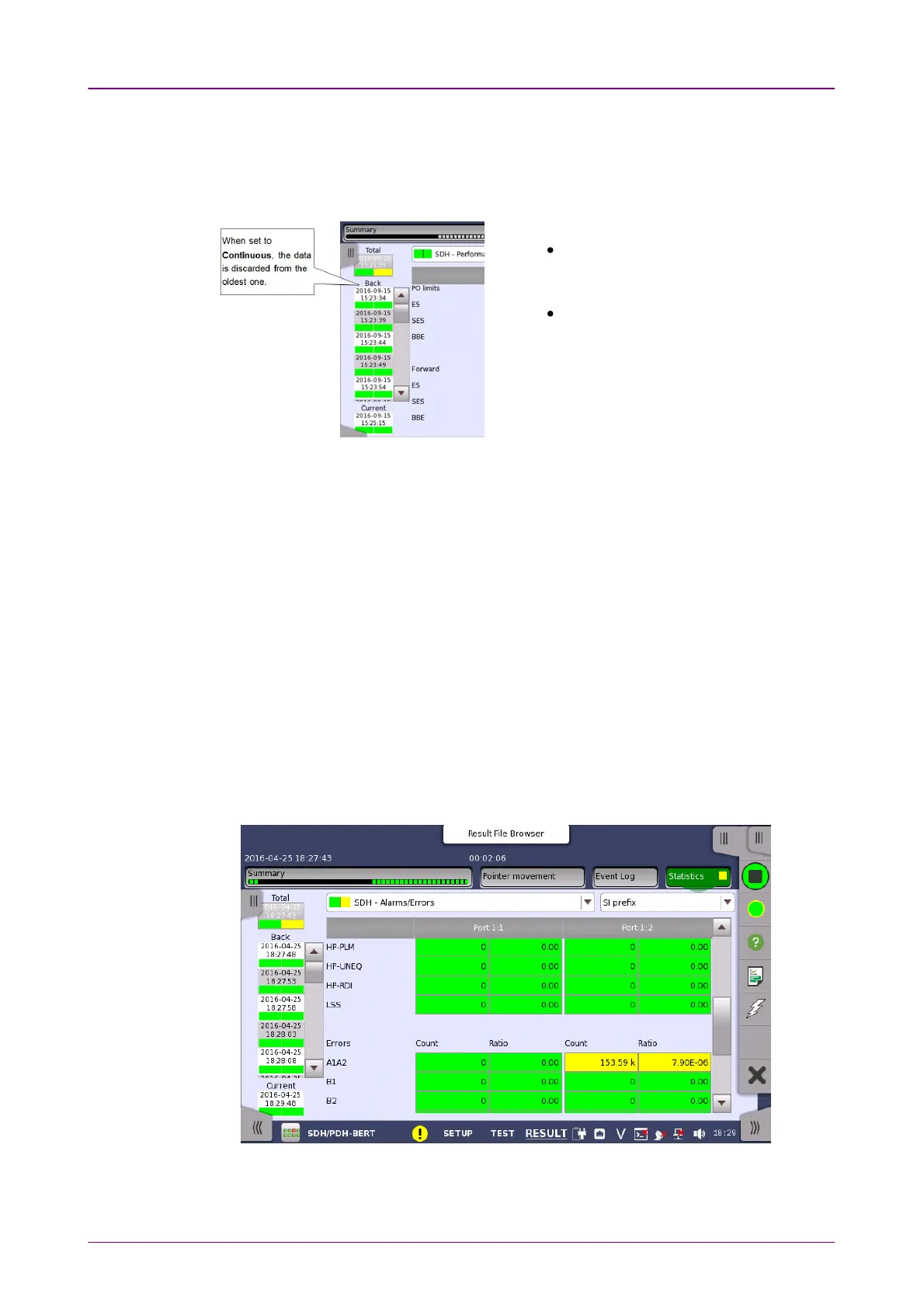
55..99..33..44 StatisticsStatistics
Touching the StatisticsStatistics button in the navigation area displays the screen shown
below.



 To Next Page