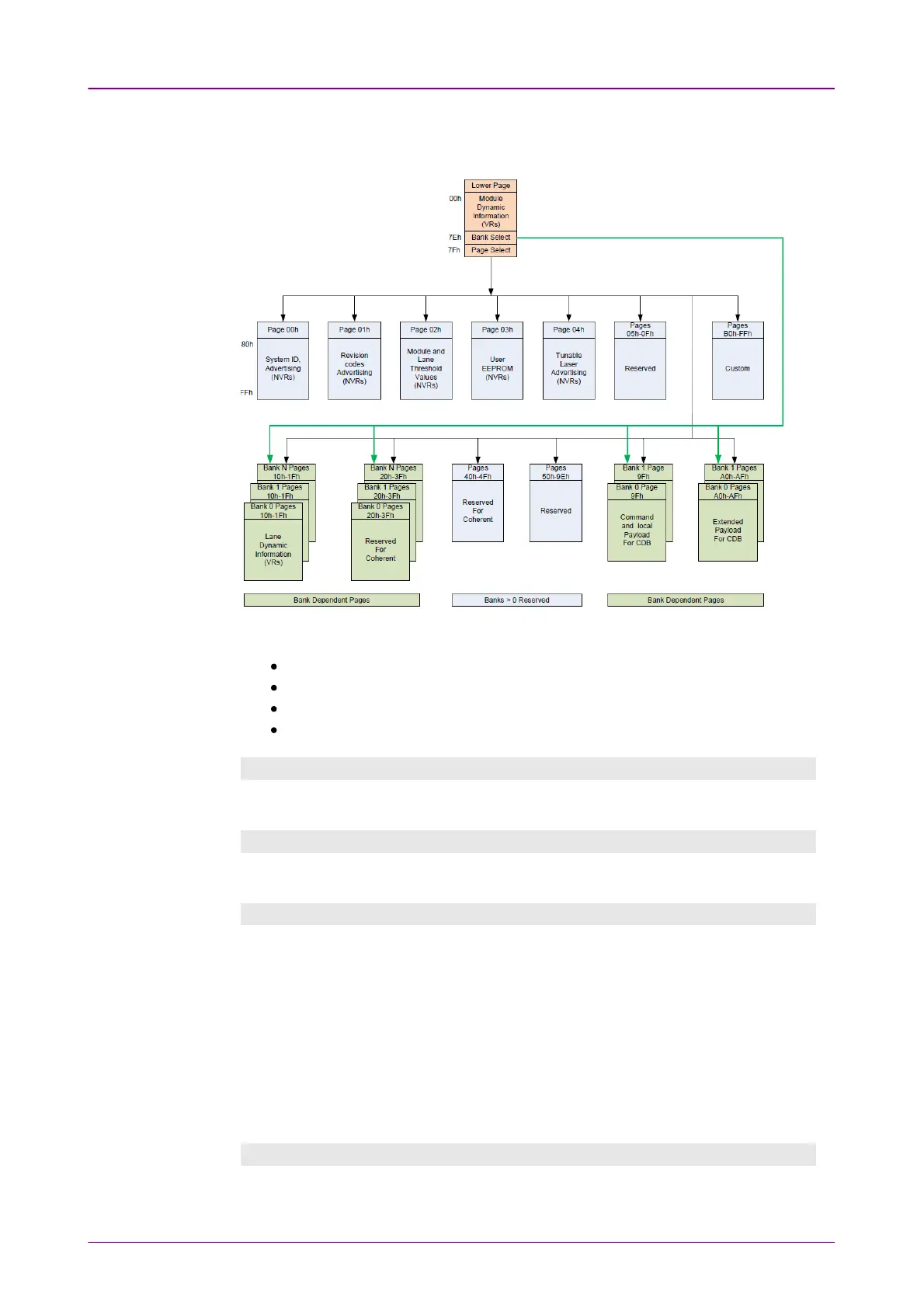
Registers in the transceiver are defined in
Common Management Interface
Specification (CMIS)
. The bank can be changed by writing the bank number to
Bank Select address on Read / WriteRead / Write tab.
CMIS Memory Map (Quotes from CMIS Rev4.0)
ApSelApSel shows information of Application code.
CTRLCTRL allows you to set physical signals of the interface for the transceiver.
EqualizerEqualizer allows you to set the equalizer for optical signals of the transceiver.
Read / WriteRead / Write allows you to read or write values to the specified registers.
InformationInformation
InformationInformation allows you to view memory map information.
Info (Lane)Info (Lane)
Info (Lane)Info (Lane) allows you to view memory map information for each lane.
ApSelApSel
ApSelApSel allows you to view values of the application select code in the
transceiver.
ApSel SetupApSel Setup
To view the ApSel codes, select ApSel code and touch the ApplyApply button.
UpdateUpdate
Touching the UpdateUpdate button updates values after reading registered ApSel
codes in the transceiver.
CTRLCTRL
CTRLCTRL allows you to view values of the application select code in the
transceiver.



 To Next Page