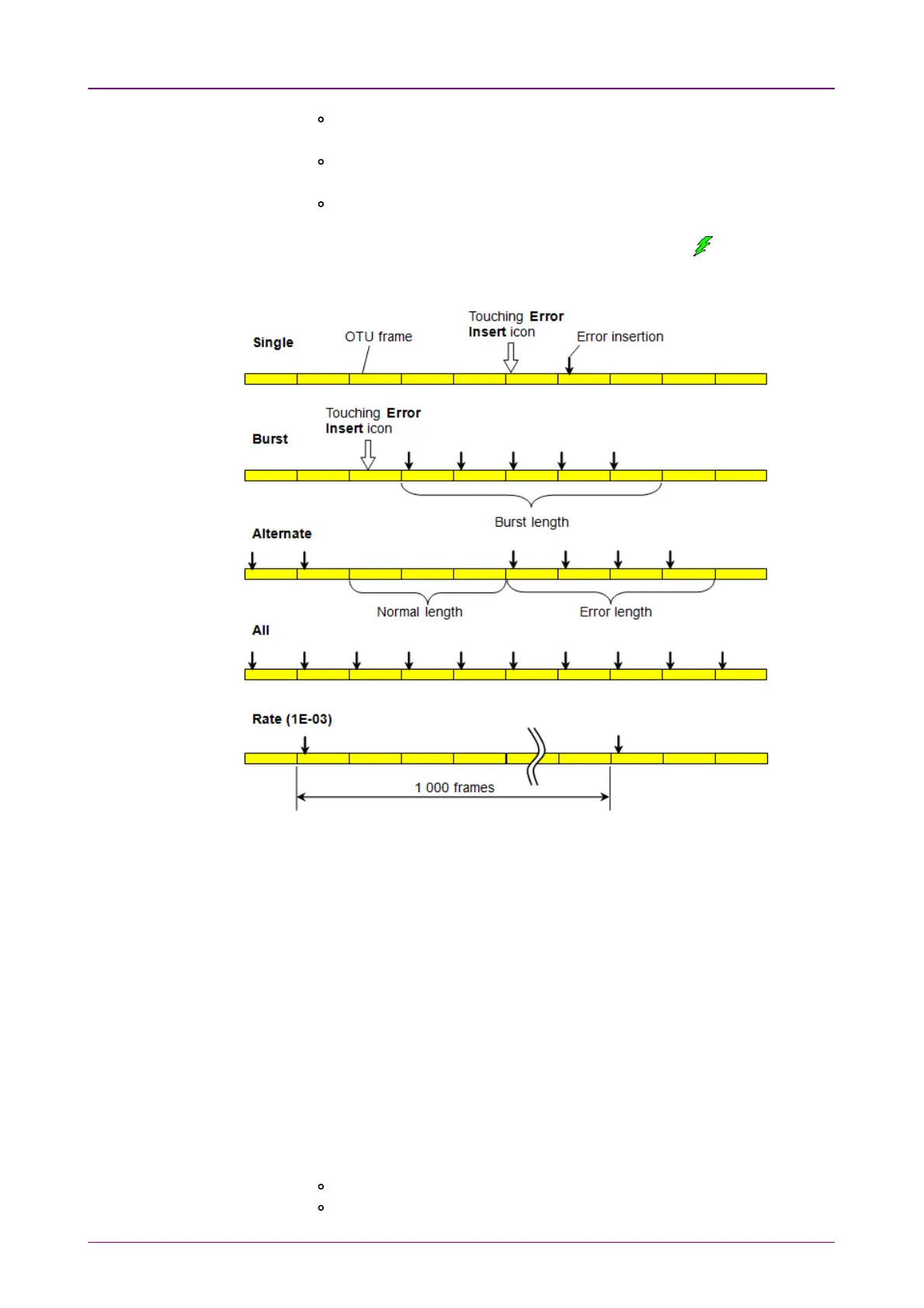
AlternateAlternate: Repeats error/alarm insertion per specified number of
frames. The Error Insert icon shows only status.
AllAll: Inserts errors or alarms in all OTU frame. The Error Insert icon
shows only status.
RateRate: Inserts errors in the specified rate continuously. The Error Insert
icon shows only status.
5. When selecting SingleSingle or BurstBurst, touch the Error Insert icon ( ) to insert
errors or alarms.
GMPGMP
1. Select the LevelLevel to insert errors.
2. Select the Error ItemError Item.
3. Touch the Error BitsError Bits field to edit bits.
4. Touch the Error InsertError Insert icon. The error is inserted once by touching the icon.
GFPGFP
1. Select the Error ItemError Item.
The available option depends on the Client Signal of Mapping.
2. Select the Insertion ModeInsertion Mode.
3. Touch the Error BitsError Bits field to edit bits.
4. If Insertion Mode is set to SingleSingle, touch the Error InsertError Insert icon. The error is
inserted once by touching the Error InsertError Insert icon.
FEC TestFEC Test
1. Select the Error ItemError Item.
O.182 Poisson (appears only if Client Signal is PRBS.)
Uncorrectable Error



 To Next Page