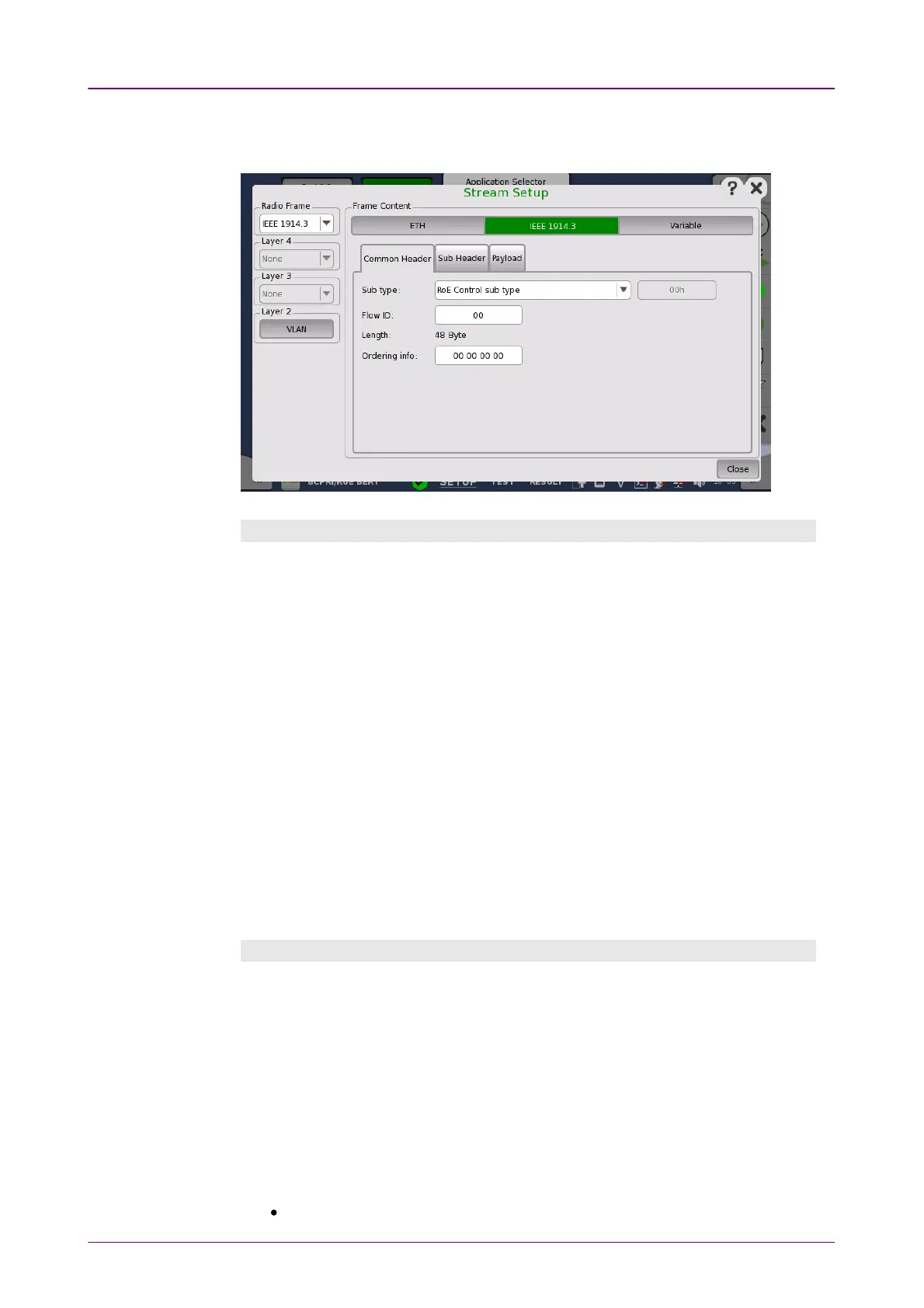
IEEE 1914.3IEEE 1914.3
Selecting the IEEE 1914.3IEEE 1914.3 in Radio Frame drop-down list displays the
parameters available for the IEEE 1914.3 protocol layer.
Common HeaderCommon Header
Sub typeSub type
The 8-bit subType field is used to define the RoE sub type and the type of flow
carried by the RoE packets. Select a Sub type. When User DefinedUser Defined is selected,
enter the RoE sub type code in the right-hand field.
Flow IDFlow ID
The flowID identifies a specific flow between two end-points. Touch the field to
enter a flow id number.
LengthLength
The value of the length is the total number of octets following the common
RoE header. The length does not include the Ethernet FCS bytes.
Ordering infoOrdering info
Ordering information is assigned to each flow and is presented in one of two
methods, a sequence number or time stamp. Touch the field to enter an
Ordering information length.
Sub HeaderSub Header
EnableEnable
Selecting the checkbox enables to edit Sub Header which locates between
Common Header and payload. When the checkbox is not selected, no Sub
Header is added.
LengthLength
Enter a byte length of Sub Header.
Custom patternCustom pattern
Touch the field to edit the pattern.
ImportImport: loads a pattern from a file.



 To Next Page