Physical StatusPhysical Status
Monitor StatusMonitor Status
1010..11..22 Status InformationStatus Information
This section describes the status information available for the Device Test
Applications in the status area of the Ports SetupPorts Setup screen.
1010..11..22..11 Status SummaryStatus Summary
The status summary displayed for the Device Test Applications consists of the
following information:
The topmost part of the status area gives you access to information about the
current physical status of the selected interface. A summary consisting of the
most relevant status indicators is displayed constantly. By touching the
summary, you can launch a display that contains the detailed status
information.
At the bottom of the status area are below buttons that give you access to
various monitor information. By touching a button, you can launch the
corresponding information display.
TransceiverTransceiver
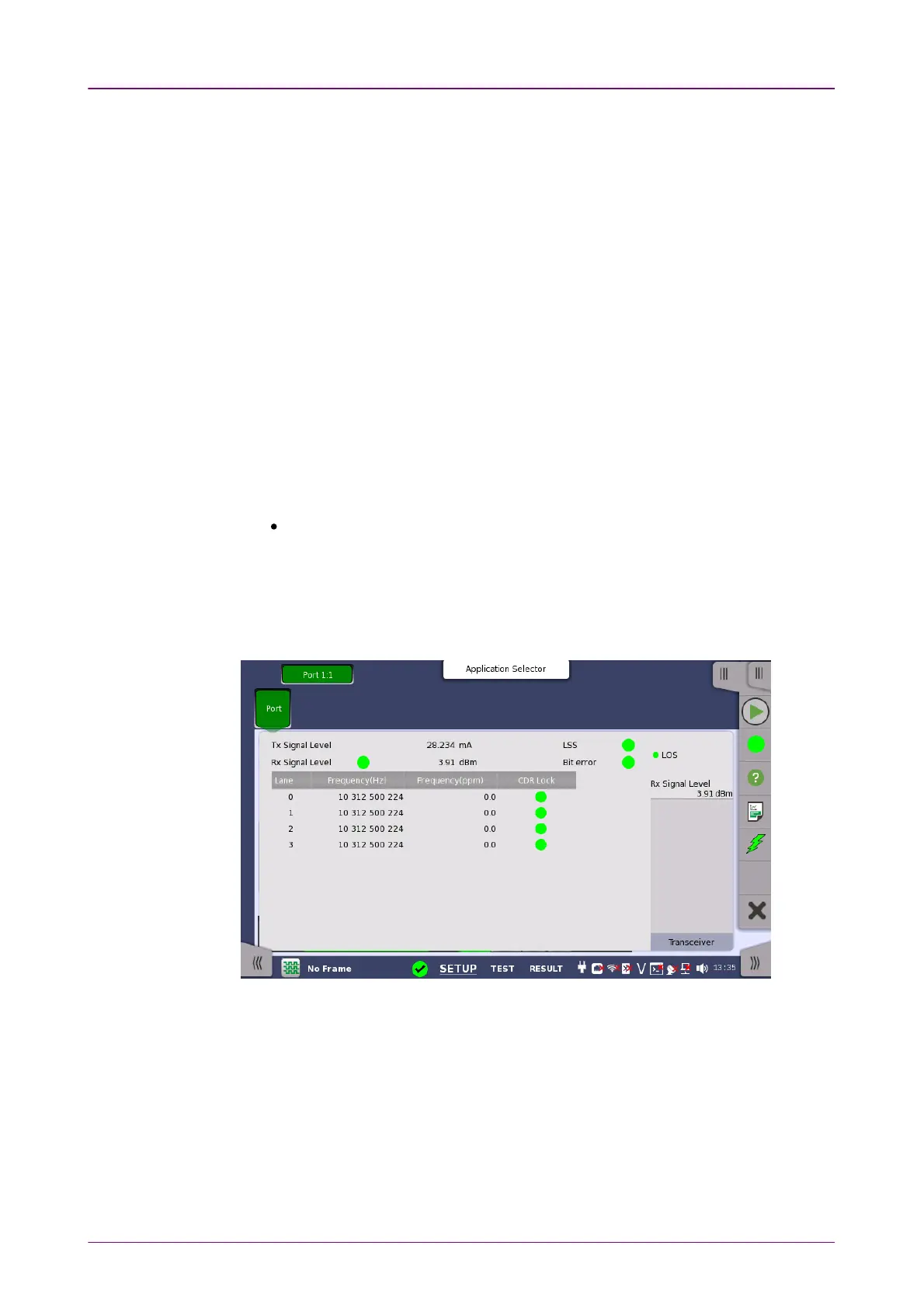
1010..11..22..22 Physical DetailsPhysical Details
Touching the topmost summary box in the status area of the Ports SetupPorts Setup screen
launches the status shown below.
This screen presents detailed information about the current physical status of
the received signal at the Device Test interface.
The physical status information consists of the following parameters:
Tx Signal LevelTx Signal Level
Shows the output level of an optical signal.
Rx Signal LevelRx Signal Level
Shows the input level of an optical signal. A lamp icon indicates the LOS state.



 To Next Page