Alarms/Errors/Alarms/Errors/
OthersOthers
1010..11..33 Errors/Alarms InsertionErrors/Alarms Insertion
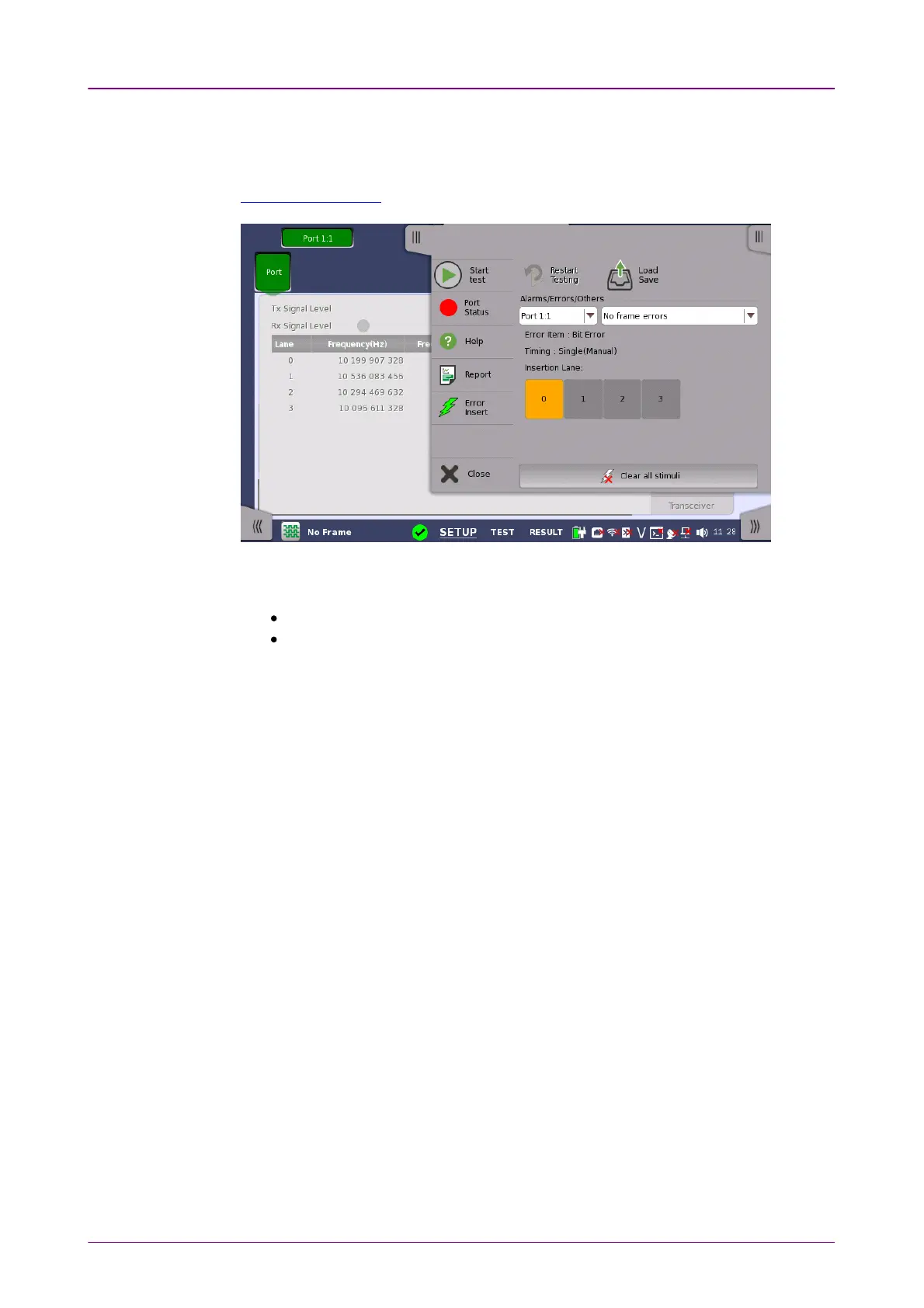
This section describes the errors or alarms insertion for the Device Test on the
Application toolbar.
Select the port to insert errors, and the stimuli type. Depending on the stimuli
type, the setting items will appear.
No frame errorsNo frame errors: Inserts bit errors to specified lanes.
No frame frequencyNo frame frequency: Adds the frequency offset to the selected bit rate.
1010..11..33..11 No frame errorsNo frame errors
1. Touch the buttons of Insertion LaneInsertion Lane, the dialog box will appear.
2. Touch the buttons to select/clear lanes. The errors will be inserted to selected
(orange) lanes.
3. Touch the Error InsertError Insert icon. The errors will be inserted once by touching the
icon.
1010..11..33..22 No frame frequencyNo frame frequency
Touch the field to set Frequency OffsetFrequency Offset. If setting a positive value, the frequency
will shift higher side.
Example:
If setting 10 ppm to the frequency offset when Bit Rate is set to OTU3, the bit
rate of output signal will be
43 018 413.559 * (1+10*10
-6
) = 43 018 843.73 (kbit/s).



 To Next Page