1111..22..22 Test ResultsTest Results
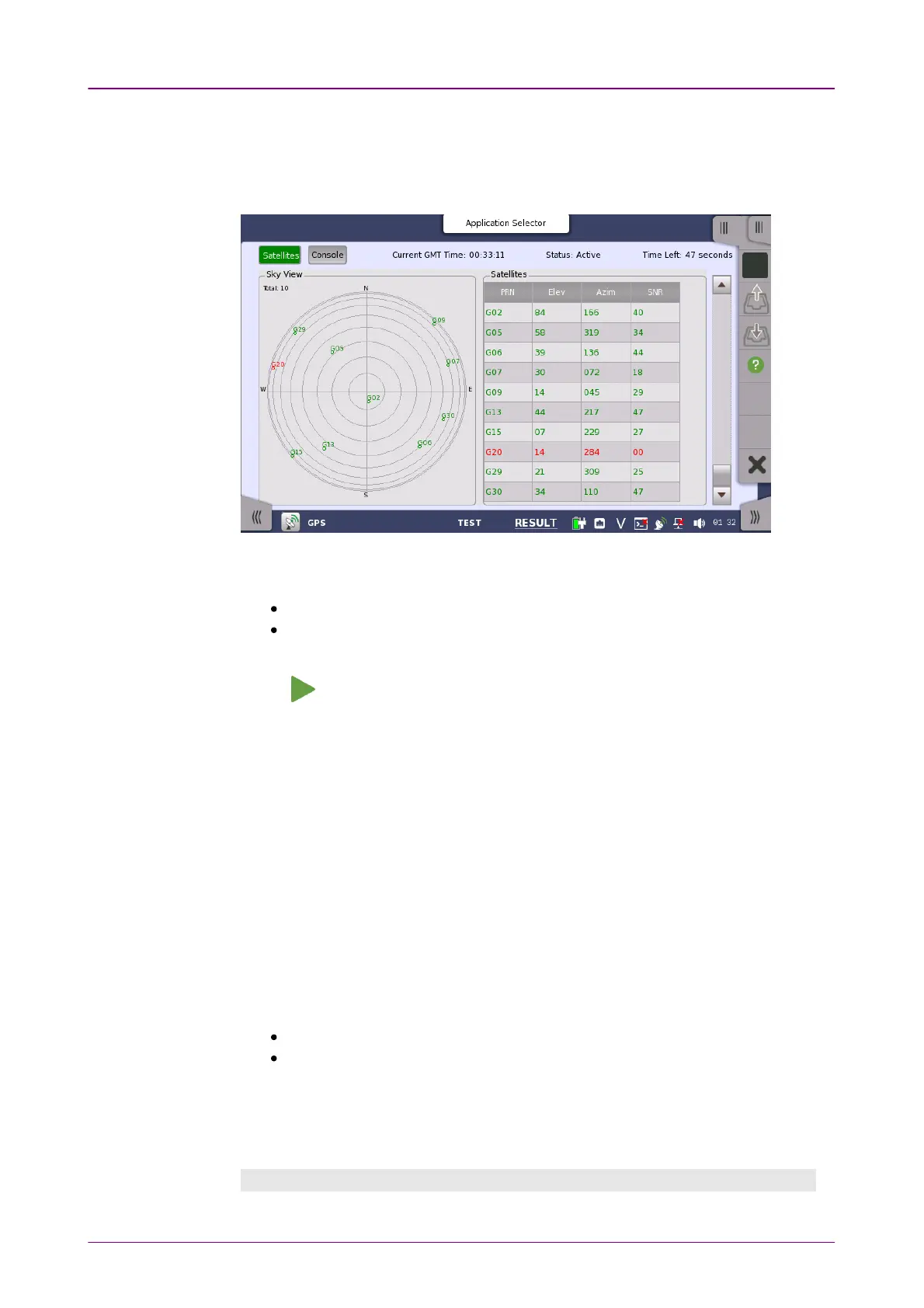
When you go to the test result of the GPS/GNSS application, the following
screen is displayed.
This screen displays positions of satellite and the logged data. Touch a left top
button to switch the result to display.
SatellitesSatellites: Displays the satellite positions by the chart and the table.
ConsoleConsole: Displays the logged data received from GPS receiver or GNSS
receiver.
Touch to start a test.
When you start the test, the satellite information will be displayed. You can use
the scroll bar on the right to view the data you have received so far. The file is
automatically saved when a certain amount of data is acquired or when the
measurement is stopped. During the test, you will not be able to view the data
stored in the file. This data can be viewed by loading the file after the test is
complete.
If you run the test to buffer full, up to 10 files will be saved.
File name: (time of saving measured data)_1.txt to (time of saving measured
data)_10.txt
Current TimeCurrent Time
The time received from GPS appears.
StatusStatus
Active: Data have been received from GPS receiver or GNSS receiver.
Stopped: Data reception from GPS receiver or GNSS receiver has stopped.
Time LeftTime Left
When Timed (or until buffer is full)Timed (or until buffer is full) is selected on the Test setup screen, the
remaining test time is displayed.
SatellitesSatellites



 To Next Page