A7 Plus – OPERATOR'S MANUAL
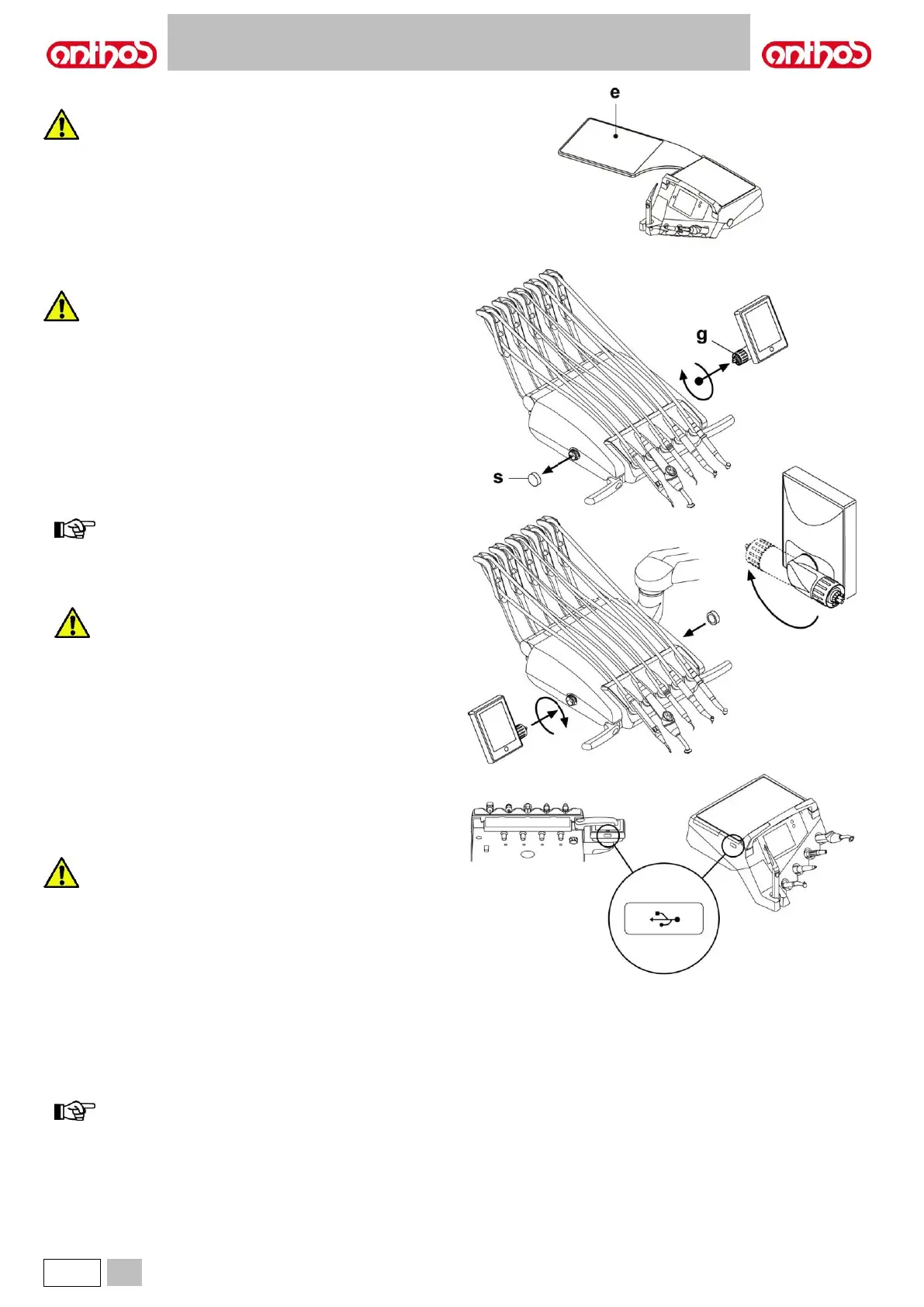
Tray holder for INTERNATIONAL board.
Maximum permitted load on the tray holder ( e ): 2 kg
evenly distributed.
Console unit position reversal (with reversible console, only).
Before carrying out this operation, turn the dental unit off.
NEVER REMOVE THE CONSOLE FROM BOARD IF DENTAL
UNIT IS ON.
To reverse console unit position on dentist's board, proceed as follows:
• Remove the console unit after having loosened the relevant fixing ring
nut ( g ) by turning it counter clockwise.
• Remove the click-on cap ( s ) protecting the quick coupling on the left-
hand side, and insert it inside the one on the right-hand side.
• Turn console unit supporting arm by 180°.
• Fit the console unit inside the quick coupling on left-hand side.
To identify the correct positioning of the console unit, push arm fully
down inside support and, at the same time screw ring nut by approx.
1/3 of a turn until it locks in place, but without forcing it.
to avoid that dentist's board can escape on the other side,
turn it by approx. 90° compared to its supporting arm position
(see figure) before starting its positioning.
• Now dental unit can be turned on again.
During console cleaning operations, do not exert too
much pressure on control pad to avoid putting stress on
to the connection.
USB connector.
Dentist's board is equipped with a "host" USB port, with A type
connector. Port can supply the connected peripheral, up to a max. of 500
mA.
To use USB connector, see paragraphs 5.1.1.2.15 and 5.1.1.2.16.
• Connector is not protected against liquid penetration.
• Do not insert metal objects other than a A type USB
connector inside the connector.
• When unused, we recommend always covering the
connector with the special rubber cap.
Supported devices:
- USB flash drives 2.0 or 3.0 with a storage capacity between 128 MB
and 64 GB,
- USB 2.0 or 3.0 external hard disks, provided that they are separately
powered,
- flash drives or hard disks formatted in FAT and FAT32 formats,
normally available on the market,
- the devices formatted according to the NTFS standard are not
compatible.
port features a current limiter avoiding the console to be
damaged in case of accidental connection of faulty devices.



 To Next Page