A7 Plus – OPERATOR'S MANUAL
Moving the captured images to an internal memory or a USB key.
Each captured image is automatically stored inside console inner
memory.
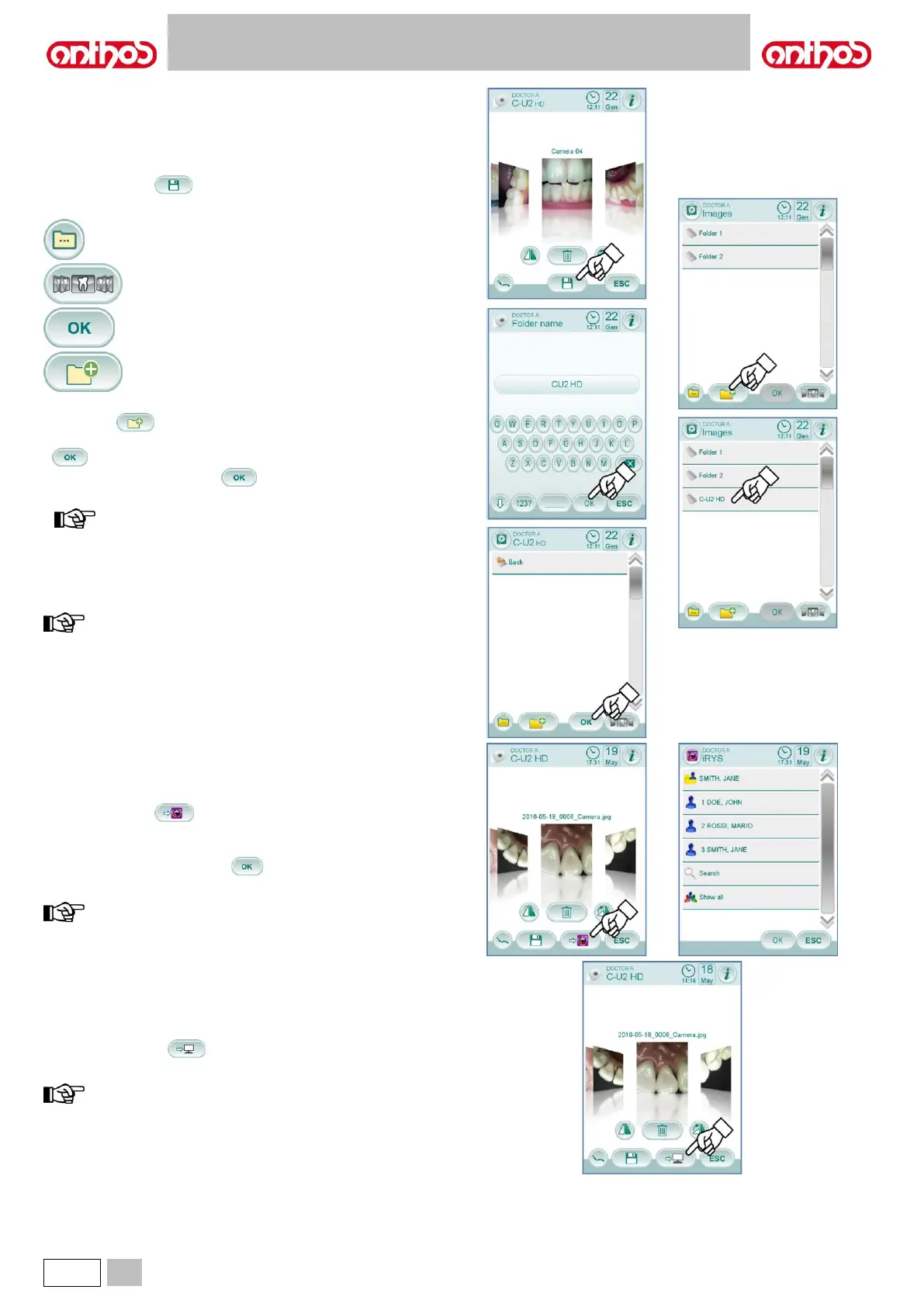
To transfer all captured images inside a specific working folder, proceed
as follows:
• Put camera handpiece back in place.
• Touch icon button to access the navigation screen.
• Now the following icon buttons are available on the TOUCH DISPLAY:
Display other available options.
Go back to "thumbnail" screen.
Confirm image transfer to the selected folder.
• Touch the folder you want to select or create a new folder by touching
icon button .
Give a name to the new folder and confirm by touching icon button
.
• Now simply touch icon button to transfer all the images present
inside console inner memory to the selected folder.
images are transferred all together, this is why we
recommend carrying out this operation after seeing each
patient.
The image folders saved on console internal memory can be copied at
any time on a USB flash drive (see paragraph 5.1.1.2.16.).
console internal memory can store up to approx. 20,000 images
taken by the camera. Once the available space is running out,
a warning message will appear on the TOUCH DISPLAY.
Moving the captured images to iRYS.
To move all captured images to a specific iRYS patient folder, proceed
as follows:
• Put camera handpiece back in place.
• Touch icon button to access the navigation screen.
• Select the desired patient folder by means of the various search
functions (see paragraph 5.1.1.2.16.1.).
• Now simply touch icon button to move all the images present
inside console internal memory to the selected folder.
images are transferred all together, this is why we recommend
carrying out this operation after seeing each patient.
Moving the captured images to a PC with image management
software.
• To move all captured images to a PC equipped with a generic image
management software, proceed as follows:
• Put camera handpiece back in place.
• Touch icon button to move all the images present inside
console internal memory to a pre-set PC folder.
the PC storage folder is set by means of the iCapture
programme (see user’s manual supplied with the programme).



 To Next Page