Automatic Divider-rounder model Syncro
40/79
Use and maintenance manual (translation of the original instructions) - MASA6_en_2 of 23/03/2021
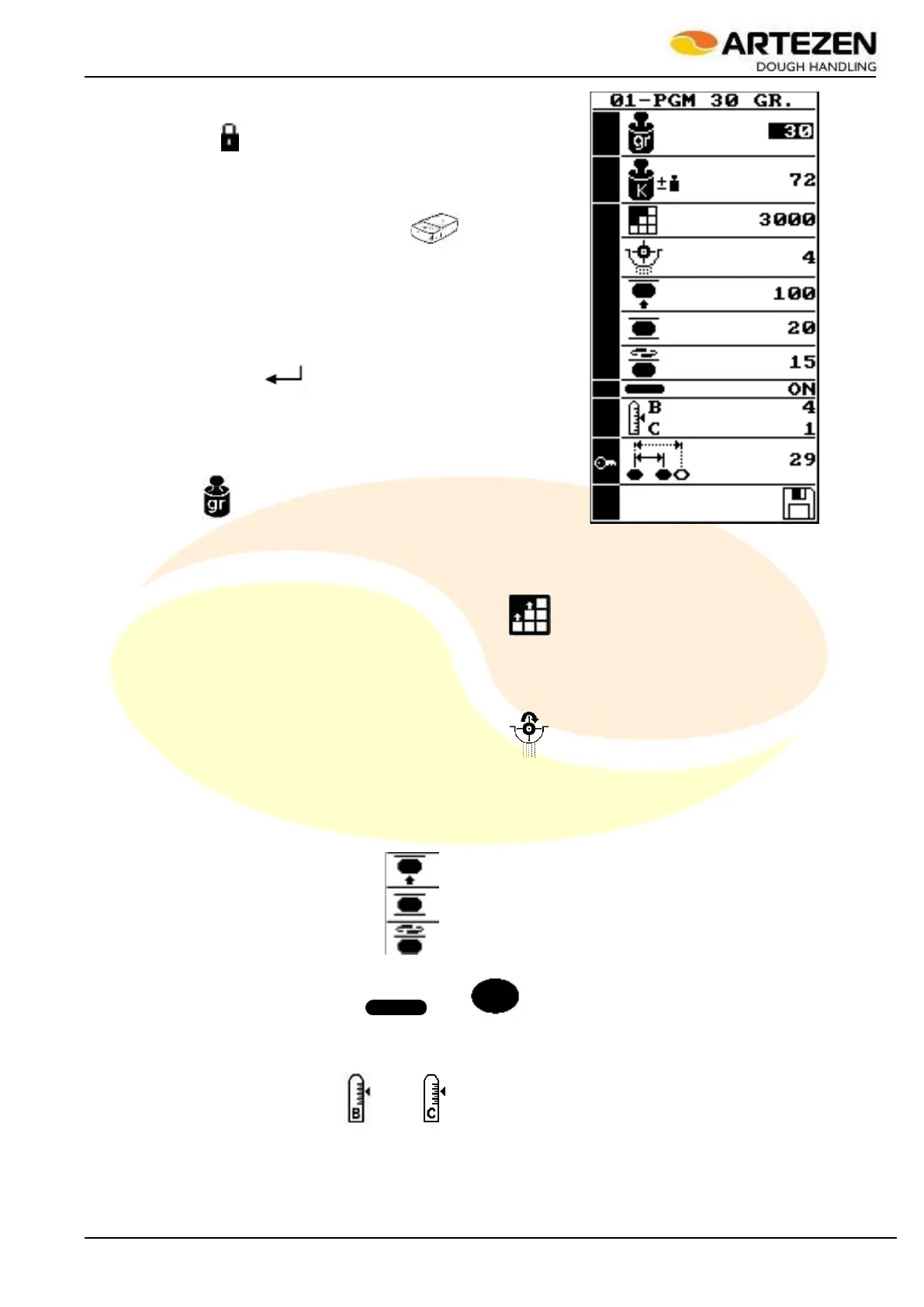
Press the "P" RECIPE PARAMETERS 2.4 button ref. 5: the display
will show the image in Figure 30: as you can see, no parameter
shows the symbol " ".
Turn anticlockwise I-DRIVE2.4 ref. 9 to select the top line
which corresponds to the description - or name - of the recipe
or program: a screen with alphanumeric characters will open.
To overwrite the text, use the symbol " ” on which the
mobile cursor must move by turning “ I-DRIVE ”; then, select
the symbol several times until the entire line is deleted. Next,
select the various characters until you complete the
description. Up to 12 characters can be used to complete the
description. At the end, to exit the alphanumeric characters
screen and return to the one in the image shown to the side,
select the icon " ” using “I-DRIVE” and confirm the
selection by pressing the same control.
Use "I-DRIVE" to select the fundamental parameter of the
recipe, that is the required dividing weight, exactly like the
image above: a subsequent screen will open and show the
symbol " ". Use “I-DRIVE” to select the required dividing
weight, then confirm by pressing the same control, thus going
back to the initial screen: all the parameters of the recipe will
be automatically configured in such a way as to facilitate
subsequent verification during production as well as any adjustment.
Use “I-DRIVE” to select the “OUTPUT” parameter “ ” to set the working speed of the machine.
Generally speaking, if the machine is used by a single operator, the speed must be set to no more than
3200 pcs / h for up to 60 grams of dough; for up to 90 grams of dough the speed will be no more than
3000 pcs / h; for up to 110 grams of dough it will be no more than 2500 pcs / h, and for the maximum
dough weight, the speed will be set to about 2200 pcs / h.
Use "I-DRIVE" to select the “FLOUR” parameter " to set the amount of flour dusting during
processing. This value will depend very much on the consistency and humidity of the dough. NEVER set
this value to “0” because it means completely stopping flour dusting. It should be set to around 4 ÷ 5 for
relatively thick and dry pasta, and its value should be increased up to around 10 ÷ 12 for very soft and
moist dough.
Use “I-DRIVE” to select in succession the “ROUNDING PRESSURE”, “ROUNDING OPTIMIZATION”,
“ROUNDING SPEED” parameters by adjusting their value, according to the result that will be
obtained on the processed product, visible at the start of processing.
Use “I-DRIVE” to select the “ ” or “ ” parameter to set elongation of the ball or,
alternatively, the crushing of the same. This parameter is present only in the “SYNCRO M” and
“SYNCRO EM” versions equipped with the final loaf moulder, and it sets the speed with which the upper
moulding belt is started.
Use "I-DRIVE" to select the “ ” and “ ” parameter to set the size of the desired product which will
be obtained by manually adjusting the loaf moulder. These two parameters do not change the execution
of the process, but will only show the value on the display when the recipe is loaded, as indicated in
Figure 29 ref. “A” and “D”, so that the operator can properly adjust the loaf moulder as illustrated in par.
3.7.5.
Figure 30 - Recipe parameters



 To Next Page