Automatic Divider-rounder model Syncro
47/79
Use and maintenance manual (translation of the original instructions) - MASA6_en_2 of 23/03/2021
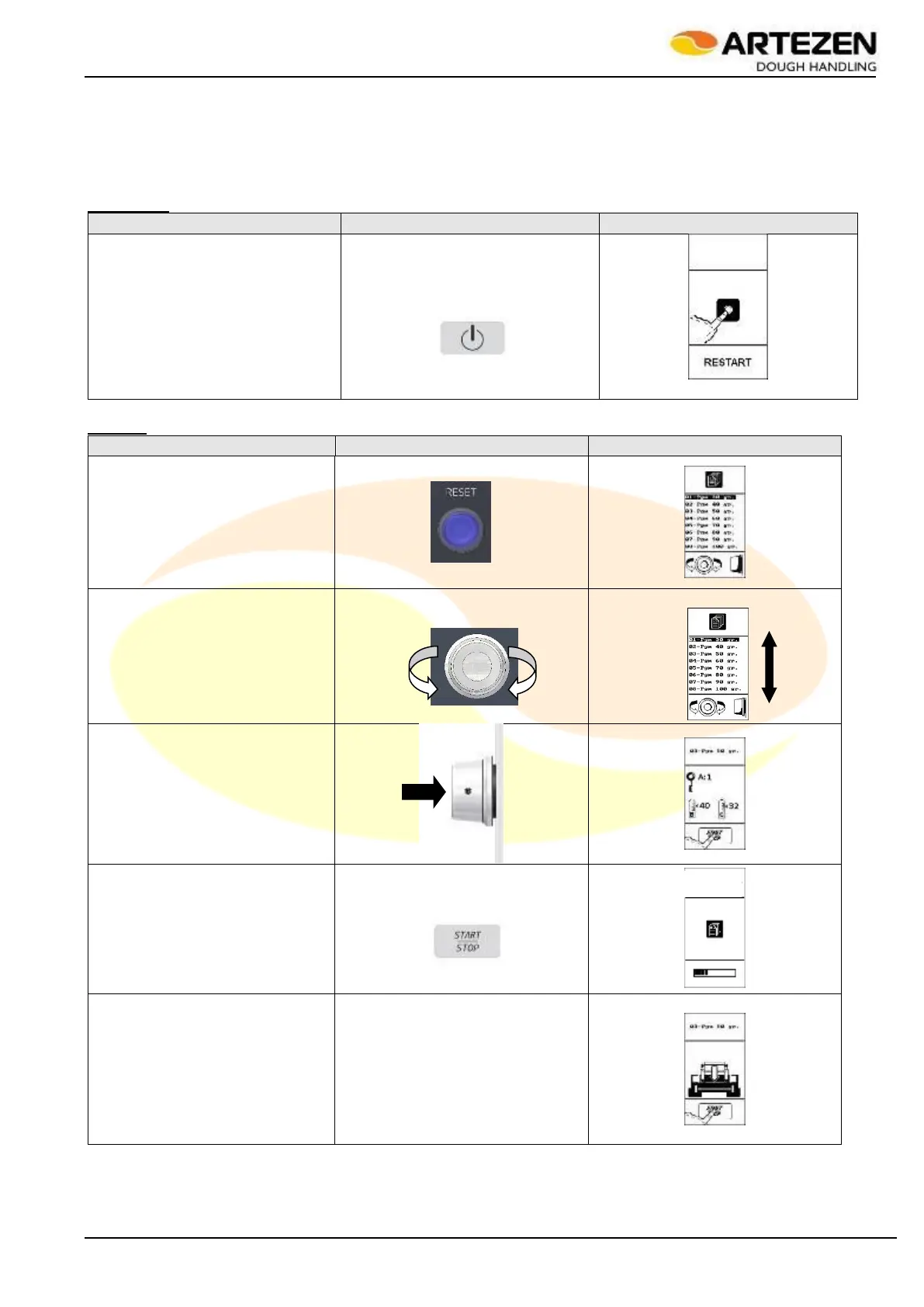
3.16 QUICK GUIDE TO USING THE CONTROL PANEL
In order to offer a quick consultation of the manual for the purpose of a quick acquisition of the technical notions
necessary for using the control panel and its functions, the various operating functions of the controls are
illustrated here below. It is understood that this support is intended for quick consultation only after having
carefully read par. 2.4relating to the control panel and chapter3 relating to starting the machine and all its
functions.
Turning on
Turn on the machine by briefly
pressing the “ON / OFF” button:
the display shows the RESET
screen
Table 8 - Quick guide
Starting
Press the "RESET" button as
indicated: the recipe list screen is
displayed
Select the recipe by turning “I-
DRIVE” par. “Pgm 30 gr”
Confirm the selection by pressing
"I-DRIVE": the display shows the
recording screen "A", "B" and "C"
for versions “SYNCRO M” and
“SYNCRO EM”
Press “START”: the display
shows the recipe loading phase
At the end of the recipe loading
phase, the display instructs to
load the dough and press
“START” to start processing.



 To Next Page