VAR8 and Variants Operation, Commissioning, Fault Finding, and Maintenance Guide
sue: 02 complete, approved
-
Is
Page 25 of 166
7 Stand-alone Operation Setup
L
The VAR8 is by default configured for 3-channel network operation mode. If its configuration is
cleared at anytime, it defaults to 3-channel network operation mode.
To Change the DAU from Network Mode to Stand-Alone Mode:
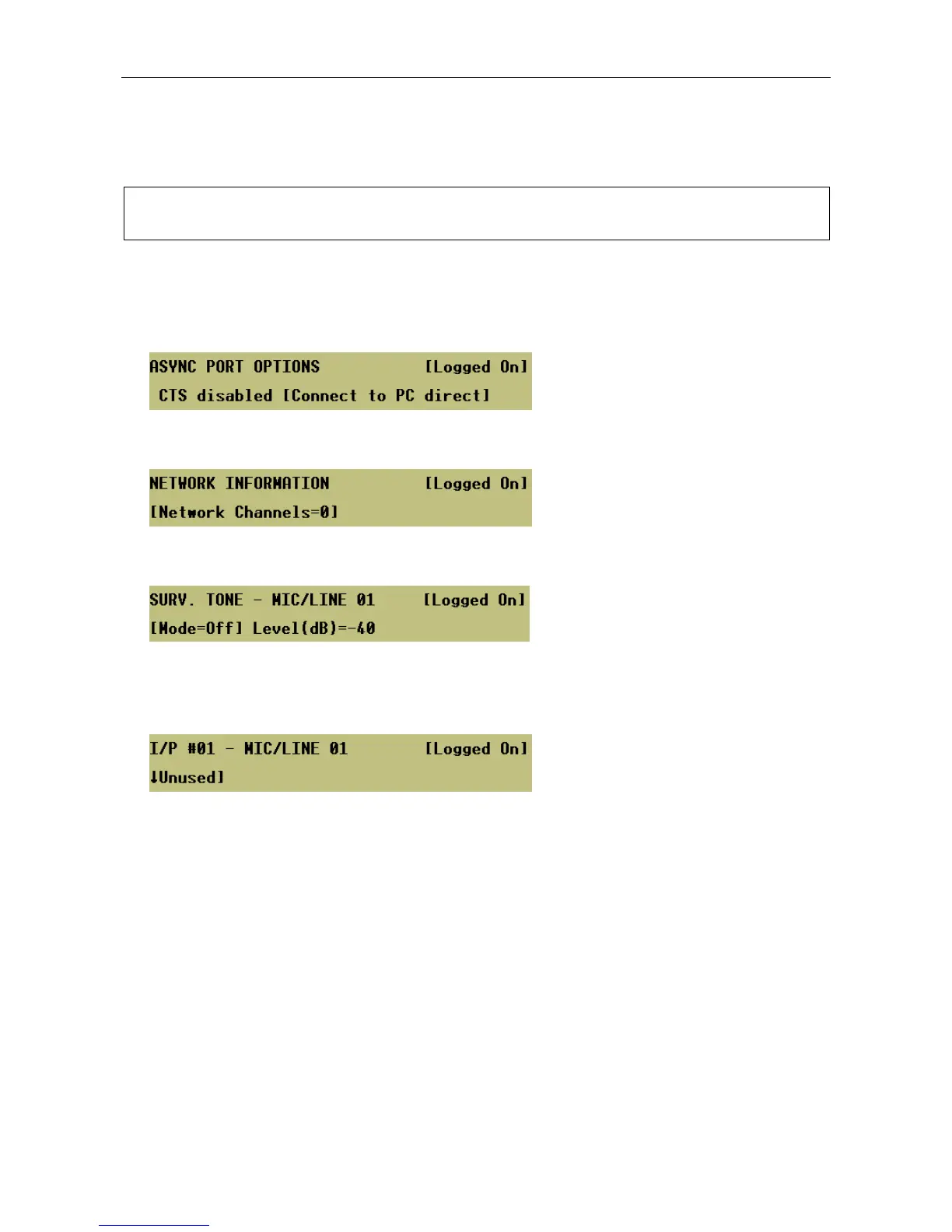
1. Set the RS232 port to be connected to a host PC.
Menu: ConfigurationÆSystemÆMiscÆAsync-PortÆConnect to PC
2. Set the number of Network Audio Channels to 0.
Menu: ConfigurationÆSystemÆNetworkÆChannels
3. Disable the surveillance tone detection for Mic/Line inputs 1, 3, and 4.
Menu: ConfigurationÆSystemÆRouterÆInputsÆMic/LineÆI/P #<nn>ÆAudioÆSurv
4. Set Mic/Line inputs 1, 3, and 4 to Unused in order to exclude these inputs from routing and audio
monitoring. An ‘Unused’ input can then be normally used for the connection of microphones or other
audio sources.
Menu: ConfigurationÆSystemÆRouterÆInputsÆMic/LineÆI/P #<nn>


 To Next Page