9 | Web interface operation Baumer
50 Operating Manual OX100 | V2
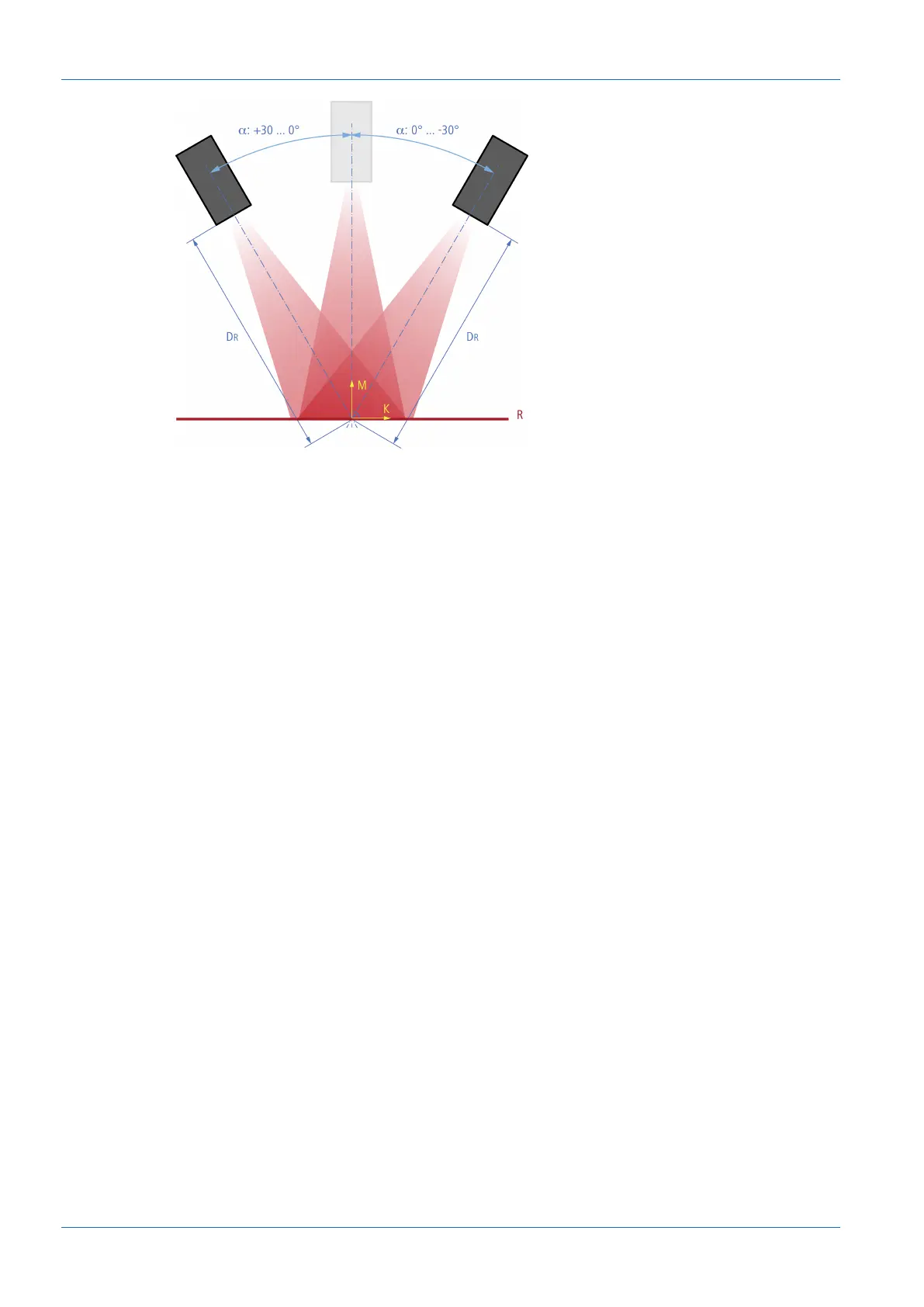
Ill.21: Inclination angle and distance to the reference surface with angled installation
To activate the Flex Mount function, proceed as follows:
Condition:
ð The reference surface is within the measurement range (distance between the sensor and
the reference surface is less than the measurement range end Sde).
ð The maximum tile angle is ±30°.
ð For uneven reference surfaces: The unevenness must not exceed a maximum value, which
depends on the measurement range and the exposure. If required, use an auxiliary plate
during teaching in or alternatively adjust the parameters manually.
ð There are no undesired objects in the measurement field.
a) Select mode Parametrization | Global Parametrization in the menu.
b) In the Global Parameters window, proceed to Field of View | Flex Mount.
c) Set Flex Mount to On.
d) Click the Auto button.
e) Confirm with Teach Flex Mount.
Result:
ü The coordinate system is rotated.
ü The reference surface is taught in. The original reference point of the sensor is no longer
valid.
ü Measurement objects below the reference surface are ignored.
ü The axes are no longer referred to as X and Z axes, but as K and M axes. The denomina-
tion does not change on the web interface.
ü The measurement field is reset to the maximum measurement field.



 To Next Page