Error handling
Instruction handbook b maXX BM4400, BM4600, BM4700
Document No.: 5.12008.07 Baumüller Nürnberg GmbH
248
of 358
9.4
P0213 Error position controller
P0214 Error speed controller
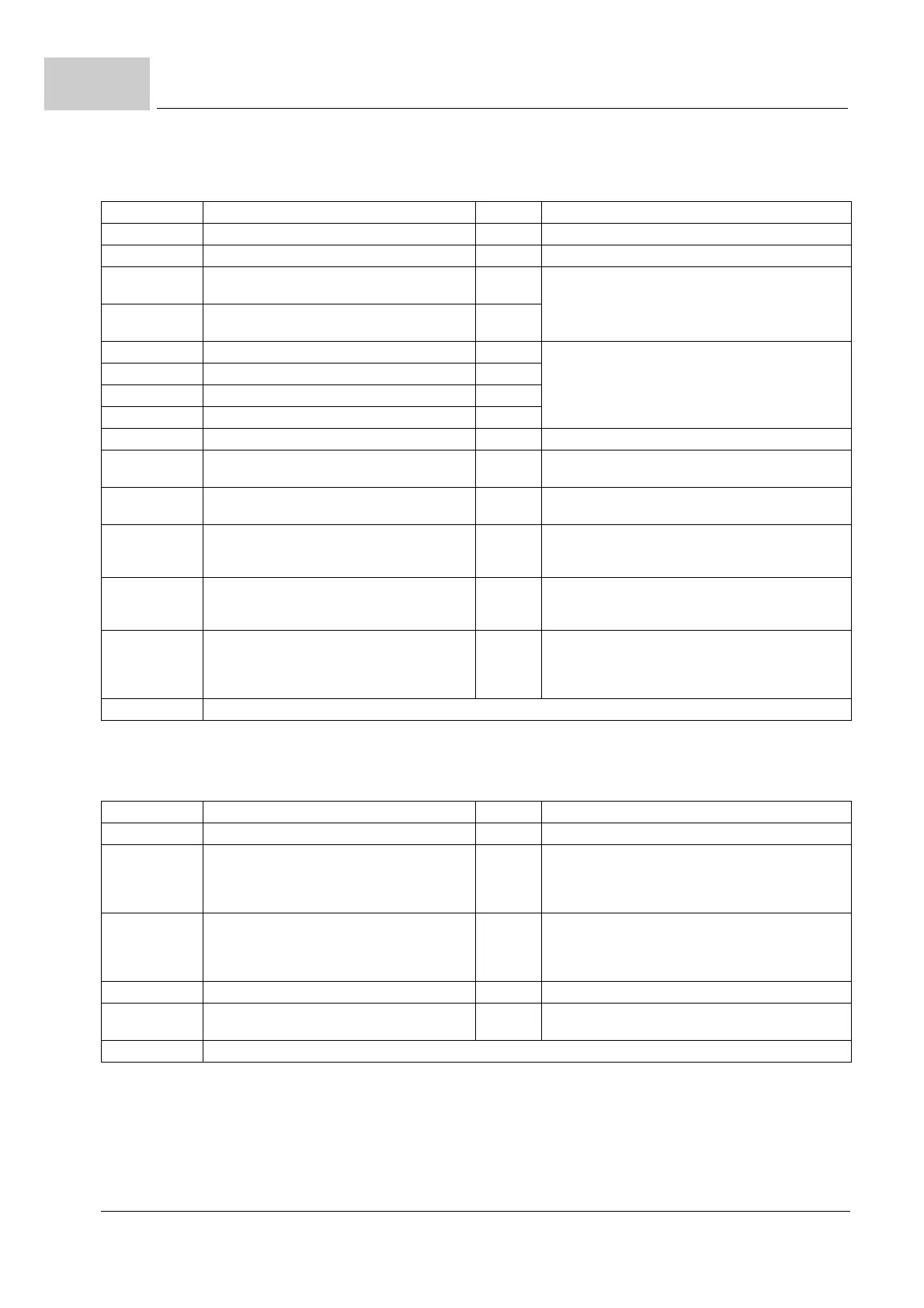
Error No. Meaning Reaction Troubleshooting
192 Position deviation dynamic adjustable Remove the dynamical position deviation error
193 Position deviation static adjustable Remove the statical position deviation error
194 Encoder 1 is used for position control, but is
inactive.
IS Activate encoder 1/2
This error is also shown, if the faulty positioning is in
one of the inactive data sets.
195 Encoder 2 is used for position control, but is
inactive.
IS
196 Software limit switch 1 exceeded adjustable Check the target position with the travelling range
enabled by the limit switches
197 Software limit switch 2 exceeded adjustable
198 Hardware limit switch 1 exceeded adjustable
199 Hardware limit switch 2 exceeded adjustable
200 Homing necessary and not yet executed adjustable Start homing
201 Mode set-of-setpoints,
set-of-setpoints not in time
adjustable Assure, that positioning data and handshake are in
time (also see parameter manual)
202 Target position v Modulo position adjustable Minimize target position or
adjust Modulo position P1239
203 Spindle positioning:
Error while initialization of the trigger
adjustable Used encoder without trigger signal (zero pulse) or
incorrect adjustment in P1425 spindle positioning
mode
204 Spindle positioning:
Timeout at trigger signal
adjustable Check encoder for zero pulse; check encoder connec-
tor; check zero pulse signal by means of the toggle bit
(encoder 1/2 status bit 8)
205 Error while executing homing adjustable Check the function of the reference switch and the
hardware limit switch; adjust the encoder input selec-
tion where necessary; select only supported homing
methods
206 to 207 not assigned = 0
Error No. Meaning Reaction Troubleshooting
208 Drive blocked IS Remove the blockade of the drive
209 Encoder 1 is parameterized as encoder for the
motor control, but the evaluation is not acti-
vated. This error is also shown, if the faulty set-
ting is in one of the inactive data records.
IS You have got to either activate the encoder in the
encoder 1 (modeP0150) or you set the encoder 2 as
encoder for the position control (parameter P1030)
210 Encoder 2 is parameterized as encoder for the
motor control, but the evaluation is not acti-
vated. This error is also shown, if the faulty set-
ting is in one of the inactive data records.
IS You either have got to activate the encoder in the
encoder 2 (P0160) or you set the encoder 1 as
encoder for the position control (parameter P1030)
211 Overspeed Open loop IS Check parameterization and reduce speed
213 Export restriction:
Maximum electrical frequency exceeded
IS Reduce speed
214 to 223 not assigned = 0


 To Next Page