Alphabets and Monograms
126
8.2 Creating lettering
When sewing sideways motion pattern, for example monograms, it is recommended to the use the
Sideways motion foot No. 40C. Sewing a test sample with the thread, the actual fabric and stabilizer you
intend to use is recommended. Make sure that the fabric is fed evenly and lightly, ensuring that it cannot
pushagainstorcatchonanything.Thefabricshouldn'tbepulled,pushedorheldback.
> Touch the icon «Alphabets».
> Select the font.
> Touch the icon «Single/Combi mode» to create a combination.
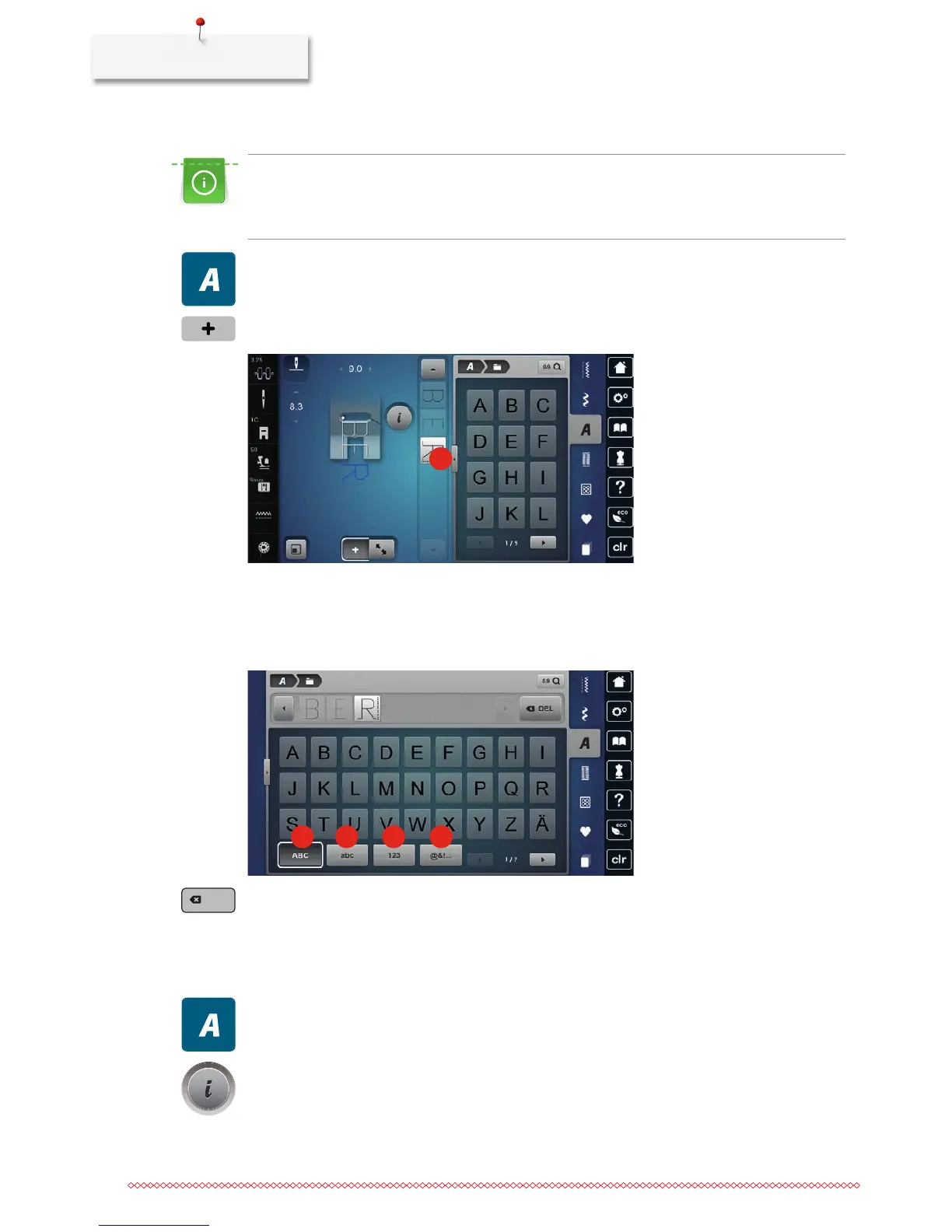
> Touch the icon «Display alphabets» (1) to open an extended enter mode.
1
> Select the letters.
> Touch the icon (2) (standard setting) to use upper case letters.
> Touch the icon (3) to use lower case letters.
> Touch the icon (4) to use numbers.
> Touch the icon (5) to use special characters and mathematical symbols.
2 3 4
5
> Touch the icon «DEL» to delete single letters of the entered text.
> Touch the icon «Display alphabets» again to close the extended enter mode.
8.3 Altering font size
Block, Double block, Script and Comic alphabets as well as as Cyrillic can be reduced.
> Touch the icon «Alphabets».
> Select the font.
> Select the letters.
> Touch the icon «i»-Dialog.



 To Next Page