The following table describes the Adj tab commands:
Setting Description
Print Density
Adjusts the print darkness. Allowable adjustment
range is -30 to +30.
Left Margin
Moves the starting position of all text on a label
left or right.
Top Margin
Moves the starting position of all text on a label
up and down.
-
Decreases the adjustment by 0.01” (0.25 mm).
+
Increases the adjustment by 0.01” (0.25 mm).
Default
Changes the setting back to zero.
Advanced
Displays a dialog of advanced settings.
Advanced Settings Menu
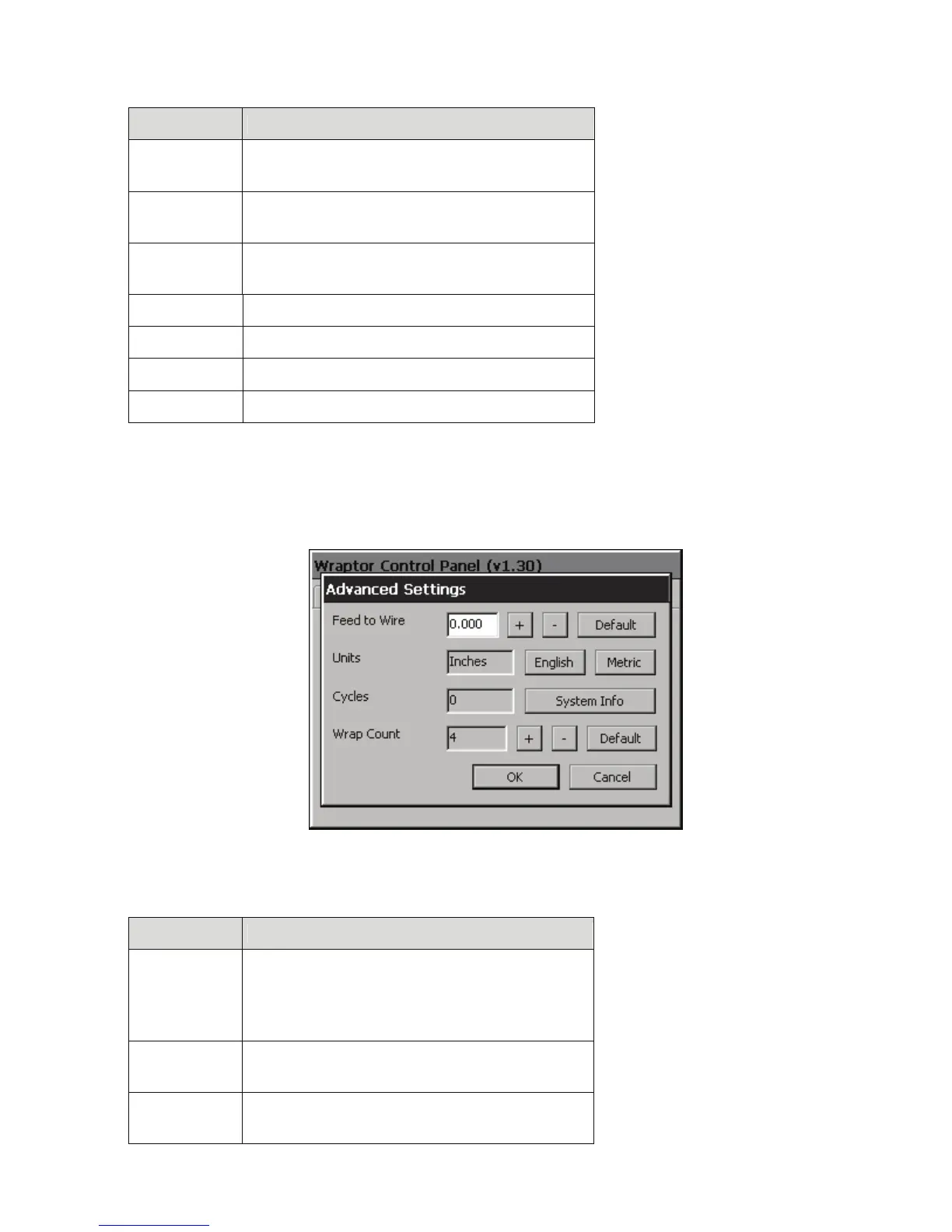
The Advanced Settings menu (shown in Figure 19) appears when you press Advanced…. It allows you to
adjust the Feed to Wire setting. It also displays the total number of cycles the Wraptor has run and the
Wraptor’s software version number.
Figure 19. Advanced Settings Menu
Advanced Settings Commands
Button Description
Feed to Wire
Adjusts the amount that Wraptor peels a label
prior to wrapping it.
CAUTION: Inappropriate adjustment can result
in a poor label wrap.
-
Decreases the Feed to Wire distance by 1/300
inch (0.08 mm) relative to the factory setting.
+
Increases the Feed to Wire distance by 1/300
inch (0.08 mm) relative to the factory setting.
40 Wraptor™ User’s Guide



 To Next Page