68 Wraptor™ User’s Guide
Chapter 8 Error Messages
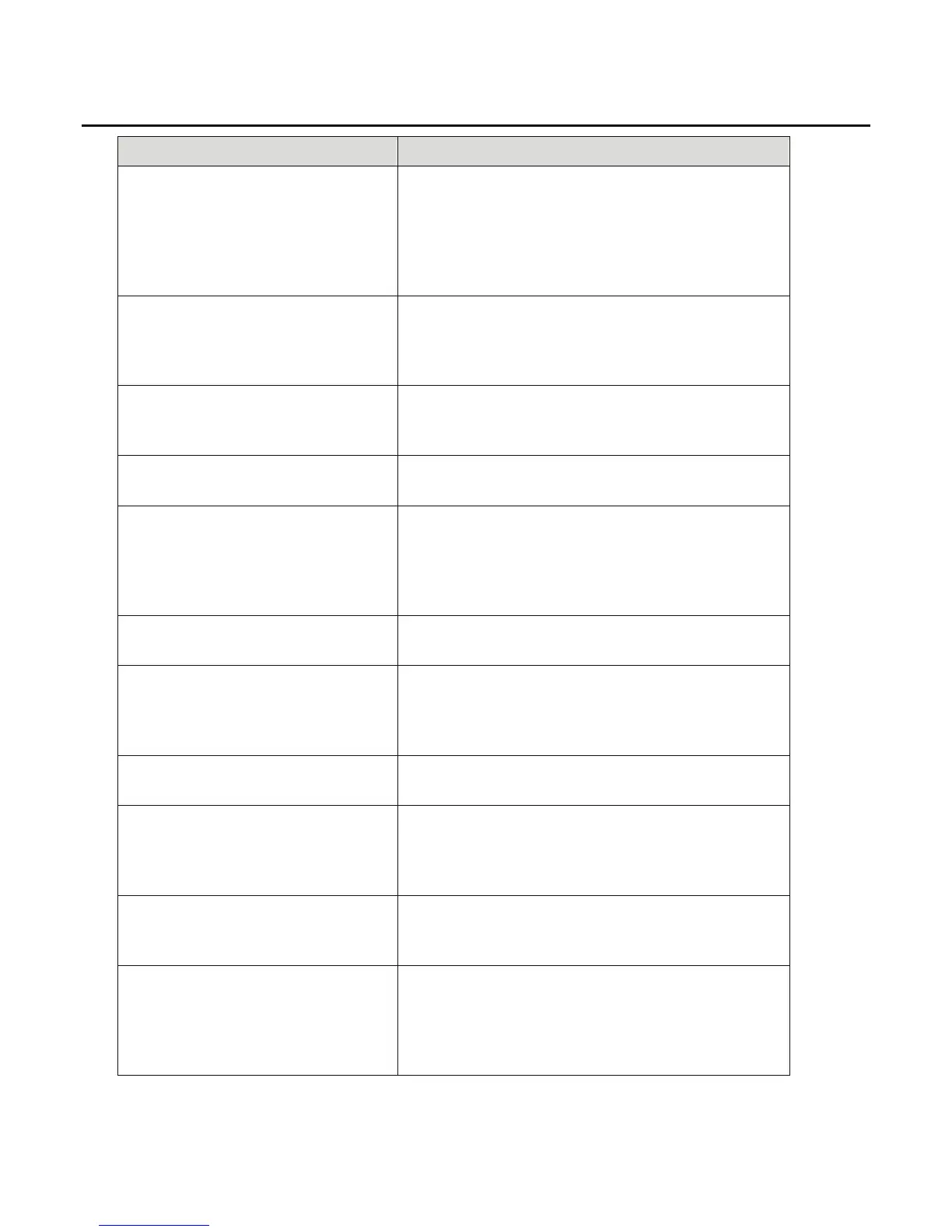
Error Message Possible Cause/Resolution
Cannot change connection to serial
port. It's used by remote control.
Cause: User tried to connect to printer from computer
using Connection Type = Serial in the Config tab while
the printer is in remote control mode.
Resolution: Shut down remote control mode by
pressing the Local Control button in the Config tab.
Then select the Serial connection type.
Cannot go to another label.
Cause: Error occurred in moving to another label in
the print file.
Resolution: Reopen the file and try again. If problem
persists the PRN file may be corrupt.
Cannot read Wraptor settings from the
registry.
Cause: Registry settings are corrupted.
Resolution: Stop and restart the program. Default
settings will be automatically re-initialized.
Cannot save Wraptor settings to the
registry.
Cause: Persistent storage manager not working.
Resolution: Contact Brady Technical Support.
Check Labels
Cause: Out of labels.
Resolution: Make sure guide rollers are adjusted
properly.
Clean the label notch sensor.
Load new labels in the Wraptor unit.
Check Ribbon
Cause: Out of ribbon.
Resolution: Load a new ribbon in the Wraptor unit.
Command Not Recognized
Cause: Print file contains a command that is not
recognized.
Resolution: Reprint the file from LabelMark and try
again..
Door is Open
Cause: The door is open.
Resolution: Close the side door.
Door is Open. This operation is not
allowed with door open.
Cause: The user pressed the Load Labels, Load
Ribbon, Clear Jam, or Online button with the unit door
open.
Resolution: Close the door.
Each segment of an IP address must be
less than 255.
Cause: IP Address segment entered by the user is
greater than 255.
Resolution: Enter a valid segment number.
Error Reading Touch Memory
Cause: The Wraptor’s material reader cannot read the
touch memory button.
Resolution: Confirm that roll of labels is correctly
installed and the touch memory button is in the
material reader.



 To Next Page