Confidential
2-61
■ Paper jam during duplex printing
< User Check >
- Adjust the paper guide to match the recording paper size.
- Check that the paper smaller than the specified size is not loaded.
- Check thickness of recording paper is within tolerance of each type.
- Clean the related rollers.
4.2.8 Prints only single side of the paper when duplex-printing
< User Check >
- Set the driver settings to duplex-printing.
- Check if the recording papers are not overlapping each other. Shuffle the papers
thoroughly in the case of overlapping.
4.2.9 “No Paper Fed” is displayed
< User Check >
- Load recording paper in the target paper tray.
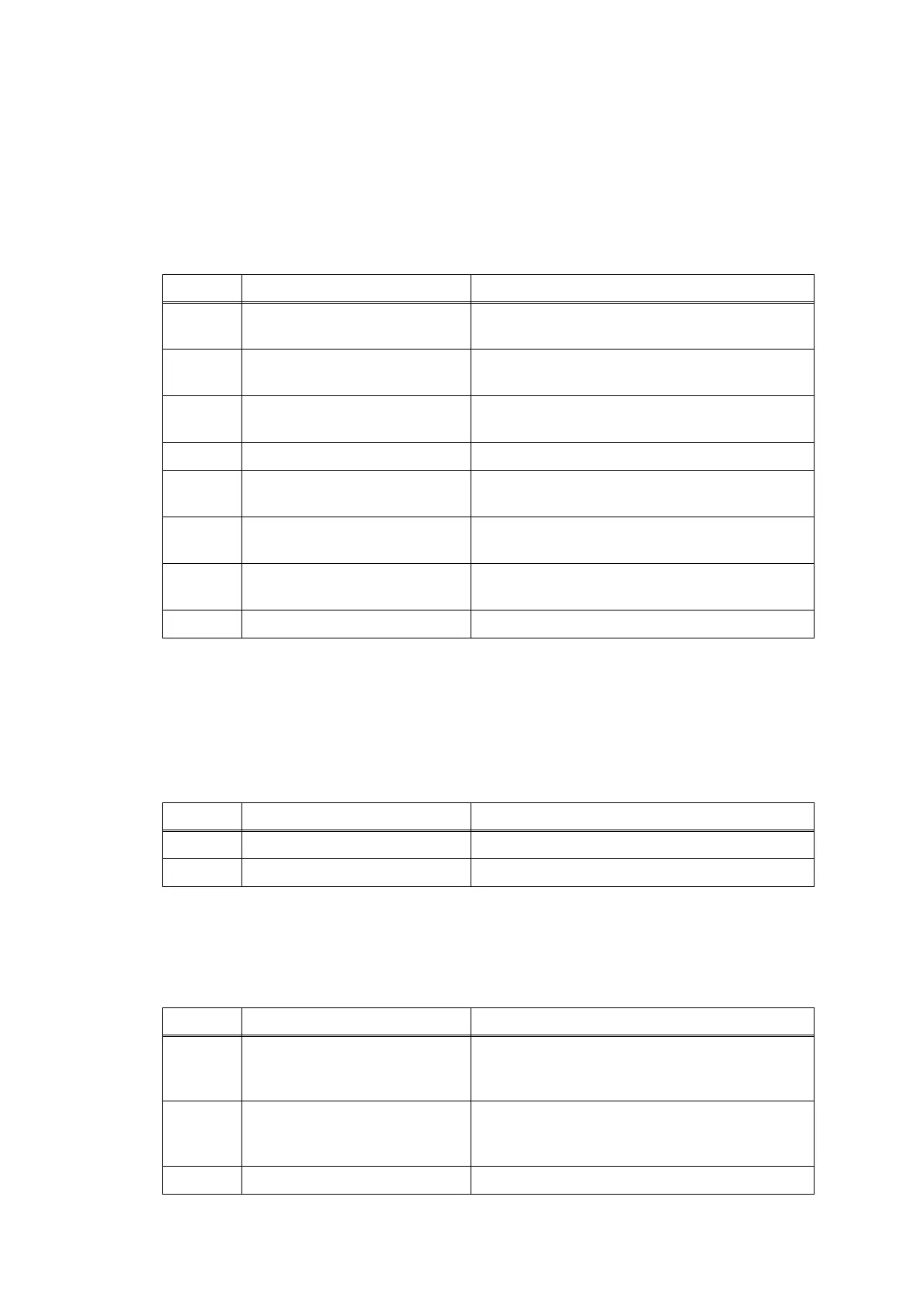
Step Cause Solution
1 Foreign materials in the
recording paper path
Remove foreign materials.
2 Switchback inner paper guide
not mounted in place
Set the switchback inner paper guide into place.
3 Switchback outer paper guide
not mounted in place
Set the switchback outer paper guide into place.
4
Switchback roller belt out of place
Set the switchback roller belt into place.
5
Paper ejection roller belt out of
place
Set the paper ejection roller belt into place.
6 DX paper guide ASSY not
mounted in place
Set the DX paper guide ASSY into place.
7 DX roller holder not mounted in
place
Set the DX roller holder into place.
8 Main PCB defective Replace the main PCB.
Step Cause Solution
1 Switching lever guide defective Replace the maintenance unit.
2 Main PCB defective Replace the main PCB.
Step Cause Solution
1 Paper detection sensor
harness of the each paper tray
connection failure
Reconnect the paper detection sensor harness
of the each paper tray.
2 Paper detection actuator of the
each paper tray caught on the
surrounding parts
Set the paper detection actuator of the each
paper tray into place.
3 Main PCB defective Replace the main PCB.


 To Next Page
 Loading...