7. ADJUSTMENTS
S-7300A
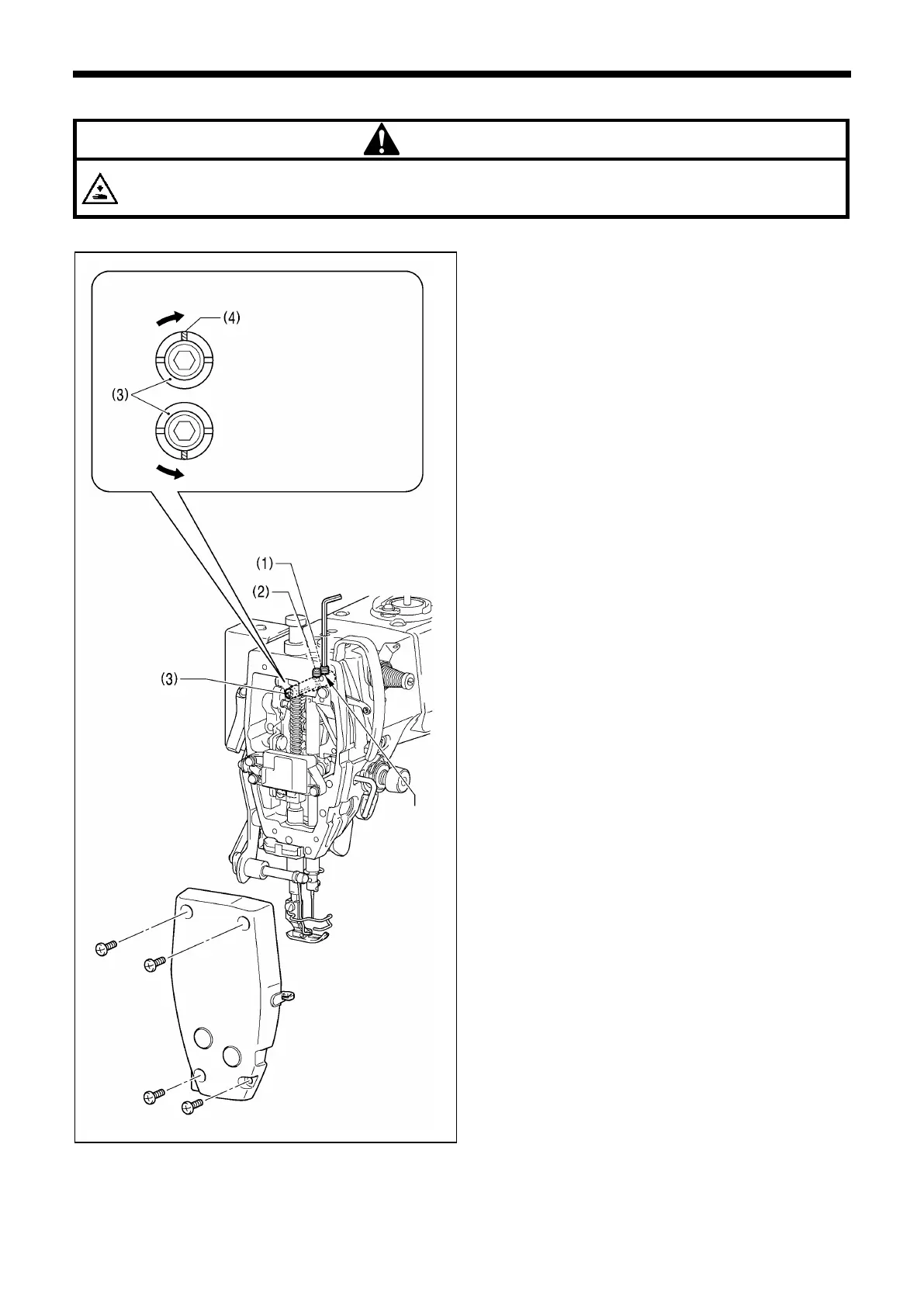
7-8. Adjusting the thread take-up amount (-[][]3 specifications)
Turn off the power switch before carrying out these operations.
The machine may operate if the treadle is depressed by mistake, which could result in injury.
NOTE: Do not use this function with models that are not -[][]3 specifications.
When sewing heavy materials, the thread tension can be
adjusted more easily if the thread take-up amount is set to a
larger amount.
1. Remove the face plate.
2. Use a hexagonal wrench to loosen the set screws (1) and
(2) by approximately two turns.
3. Adjust the thread take-up amount.
<To increase the thread take-up amount>
Turn the thread take-up support shaft (3) clockwise
so that the groove (4) is facing straight upward.
<To return the thread take-up amount to the standard
setting>
Turn the thread take-up support shaft (3)
counterclockwise so that the groove (4) is facing
straight downward.
4. With the thread take-up support shaft (3) pushed in as far
as it will go, first tighten the set screw (1) until it touches
the screw stop on the thread take-up support shaft (3).
5. After this, tighten the set screw (2).
6. Install the face plate.



 To Next Page