S-7300A
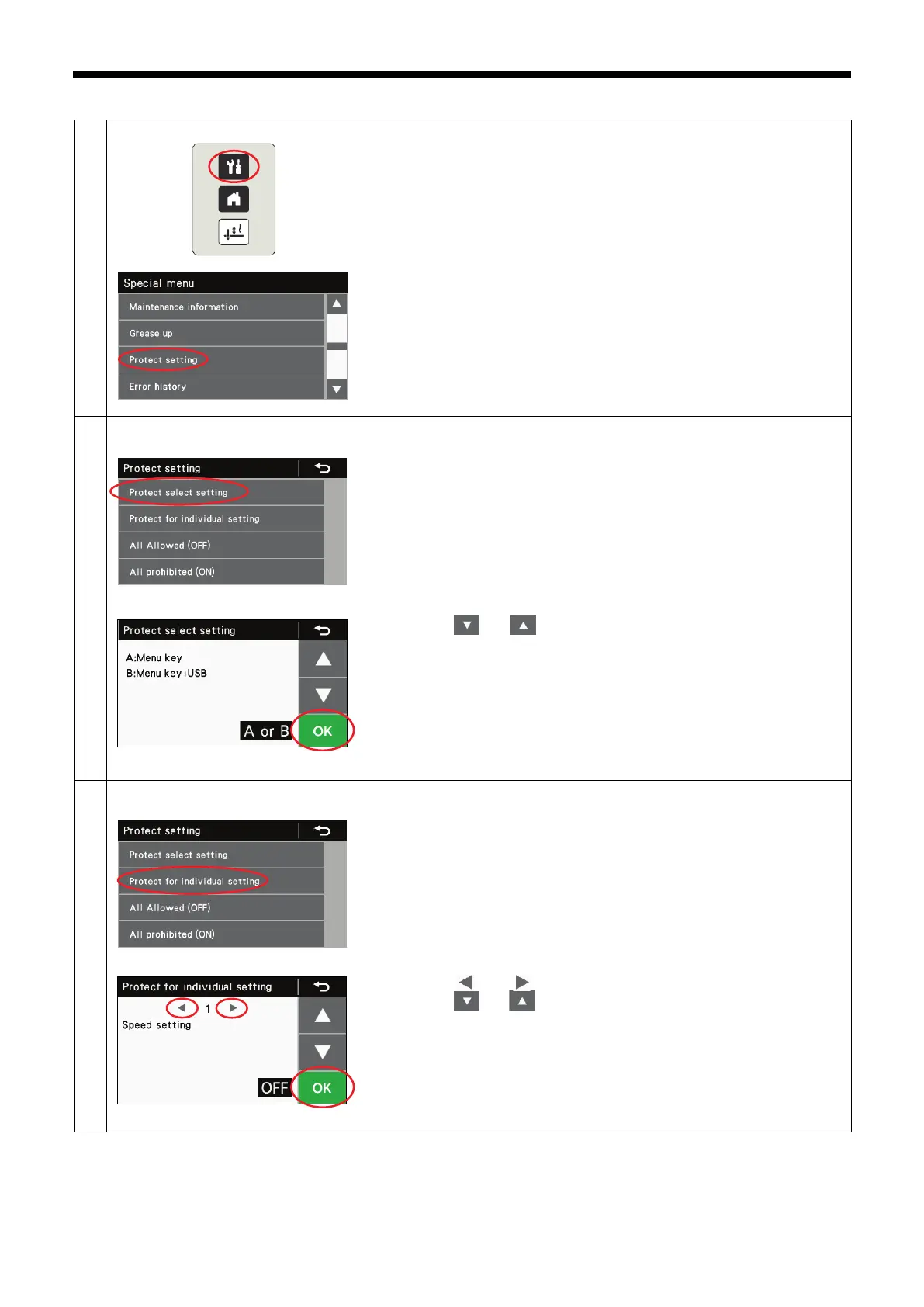
3-7. Protect setting
1. While pressing the menu key, turn on the power to switch to the special
menu screen.
2. At the special menu screen, select "Protect setting".
* If startup method B has been set, this option cannot be selected unless
USB media has been inserted. (The initial setting is "A or B".)
You can change the protect setting startup method.
1. At the protect setting screen, select "Protect select setting".
2. Press the[ ] or [ ] key to select the desired setting.
A or B: Protect settings can be carried out at any time.
B: Protect settings cannot be carried out unless USB media is inserted.
3. Press the OK key to confirm the setting.
<Protect for individual setting >
Protect settings can be carried out individually for each function*.
* For details, refer to "Protection setting list".
1. At the protect setting screen, select "Protect for individual setting".
2. Press the[ ] or [ ] key (1) to select the function number.
3. Press the[ ] or [ ] key to select the desired setting.
ON: Protect setting is enabled (changing settings is prohibited)
OFF: Protect setting is disabled (changing settings is allowed)
4. Press the OK key to confirm the setting.



 To Next Page