S-7300A
3-2. Memory switch setting method (Advanced)
The settings for the memory switches are valid for all programs.
Refer to "3-3. List of memory switch settings" for details on memory switch numbers and settings.
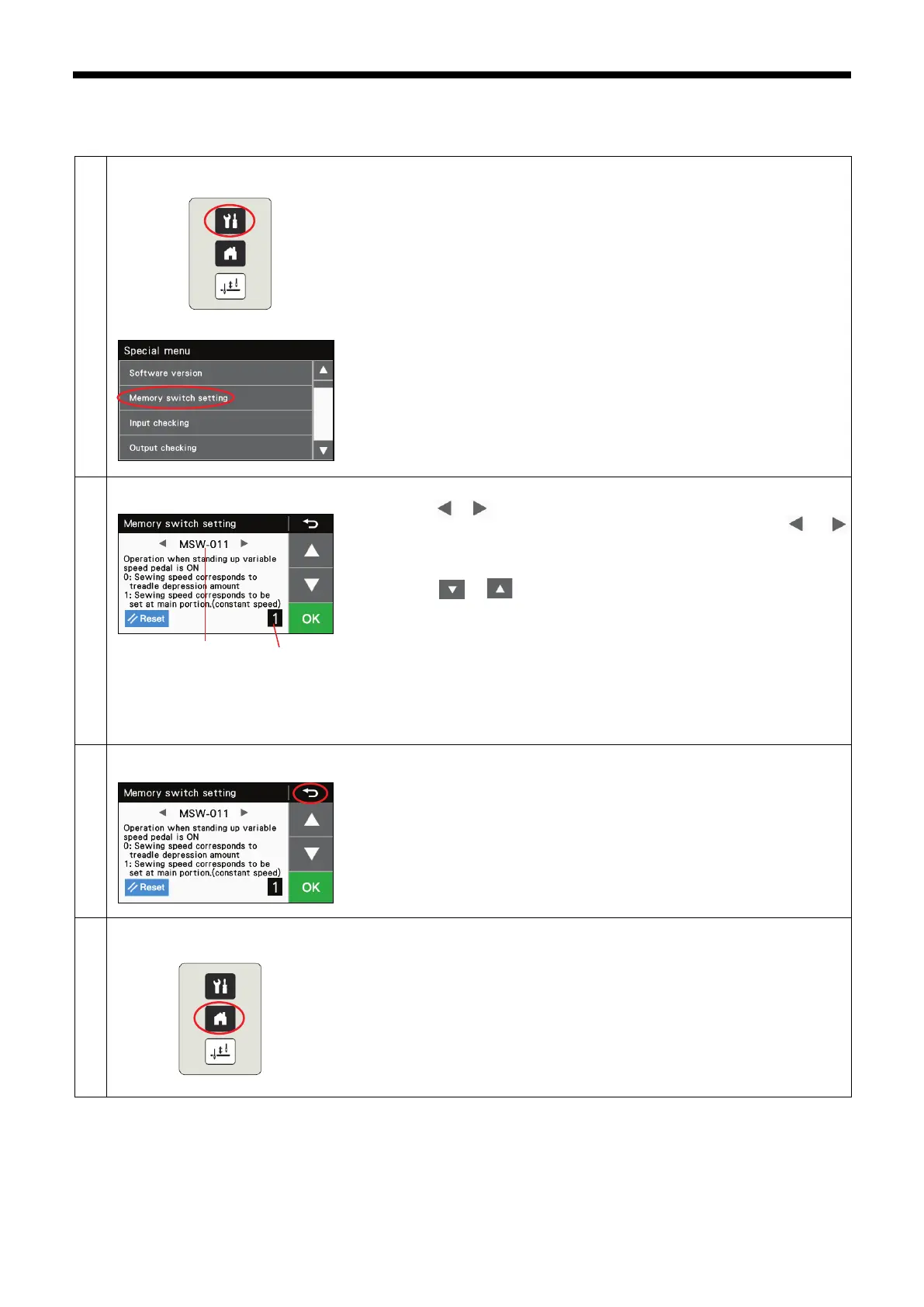
<Switching to memory switch setting mode (Advanced)>
1. While pressing the menu key, turn on the power to switch to the special
menu screen.
2. At the special menu screen, selec
t "Memory switch setting" to switch to
memory switch setting mode.
<Memory switch setting mode>
1. Press the or key to select the memory switch number (1).
At this time, keep pressing the half stitch key and then press the or x
key at
the same time to display only the memory switches with current
values that are different from their initial values.
2. Press the or key to change the memory switch value (2).
If the value that is displayed is different from the value that is currently set,
the value in the display will flash.
If you would like to return the setting to the initial value, press the Reset
key.
* The Reset key is only displayed when the setting value (the value being
displayed) is different from the initial value.
3. Pre
ss the OK key to store the memory switch setting. The setting display
will change from flashing to illuminated.
<Memory switch setting mode exiting method>
・
Press the return key to return to the special menu screen.
<Special menu exiting method>
・
At the special menu screen, press the home key to close the special menu
and switch to the home screen.
(1)
(2)



 To Next Page