53Premio/Averso - 13/14 - Ausgabe 09/13 - 2354619 - BUE-0048-12EN
Living
6
6.6 Spotlight (moveable)
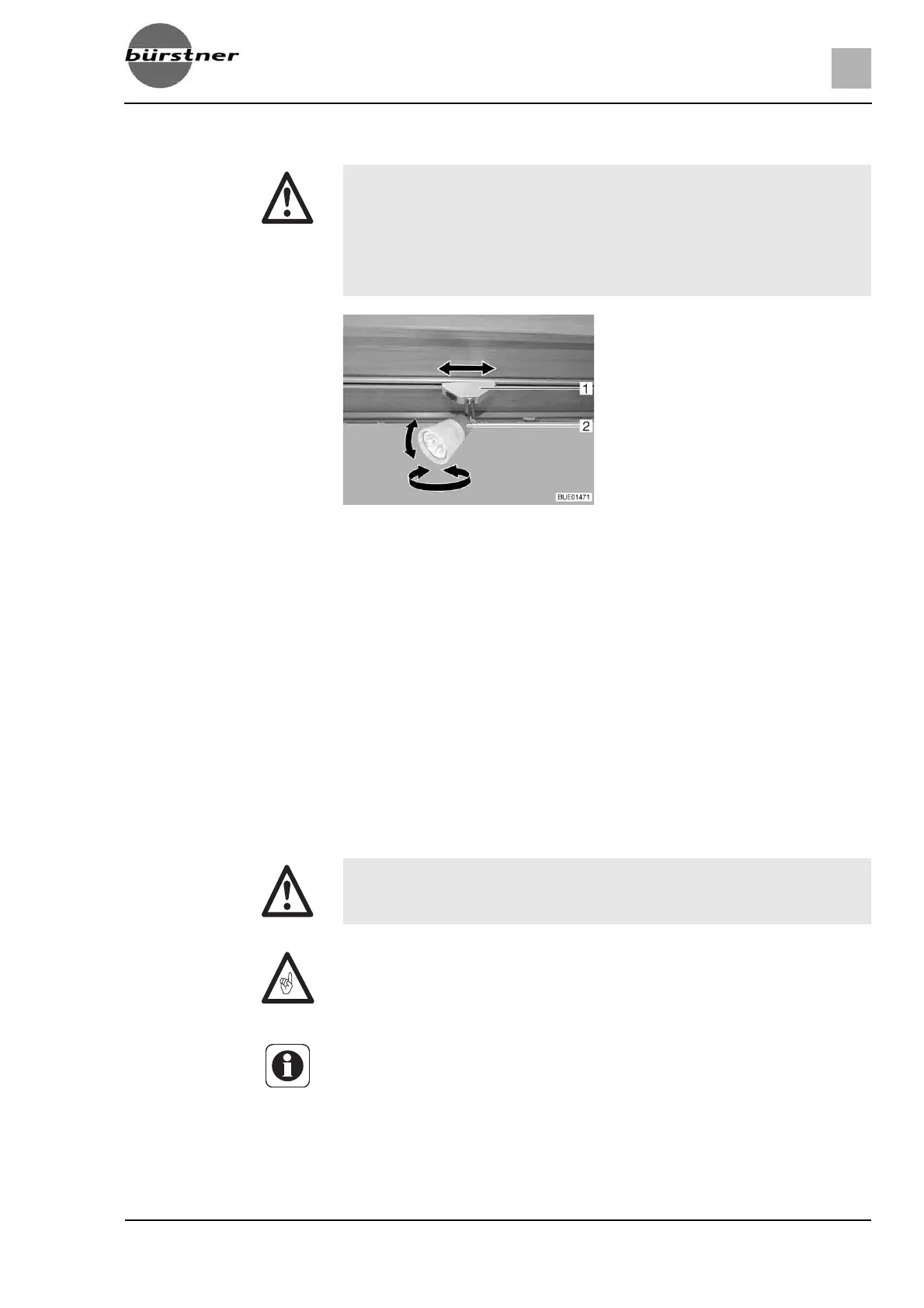
Rotating: Grasp the housing (Fig. 51,2) and turn it.
The housing can be turned in different directions:
z To the left and to the right
z Up and down
Shifting:
Grip holder (Fig. 51,1) and turn by approx. 45°.
Push spotlight along the rail system to desired position.
Removal:
Grip holder (Fig. 51,1) and turn by approx. 90°.
Remove spotlight from rail.
The spotlight can be installed in any position into the rails.
6.7 Holder for flat screen
X Bulbs and light fittings can be extremely hot.
X Allow the light bulbs and lamp holders to cool down before touching
them.
X If the light is switched on or still hot, there must always be a safety dis-
tance of at least 30 cm between stores or curtains and flammable
objects. Fire hazard!
Fig. 51 Spotlight
X Before commencing the journey, place and secure the flat screen and
screen support in the initial position. If the screen holder is installed in a
TV cabinet: Close TV cabinet.
Z If there is a risk of frost, do not leave the flat screen television in the vehicle.
Z Also read the manufacturer's instruction manual.



 To Next Page