Chapter 4
4-33
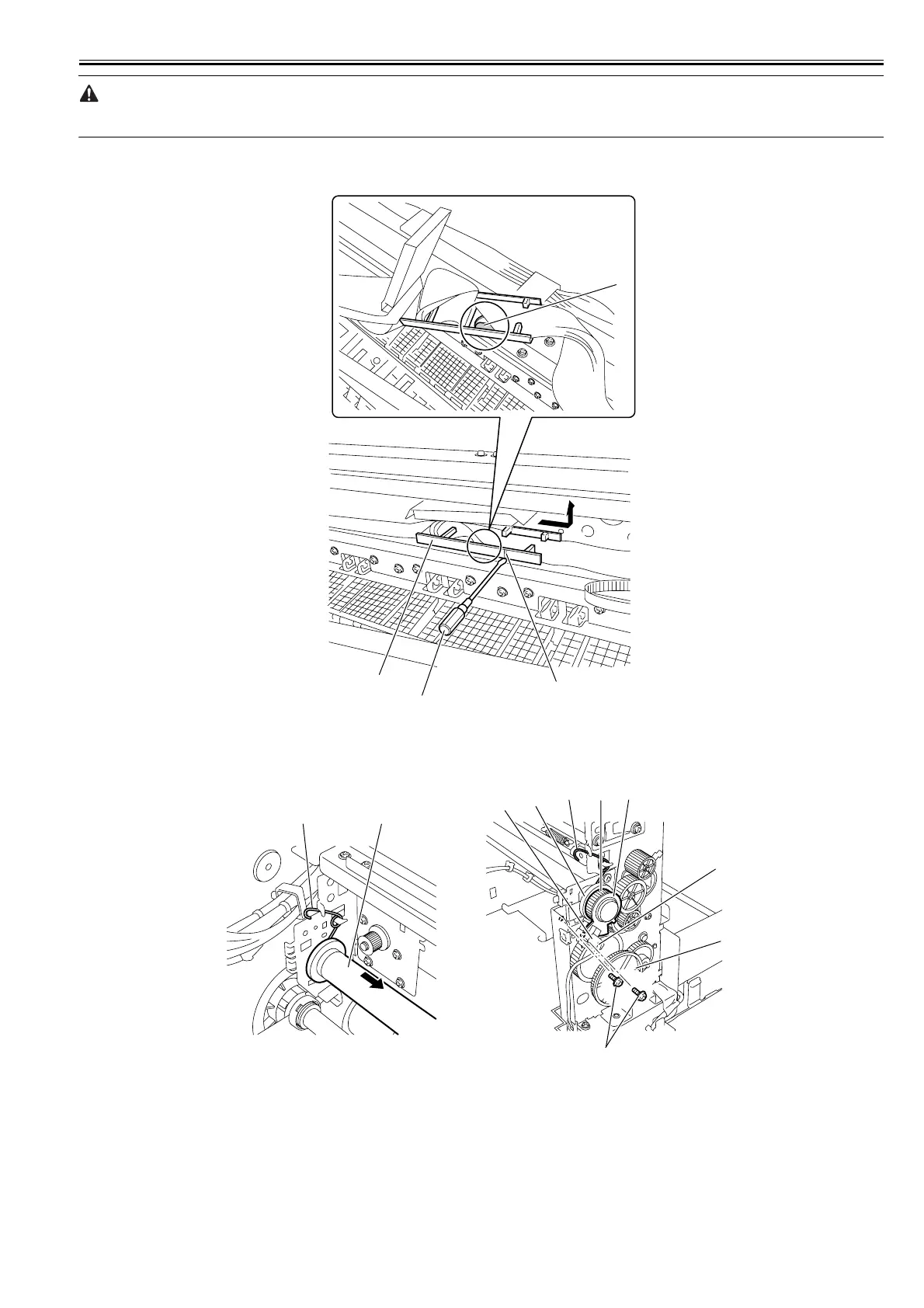
The flexible cable connectors[2] are provided with a locking mechanism. When disconnecting or reconnecting the flexible cable, be sure to release the lock. Oth-
erwise, the flexible cable can damage, resulting in malfunction.
8) Insert the flat-head screwdriver[3] into the part shown to release the hook[2] and then remove the flexible cable retainer[1]. (If the flexible cable retainer[1] is
marked with index[A], insert the flat-head screw driver to meet the index.)
F-4-71
9) Turn the gear[1] so that the sensor flag of the lift gear[2] leaves the interrupt position of the lift cam sensor[3], then remove the ring[4], the lift gear[2] and the
lift cam[5]. Disconnect the connector[6], remove the two screws[7], and then remove the lift cam sensor[3]. Remove the two torsion springs[8], pull out the carriage
rail[9] from the right side of the printer, and then remove the carriage.
F-4-72
[1]
[3]
[2]
[A]
[7]
[8] [2] [4]
[3]
[5]
[1]
[6]
[8] [9]














 To Next Page