Chapter 3
3-10
3.1.2.2 Installing the Stand
0016-8538
iPF6100 / iPF6200 / iPF6000S
Stand assembly requires two or more people.
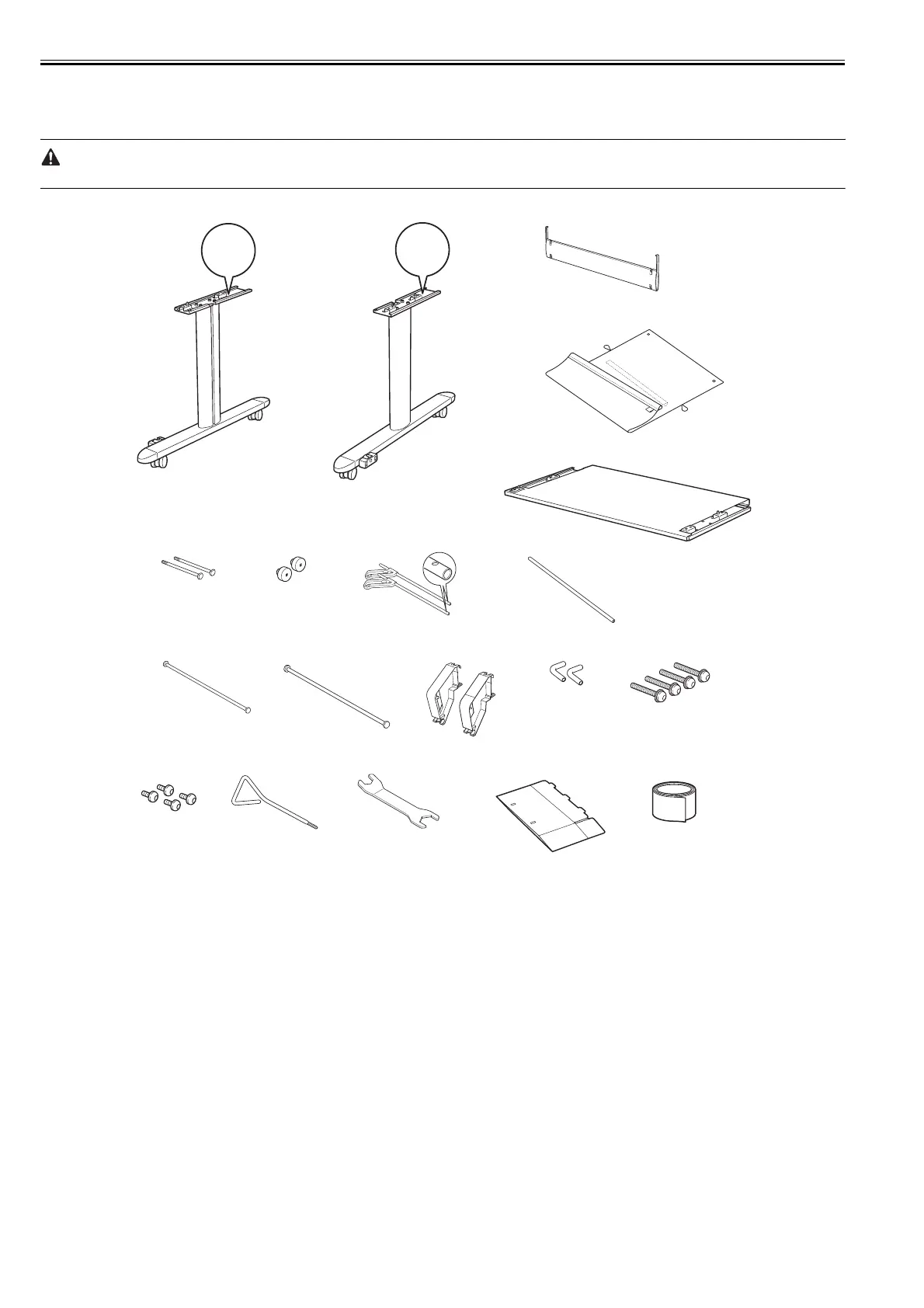
a. Package Contents
F-3-32
[1] Stand L
[2] Stand R
[3] Stand Stay
[4] Output Stacker
[5] Stand Board
[6] Basket Bolts (2pcs.)
[7] Basket Decorative Nuts (2pcs.)
[8] Basket Rod #1 (2pcs.)
[9] Basket Rod #2
[10] Basket Rod #3
[11] Support Rod
[12] Basket Arm (2pcs.)
[13] Basket Rod Caps (2pcs.)
[14] Main Unit Securing Bolts (long, 4pcs.)
[15] Table Bolts (short, 4pcs.)
[16] Allen Wrench
[17] Wrench
[18] Accessory Box
[19] Velcro Tape
L
R
[1]
[16]
[15]
[8]
[14][13][12]
[10]
[9]
[11]
[7][6]
[5]
[4]
[3]
[2]
[17] [18]
[19]














 To Next Page