Chapter 8
8-8
8.3 Error Table
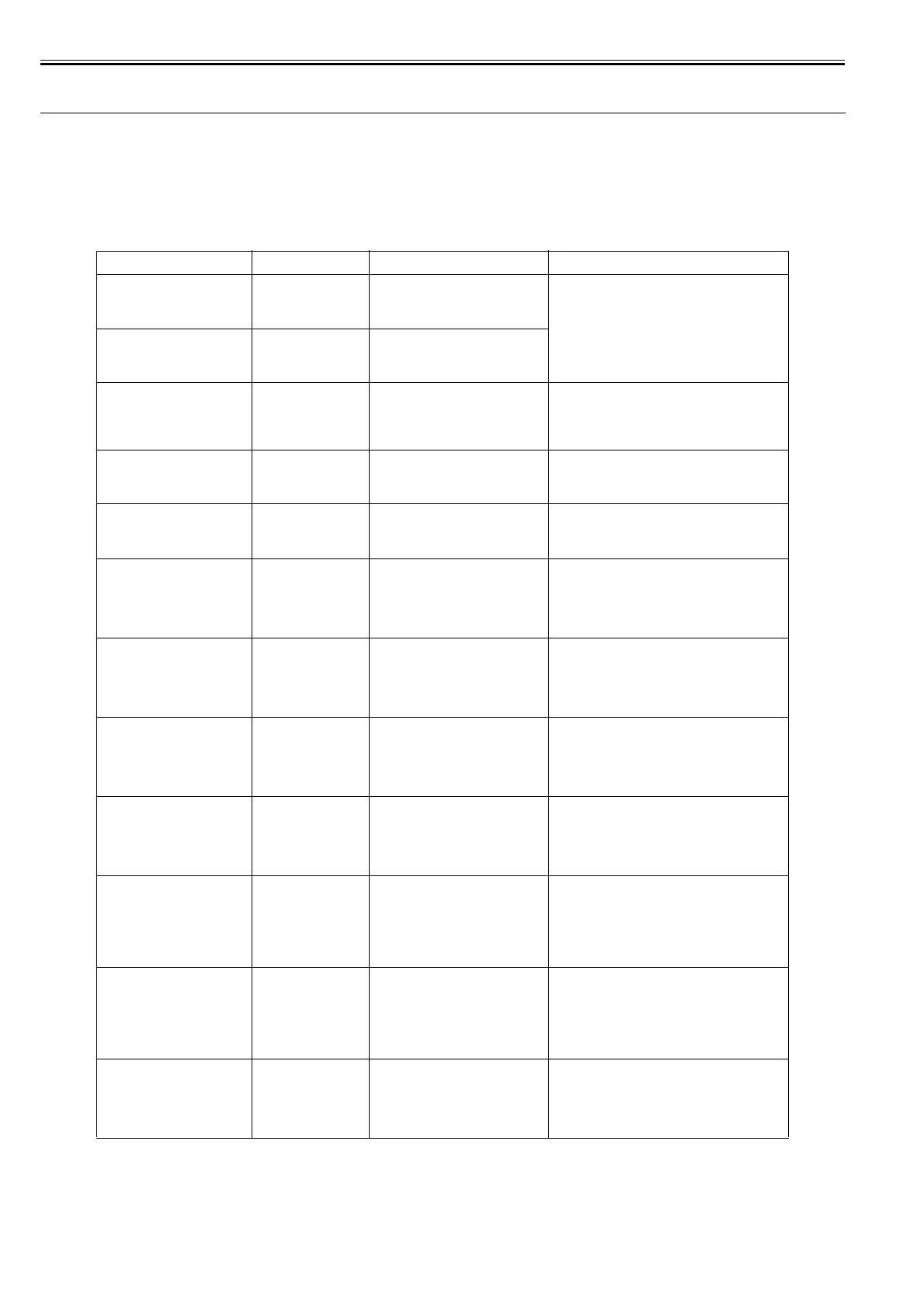
8.3.1 Error Code List
0016-8356
iPF6100
* Codes represent the numbers that are displayed in DISPLAY in service mode.
If the same message is displayed when the printer is turned off, then back on, take action as recommended in the Action column.
T-8-5
Display massage Code* Condition detected Action
Clean right P Head
Press Online to
clear error.
03800501-280D Printhead R found to have many non-
discharging nozzles during a non-
discharging inspection (printing paused)
Clean the printheads. Identify the nozzles in a nozzle
check pattern. Replace the printheads.
Clean left P Head
Press Online to
clear error.
03800502-280E Printhead L found to have many non-
discharging nozzles during a non-
discharging inspection (printing paused)
PHeads: wrong pos.
Open top cover and
check the
printhead positions.
03800201-2804
03800202-2807
Printheads L and R installed in reverse
position
Reinstall the printheads in correct position.
No right printhead
Install right
printhead.
03800101-2800 Printhead R not found Install a printhead on the R side.
No left printhead
Install left
printhead.
03800102-2808 Printhead L not found Install a printhead on the L side.
Paper size not
detected.
Press Load/Eject
and reload the
paper.
03010000-200C Unable to detect the leading end of
paper
Check the leading end of paper. Reload the paper.
Paper size not
detected.
Press Load/Eject
and reload the
paper.
03010000-200D Unable to detect the trailing end of cut
sheet
Check the sheet length. Check to see if paper has not
jammed.
Paper size not
detected.
Press Load/Eject
and reload the
paper.
03010000-2017 Paper (right) edge detection error Check the right edge of paper. Check the paper type.
Paper size not
detected.
Press Load/Eject
and reload the
paper.
03010000-2018 Paper (left) edge detection error Check the left edge of paper. Check the paper type.
Cannot adjust
printhead.
Press Online to
clear the error
and readjust
printhead.
03010000-2820 Printhead registration unadjustable Check the paper on which a pattern is printed for
smears.
Check the environment for interferences from outside
light.
Clean the printheads.
Cannot adjust
printhead.
Press Online to
clear the error
and readjust
printhead.
03010000-2821 LF unadjustable Check the paper on which a pattern is printed for
smears.
Check the environment for interferences from outside
light.
Clean the printheads.
Hardware error.
03010000-2823
Turn off printer,
wait, then
turn on again.
03010000-2823 Printhead check error Check to see if paper has not jammed.
Check the paper on which a pattern is printed for
smears.














 To Next Page