<Details>
Displays detailed information about the document selected from the list. If you specied multiple
destinations, the number of specied destinations is displayed on the screen. To check the details of
specied multiple destinations, tap <Destination>.
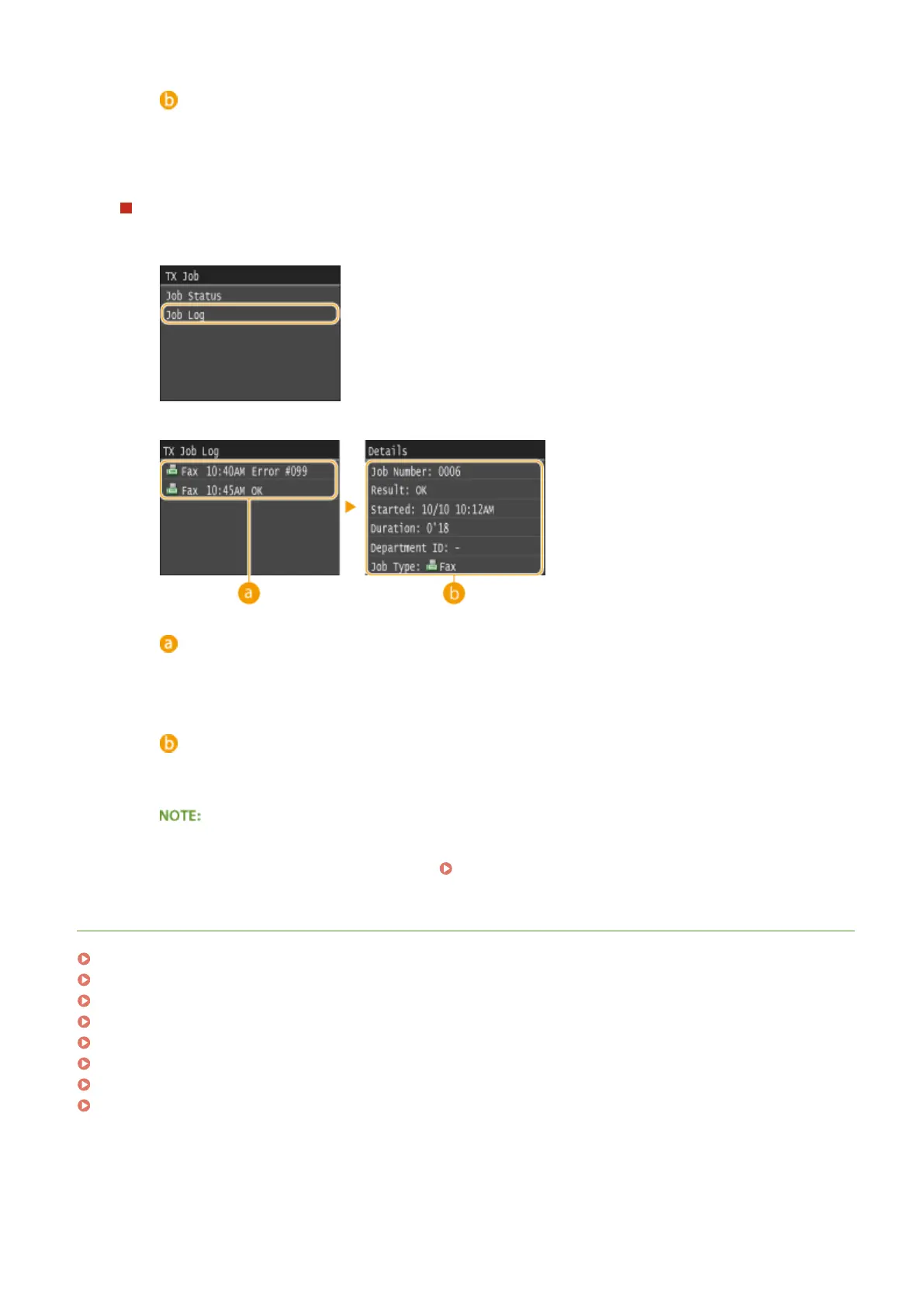
To check the communication logs for sent and received documents
1
Tap <Job Log>.
2
Select the document whose log you want to check.
<TX Job Log>/<RX Job Log>
Displays a list of the documents that were sent and received. <OK> is displayed when a document was
sent or received successfully, and <Error> is displayed when a document failed to be sent or received
because it was canceled or there was some error.
<Details>
Displays detailed information about the document selected from the list.
When a three-digit number is shown in the case of <Error>
● This number represents an error code. When an Error Code Appears(P. 747)
LINKS
Sending Faxes (MF419x / MF416dw)(P. 149)
Canceling Sending Documents (Fax/I-Fax)(P. 177)
Receiving Faxes (MF419x / MF416dw)(P. 179)
Sending I-Faxes(P. 224)
Receiving I-Faxes(P. 231)
TX Result Report(P. 809)
Communication Management Report(P. 812)
RX Result Report(P. 814)
Faxing
202











 To Next Page