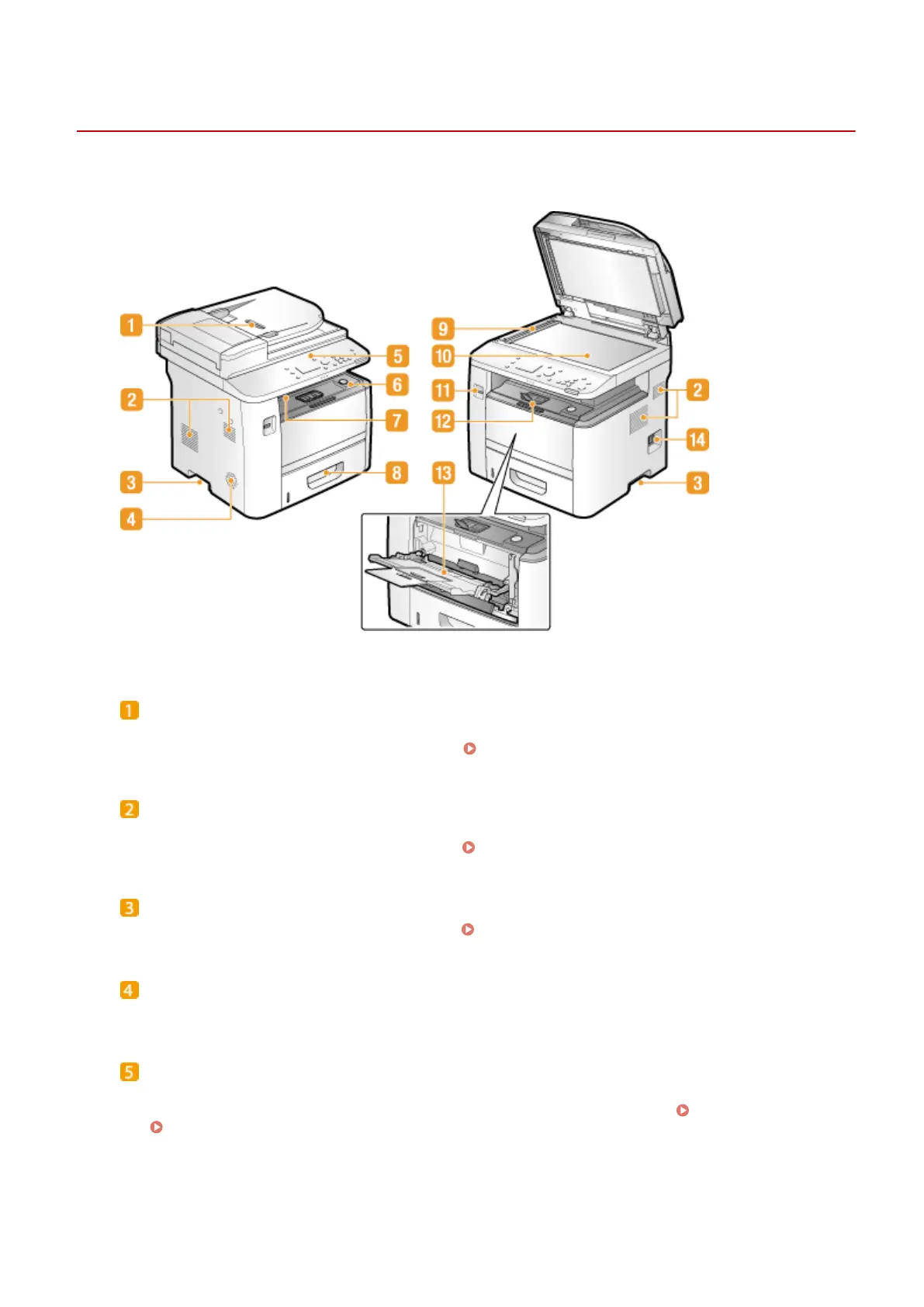
Front Side
0UWX-008
Feeder
Automatically feeds documents into the machine for scanning. When two or more sheets are loaded in the
feeder, documents can be scanned continuously. Placing Documents(P. 47)
Ventilation slots
Air from inside the machine is vented out to cool down the inside of the machine. Note that placing objects in
front of the ventilation slots prevents ventilation. Installation(P. 3)
Lift handles
Hold the lift handles when carrying the machine. Relocating the Machine(P. 801)
Speaker
Emits sounds produced by the machine, such as fax tones and warning tones.
Operation panel
The operation panel consists of keys such as the numeric keys and Start key, a display, and status indicators.
You can perform all the operations and specify settings from the operation panel. Operation Panel(P. 26)
Display(P. 29)
Basic Operations
18











 To Next Page