107
Video Detection
Detects changes in the video in a set detection area. There are seven detection types to suit the users needs.
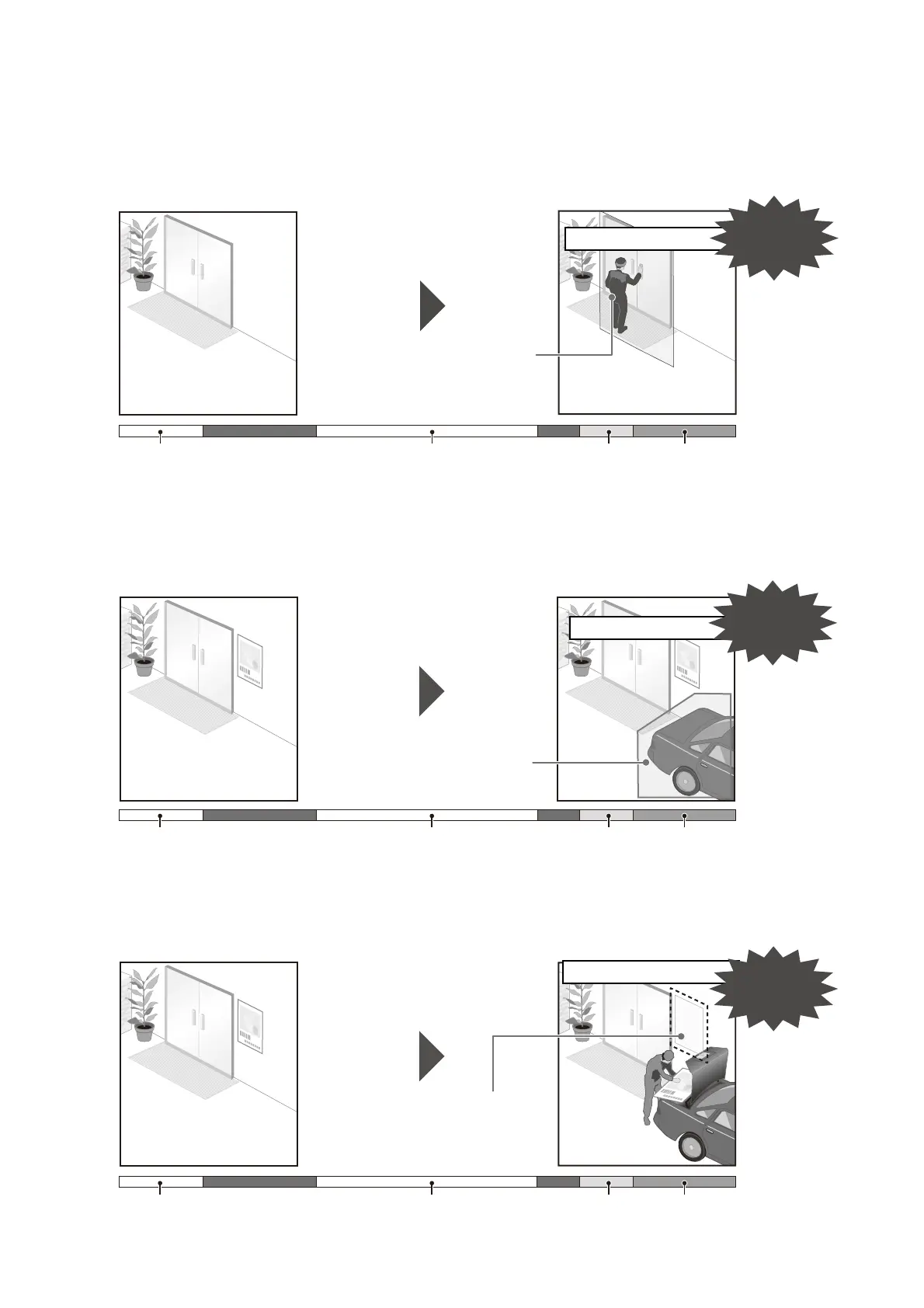
Moving Object Detection
Detects moving objects. This function can be used to detect visitors or suspicious individuals.
Moving object detection is triggered while moving objects are inside the detection area.
Abandoned Object Detection
Detect objects that are carried in and abandoned for more than a certain duration. This function can be used to
detect suspicious objects that have been left behind.
An object is judged as abandoned if it is left and remain in the detection area for longer than the specified duration.
Removed Object Detection
Detect objects that have been removed. This can be used to detect actions such as taking away valuables.
An object is judged as removed if it is taken away from the detection area for longer than the specified duration.
Background Video
Generated
People entering/exiting
Change in Detection Area Judgement Moving Object Detection
ON
Detection begins when a
moving object enters the
designated area.
Detected
Background Video
Generated
Object abandoned
Change in Detection Area Judgement Abandoned Object Detected
The object is abandoned
and detection begins after
specified duration.
Detected
Background Video
Generated
Removing an object
Change in Detection Area Judgement Object Removal Detected
The picture (object) is
removed and detection
begins after a specified
duration.
Detected



 To Next Page